Social Media Video Sizes 2026: Every Platform's Aspect Ratio in One Cheat Sheet
Every platform's video sizes, aspect ratios, length limits, safe zones and caption limits in one cheat sheet, each taken from the platform's own pages.

Key takeaways
- One size covers almost every short-video placement: 9:16 at 1080 by 1920 pixels plays on TikTok, Instagram Reels and Stories, Facebook Reels and YouTube Shorts.
- Length limits differ far more than shapes: YouTube Shorts stop at three minutes, Instagram Reels run to 20 but are only recommended to new viewers up to three, and TikTok uploads run to 60 minutes.
- Meta suggests leaving at least the top 14 percent, the bottom 35 percent and 6 percent on each side of a vertical ad clear of text and logos. Keep the headline, the figure and the logo inside that.
- Post text runs from 280 characters on X to 5,000 in a YouTube description, so one caption rarely fits everywhere. Write it in a few lengths instead.
Every platform publishes its video specifications somewhere: in a help centre, an ads guide or its developer documentation. They change often, the three sources do not always agree, and figures copied from one article to the next can fall out of date. This cheat sheet of social media video sizes collects the shapes, pixel sizes, length limits, safe zones, file formats and caption limits for TikTok, Instagram, Facebook, YouTube, LinkedIn, X, Pinterest and Threads, each taken from the platform’s own pages and checked on 14 October 2026. Where a platform’s pages disagree with each other, the article says so.
Social media video sizes at a glance
| Platform | Placement | Aspect ratio | A size that fits | Length |
|---|---|---|---|---|
| TikTok | Video | 9:16 (1:1 and 16:9 also play) | 1080 × 1920 | Up to 10 min recorded in the app, 60 min uploaded |
| Reels | 9:16 (anything from 1.91:1 to 9:16) | 1080 × 1920 | Up to 20 min; over 3 min not recommended to new audiences | |
| Stories | 9:16 | 1080 × 1920 | 60 s per story; longer videos are split | |
| Reels (every video since September 2025) | 9:16 | 1080 × 1920 | No minimum or maximum | |
| YouTube | Shorts | 9:16 or 1:1 | 1080 × 1920 | Up to 3 min |
| YouTube | Video | 16:9 | 1920 × 1080 (up to 7680 × 4320) | 15 min by default, longer once verified |
| Video | 1:2.4 to 2.4:1 | 1080 × 1350 or 1920 × 1080 | 3 s to 15 min | |
| X | Video | 16:9 or 1:1 (between 1:3 and 3:1) | 1280 × 720, 720 × 1280, 720 × 720 | Up to 20 min, 125 min with Premium |
| Video pin | 2:3, 4:5, 9:16 or 1:1 recommended | 1000 × 1500 | 4 s to 15 min | |
| Threads | Video | 9:16 recommended | 1080 × 1920 | Up to 5 min |
Where a platform gives only a minimum resolution or a range of shapes, the size column shows a common size that meets it. Each platform’s own figures, with links, follow below.
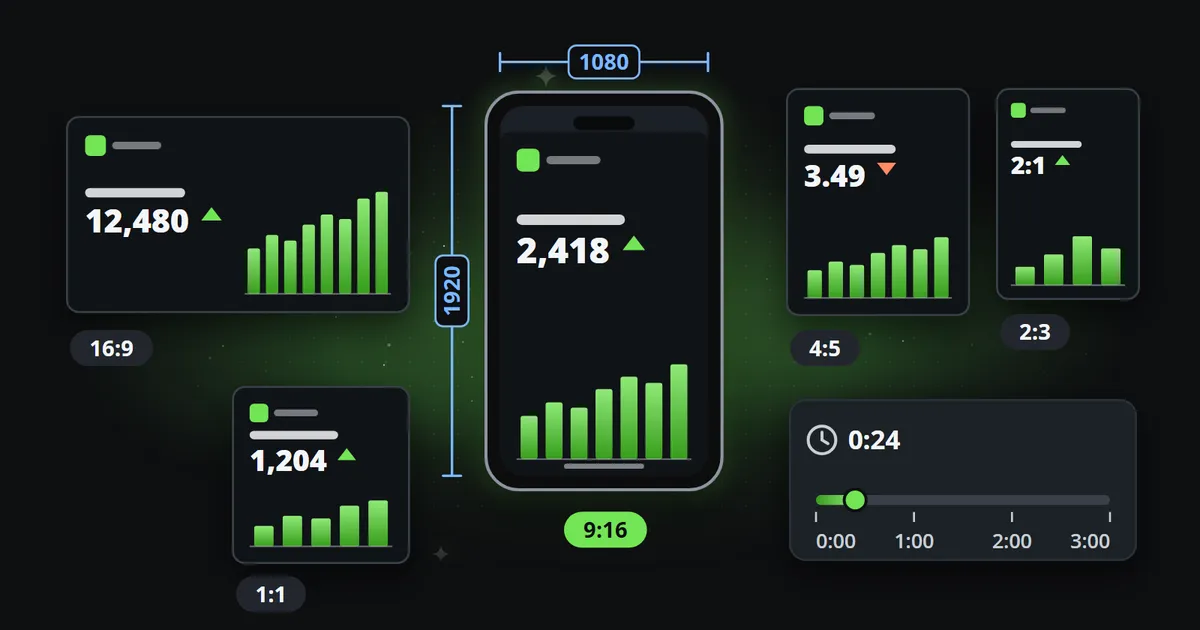
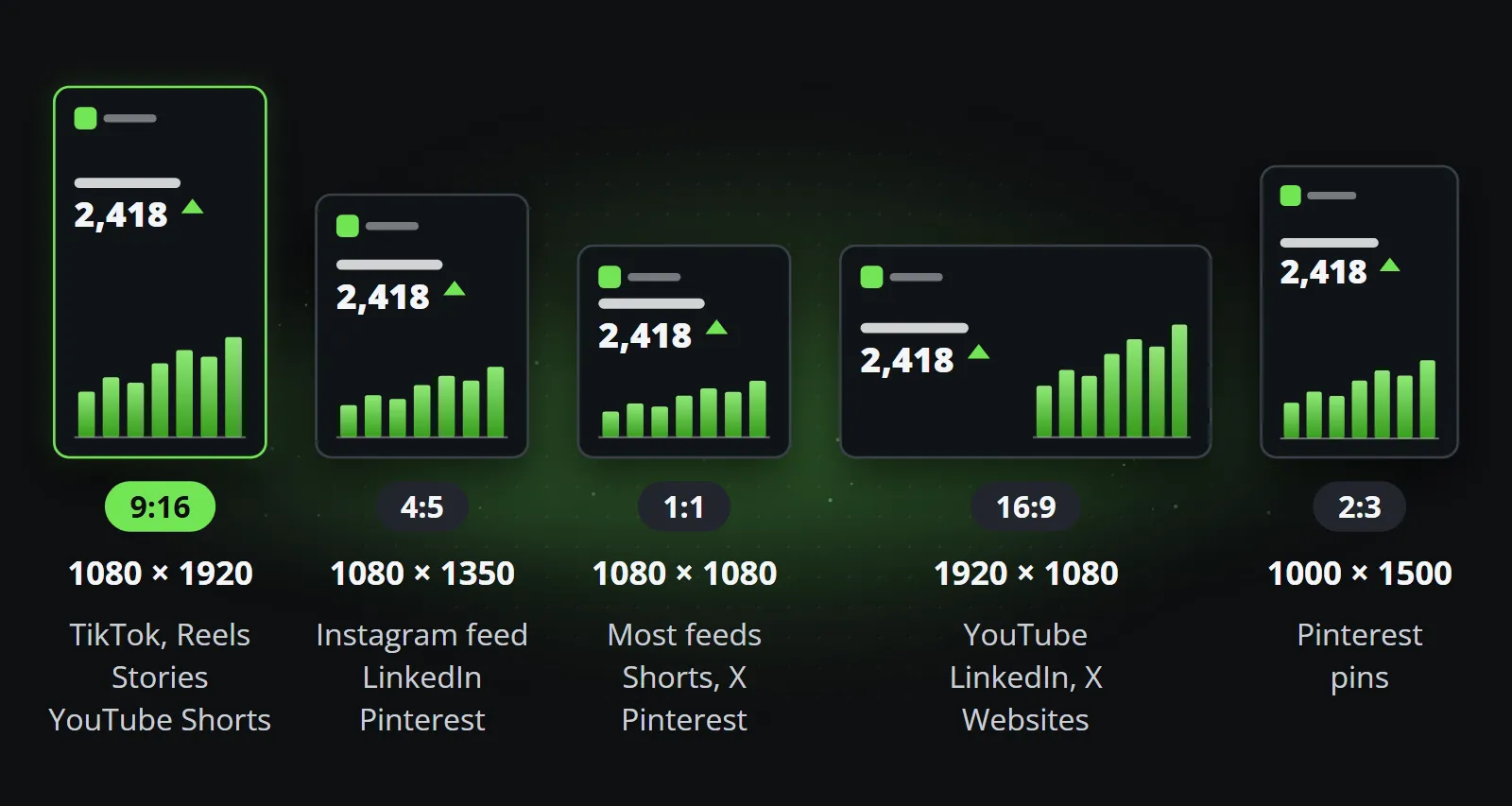
The short version: there are five shapes worth designing for. 9:16 covers every short-video placement, 4:5 and 1:1 cover the feeds, 16:9 covers regular YouTube videos and websites, and 2:3 is Pinterest’s own.
TikTok video size and length
TikTok’s help centre says that “videos you record in TikTok can be up to 10 minutes long” and “videos you upload in TikTok can be up to 60 minutes long” (TikTok help centre, checked 14 October 2026). Its organic help pages do not state a pixel size, so the most precise official figures are in two other places:
- The ad specifications recommend “Vertical (recommended): 9:16, more than or equal to 540*960px”, accept 16:9 and 1:1, and take .mp4, .mov, .mpeg, .3gp and .avi files up to 500 MB (TikTok Ads Manager help, last updated June 2026).
- The posting API recommends MP4, also takes WebM and MOV, and asks for 23 to 60 frames per second and up to 4 GB (TikTok for Developers).
In practice: 1080 by 1920, MP4, 30 frames per second.
Instagram Reels size and length
Instagram’s help centre says “you can upload a reel with an aspect ratio between 1.91:1 and 9:16”, and that reels “should have a minimum frame rate of 30 FPS (frames per second) and minimum resolution of 720 pixels” (Instagram help centre). A reel in any other shape does not fill a phone screen, so 1080 by 1920 is the size to make.
On length, the help page now says you can “record and edit videos up to 20 minutes with Instagram Reels”, with a note that “Reels over 3 minutes won’t be recommended to new audiences” (Instagram help centre, checked 14 October 2026; the page’s own summary line still says 3 minutes). For a brand that wants to be found by people who do not follow it yet, three minutes is the limit that matters.
Two more figures worth knowing:
- Stories: “When you share a video up to 60 seconds long to your stories, it will appear as one clip. Longer videos will be broken up into multiple clips” (Instagram help centre).
- Feed pictures: Instagram now accepts photos “between 1.91:1 and 3:4” (Instagram help centre), so the profile grid has moved towards taller shapes. A 4:5 cover sits well inside that range.
Facebook video size
Facebook simplified the question in 2025: “All videos posted to Facebook will be shared as reels, regardless of length or orientation” (Facebook help centre, update of September 2025). For reels it says “there is no minimum or maximum length requirement” (Meta business help) and recommends .mp4 at 1080p, 24 to 60 frames per second (Meta business help).
The organic pages name no aspect ratio. Meta’s ads guide asks for 9:16 for Reels ads and 4:5 for feed video ads, which is a sensible reading for organic posts too.
YouTube Shorts dimensions and video sizes
YouTube Shorts can be “up to three minutes in length”, and since 15 October 2024 “any videos uploaded on or after this date with a square or vertical aspect ratio up to three minutes in length will be categorized as Shorts” (YouTube Help). So a vertical clip of 3 minutes and 10 seconds becomes a regular video, not a Short.
For regular videos, “the standard aspect ratio for YouTube on a computer is 16:9”, in sizes from 426 by 240 up to 7680 by 4320 (YouTube Help). Uploads can be up to 15 minutes by default and longer once the account is verified, to a maximum of 256 GB or 12 hours (YouTube Help).
LinkedIn video size
LinkedIn’s help centre gives the widest range of any platform: aspect ratios from 1:2.4 to 2.4:1, resolutions from 256 by 144 to 4096 by 2304, 10 to 60 frames per second, files from 75 KB to 5 GB, and a length from 3 seconds (2 from the mobile app) to 15 minutes (LinkedIn Help). Its ad guidance names 4:5 as the “recommended ratio” for vertical video and allows ads up to 30 minutes (LinkedIn Marketing Solutions Help). For a company page, 4:5 or 1:1 fills the feed on a phone, and 16:9 suits desktop viewers.
X, Pinterest and Threads
- X: its developer documentation lists videos of 0.5 seconds to 20 minutes and up to 8 GB on a standard account, and up to 125 minutes and 16 GB with Premium, adding that “post-video caps match the X app”. It recommends 1280 by 720, 720 by 1280 or 720 by 720, with aspect ratios between 1:3 and 3:1 (X developer documentation). X’s help centre refused to load when checked, so these come from the developer pages alone.
- Pinterest: .mp4, .mov or .m4v up to 2 GB, “minimum 4 seconds, maximum 15 minutes”, with square (1:1) or vertical (2:3, 4:5 or 9:16) videos recommended (Pinterest Help).
- Threads: its developer documentation recommends 9:16, up to 5 minutes and 1 GB (Threads API).
What are the safe zones on Reels and TikTok?
A vertical video is not shown on its own. The app draws its own interface on top of it: the tabs at the top, the like, comment and share buttons down the right, and the account name, caption and sound at the bottom. Whatever sits under them is covered.
Meta is the one platform that puts a number on it. Its ads guide for Instagram Reels says: “Consider leaving at least 14% of the top, 35% of the bottom, and 6% on each side of your asset free from text, logos, or other important creative elements” (Meta ads guide), and the same figures appear for Stories and Facebook Reels. On a 1080 by 1920 frame that leaves an area of roughly 950 by 980 pixels in the upper middle for anything that must be read.
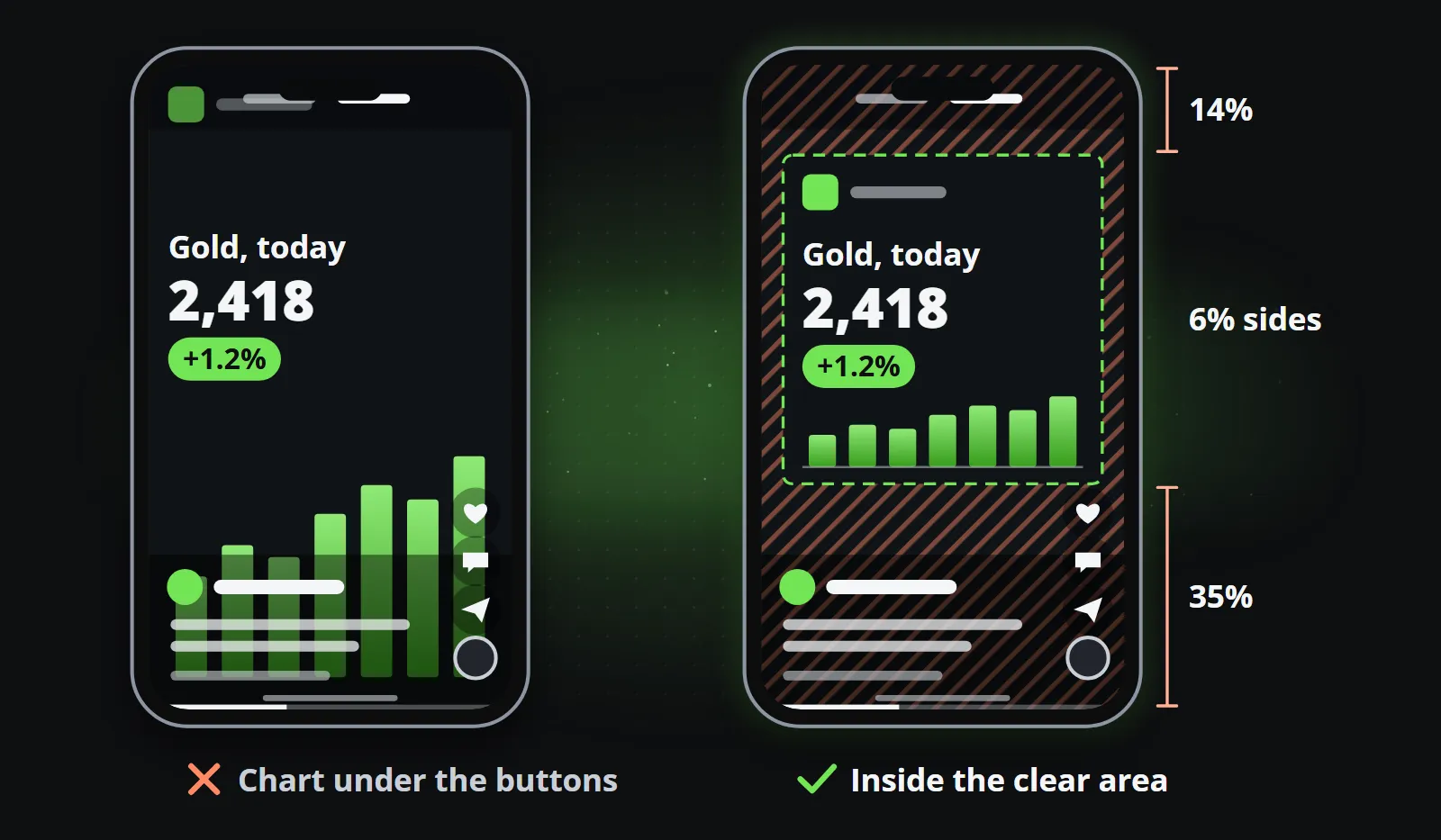
TikTok publishes no percentages. Its ad specifications say “the safe zone size is determined by the dimension (vertical, horizontal, or square), ad caption length, and any additional formats used”, and offer downloadable templates instead. LinkedIn asks only to “keep the edges (top, bottom, and sides) of your video free of key elements, text, and logos”. Meta’s figures are a safe rule for all of them: design the headline, the figure and the logo into the upper middle, and use the edges for background and colour.
Which file format and frame rate upload cleanly?
| Platform | Files | Frame rate | Other limits |
|---|---|---|---|
| TikTok | MP4 recommended, WebM, MOV | 23 to 60 fps | Up to 4 GB through the API, 500 MB for ads |
| MP4 or MOV | At least 30 fps | At least 720 pixels | |
| .mp4 recommended (H.264, H.265, VP9, AV1) | 24 to 60 fps | 1080p recommended | |
| YouTube | MP4 with H.264 video and AAC-LC audio | 24, 25, 30, 48, 50 or 60 fps | 8 Mbps suggested at 1080p |
| MP4, MOV and others | 10 to 60 fps | 75 KB to 5 GB | |
| X | H.264 High Profile video, AAC audio | Not stated | 8 GB, 16 GB with Premium |
| .mp4, .mov or .m4v (H.264 or H.265) | Not stated | Up to 2 GB |
Sources: the platform pages linked above, plus YouTube’s recommended upload settings and the Instagram API’s media reference.
One file satisfies every row: MP4, H.264 video, AAC audio, 30 frames per second, 1080 pixels on the short side. Higher frame rates and newer codecs are accepted by most, but nothing is gained on a phone screen, and an older codec is the one every platform takes without converting it first.
How long can the post text be on each platform?
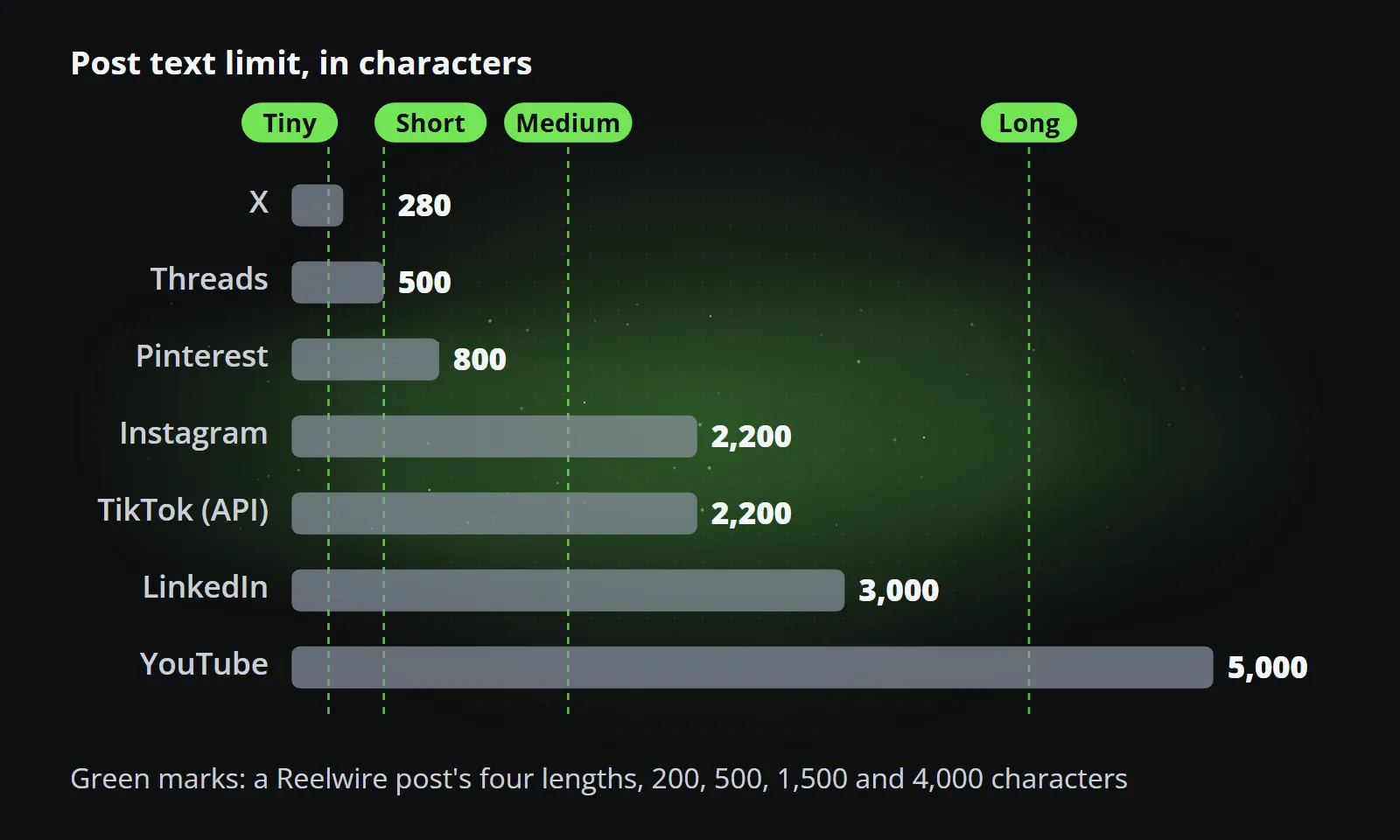
The video is only half of a post. The text under it has limits that differ far more than the shapes do:
| Platform | Post text limit | Source |
|---|---|---|
| X | 280 characters | X developer documentation |
| Threads | 500 characters | Threads API |
| Title 100, description 800 | Pinterest Help | |
| 2,200 characters, up to 5 hashtags | Instagram API reference; Instagram help centre | |
| TikTok | 2,200 characters through its posting API | TikTok for Developers |
| 3,000 characters | LinkedIn Marketing Solutions Help | |
| YouTube | Title 100, description 5,000 | YouTube Help |
Two notes. Instagram’s help centre now allows five hashtags on a post, while its developer documentation still says 30; the lower figure is the safe one. And neither TikTok nor Facebook states its in-app text limit on an official page, so the figures quoted for them elsewhere are left out here.
A limit is a ceiling, not a target. Pinterest notes that only the first 40 characters of a title may show in feeds on some devices, and a long caption under a 20-second clip is rarely read to the end. A practical approach is to write the text once in a few lengths, a line, a paragraph and a full description, and give each platform the longest one that fits.
One design for every size
The cheat sheet has a catch. Five shapes, eight platforms and their limits mean that a single post can need five video files and four texts, and every one of them made by hand is a chance for the headline to fall under the buttons or the caption to be cut mid-sentence. That multiplication, more than any single clip, is why short video gets expensive: what a short video costs counts it out.
The way around it is to design once, as rules rather than positions: a composition that knows where the safe area is in each shape and lays the same content out again for 9:16, 4:5, 1:1, 16:9 and 2:3, rather than cropping one master. One composition, every aspect ratio explains how that works and why cropping fails for anything with text in it.
This is how Reelwire templates are built. A channel names its platform and offers only the shapes that platform plays, so a clip is never rendered in a shape its platform cannot show. Every clip is drawn in that shape from the same template and data, with the brand applied, and the post text is written once in four lengths, tiny (200 characters), short (500), medium (1,500) and long (4,000), with each platform getting the longest one that leaves room for the brand’s own line, link and hashtags. The green marks in the chart above are those four lengths. How it works shows the whole chain, from data to a post handed over.
Bottom line
If you only remember one size, make it 1080 by 1920 at 30 frames per second, with nothing important in the top seventh or the bottom third. Add 4:5 or 1:1 for feeds and 16:9 for YouTube, keep Shorts and Reels under three minutes if you want them recommended, and write the text in more than one length. Then check the platform’s own page before a campaign, because the one thing that is certain about these figures is that they will change.
To see one post rendered in every shape at once, start with Reelwire’s free plan: 15 videos a month, no card needed.
Frequently asked questions
What is the best video size for social media?
1080 by 1920 pixels, the 9:16 vertical shape. TikTok, Instagram Reels and Stories, Facebook Reels and YouTube Shorts all play it full screen. Add 1080 by 1350 (4:5) or 1080 by 1080 (1:1) for feeds, 1920 by 1080 (16:9) for regular YouTube videos and 1000 by 1500 (2:3) for Pinterest.
What size is a TikTok video?
Vertical 9:16. TikTok's ad specifications recommend 9:16 at 540 by 960 pixels or more, so 1080 by 1920 is the usual choice. Videos recorded in the app can be up to 10 minutes long and uploaded videos up to 60 minutes (TikTok's help pages, checked 14 October 2026).
What are the Instagram Reels dimensions and length?
Instagram accepts reels between 1.91:1 and 9:16, at a minimum of 720 pixels and 30 frames per second; 1080 by 1920 fills the screen. Reels can be up to 20 minutes long, but Instagram says reels over 3 minutes are not recommended to new audiences.
How long can a YouTube Short be?
Up to three minutes, in a square or vertical shape. Since 15 October 2024, YouTube counts a square or vertical video of three minutes or less as a Short.
What is the LinkedIn video size?
LinkedIn takes aspect ratios from 1:2.4 to 2.4:1, from 256 by 144 up to 4096 by 2304 pixels, 3 seconds to 15 minutes long and up to 5 GB. Its ad guidance recommends 4:5 for vertical video.
What is the safe zone on Reels and TikTok?
Meta recommends keeping 14 percent at the top, 35 percent at the bottom and 6 percent on each side of a Reels or Stories ad free of text and logos. TikTok publishes its safe zone as downloadable templates, because it changes with the shape and the length of the caption.
Make your first clips today
The free plan makes 15 clips a month and asks for no card. Add your logo and colours, pick a template, and see a finished clip in your own brand before you decide anything.

Co-founder of Reelwire. Every organisation has facts worth showing, its prices, results, releases and warnings, and the vision is that every one of them can show those facts every day, on brand, in every format and language, without a production team behind each post. On brand, every day: correct, recognisable and consistent from the first clip to the thousandth.