One Composition, Every Aspect Ratio: Resize Video for Every Platform Without Cropping
9:16, 4:5, 1:1, 16:9 and 2:3: the five shapes of social video. Why cropping breaks branded video, and how one composition lays itself out for each.

Key takeaways
- Social platforms use five aspect ratios: 9:16 for Reels, Shorts and TikTok, 4:5 and 1:1 for feeds, 16:9 for YouTube and LinkedIn, and 2:3 for Pinterest.
- Cropping works for footage and fails for anything with text: the headline leaves the frame, the chart is cut in half, and the logo lands under the platform's own buttons.
- A composition built as rules rather than positions lays itself out for each shape, so the vertical clip is the same clip, not a degraded copy.
- One design for every shape also means one correction for every shape, which is where most multi-format channels quietly drift apart.
The usual way to get a 9:16 version of a 16:9 video is to crop it and hope. It works for footage, because footage has no required content: if you lose some sky, you have lost some sky. It does not work for anything with text in it, and most brand video has text in it. This article covers which aspect ratio each platform wants, why cropping breaks branded video, and how one composition can resize video for every platform without anybody re-cutting it.
The five aspect ratios social media uses
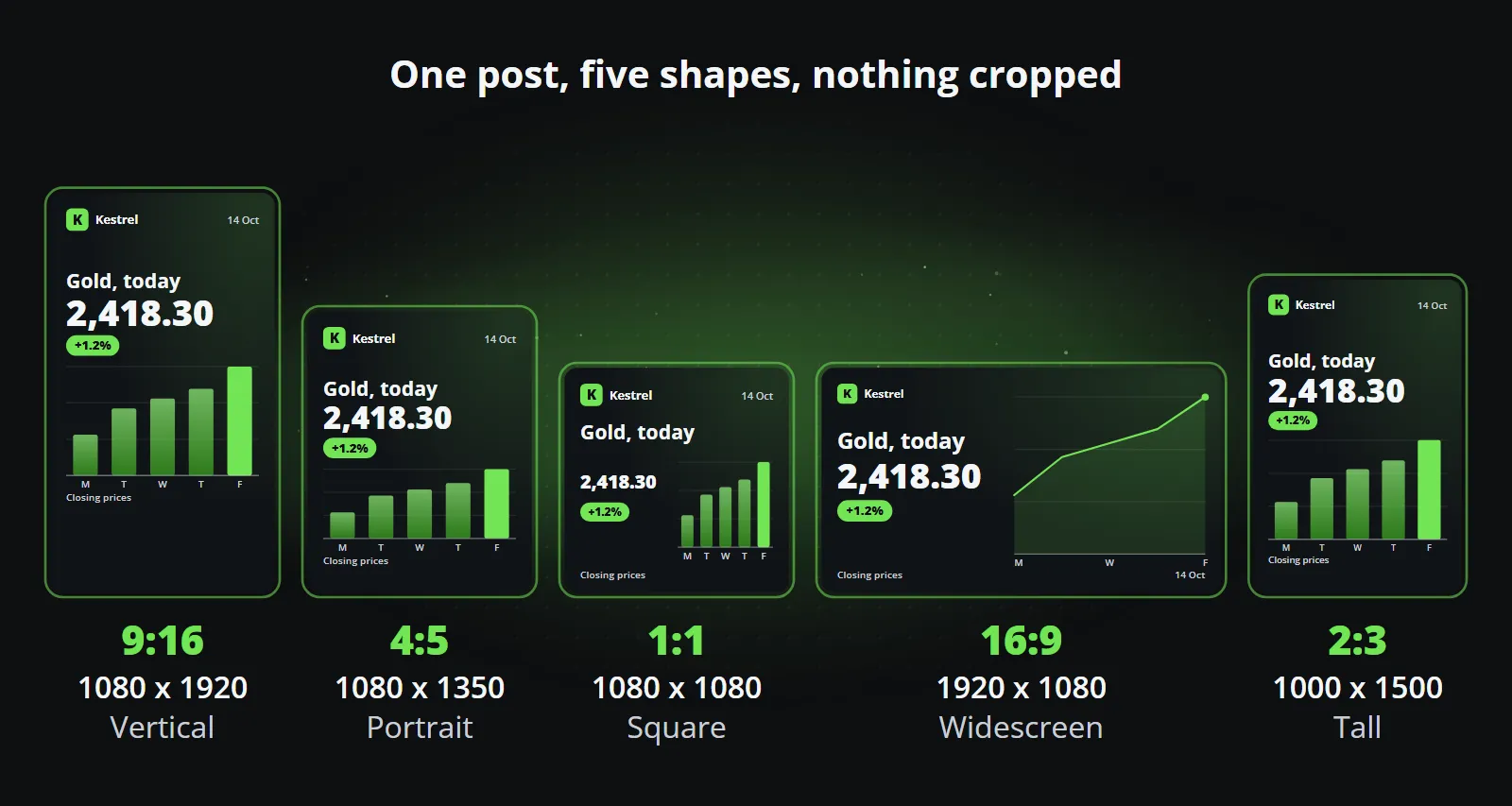
| Aspect ratio | Size (pixels) | Where it is used |
|---|---|---|
| 9:16 vertical | 1080 x 1920 | Instagram Reels, TikTok, YouTube Shorts, Facebook Reels, Stories |
| 4:5 portrait | 1080 x 1350 | Instagram and Facebook feeds, LinkedIn |
| 1:1 square | 1080 x 1080 | Feeds on most platforms, LinkedIn, messengers |
| 16:9 widescreen | 1920 x 1080 | YouTube videos, LinkedIn, X, websites and presentations |
| 2:3 tall | 1000 x 1500 | Pinterest pins |
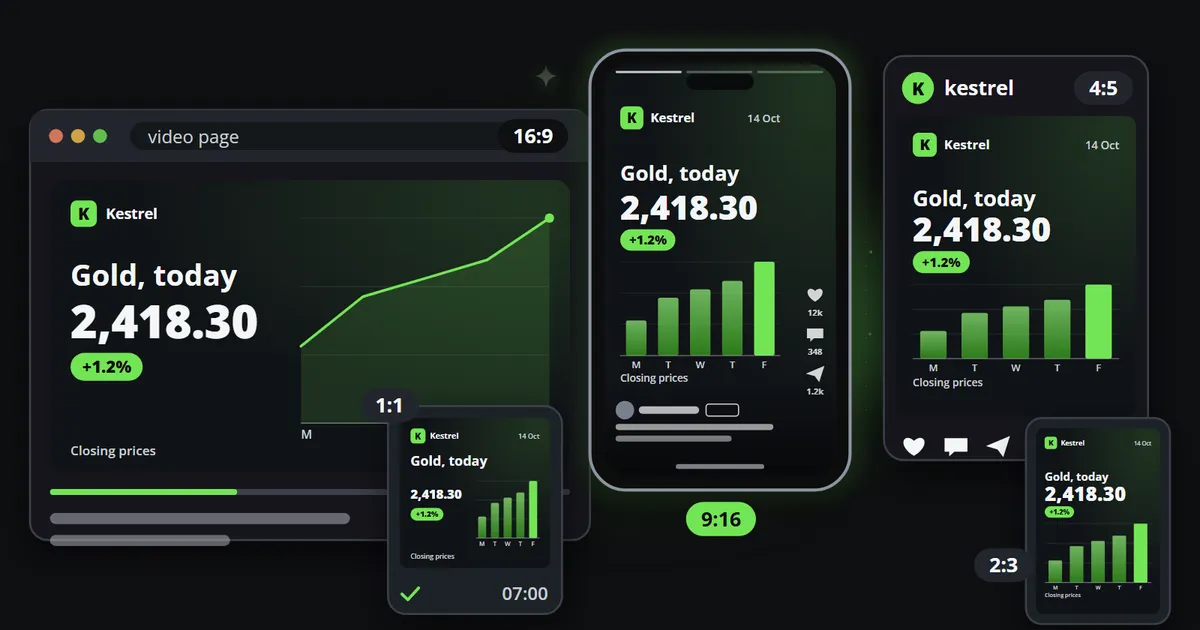
Drawn to scale, the five shapes look like this: the same post in each, with nothing cut off and nothing squeezed into a corner.
Messengers such as Telegram, WhatsApp, Discord and Slack play whatever shape you send, which makes them forgiving, but the feeds and short-video platforms each have a shape they favour.
Why cropping breaks branded video
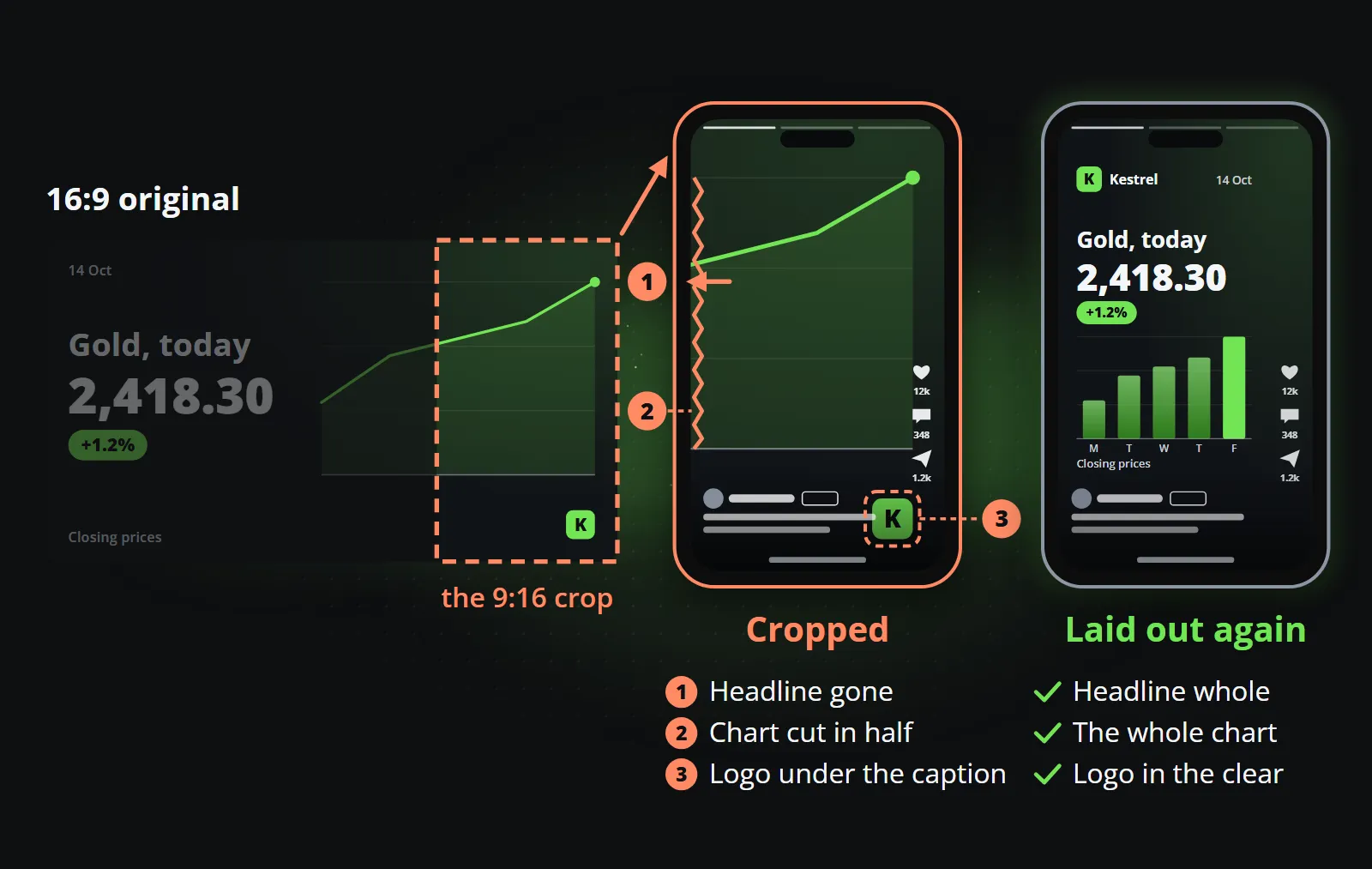
Crop a 16:9 composition to vertical and three things go wrong at once:
- The headline leaves the frame. A line that fitted across 1920 pixels does not fit across 1080.
- The chart is cut in half. Whatever was on the left and right of the centre is gone, and a chart missing half its bars says something different.
- The logo lands under the interface. Vertical platforms draw their own buttons and captions over the bottom and the right edge, the so-called safe zones, and a logo placed for widescreen ends up beneath them.
The picture below crops the right-hand slice of a widescreen clip to 9:16, which is all a crop to vertical can do: keep one narrow strip of the frame and throw the rest away. Beside it is the same post laid out again for the vertical shape.
Going the other way is no better. A vertical design shown in 16:9 either sits in a narrow column with empty bars on each side, or is stretched until it is soft.
Reflowing rather than cropping
A composition that reflows is built from the start as a set of rules rather than a set of positions:
- The safe area is declared per aspect ratio, not per clip, so nothing important ever sits under a platform’s interface.
- Type sizes are derived from the frame, so a headline that fits at 16:9 is set to fit at 9:16.
- Elements have a reading order, and the layout for each shape is an arrangement of that order: side by side in widescreen, stacked in vertical.
- Anything that cannot survive the narrowest shape is not in the composition at all.
The last rule is the discipline that makes the other three possible, and the one designers resist most, because it means the widescreen version cannot be the most elaborate one. It is also the rule that keeps every version honest: what is in the vertical clip is what the post says.
Safe zones: the part of the frame you do not own
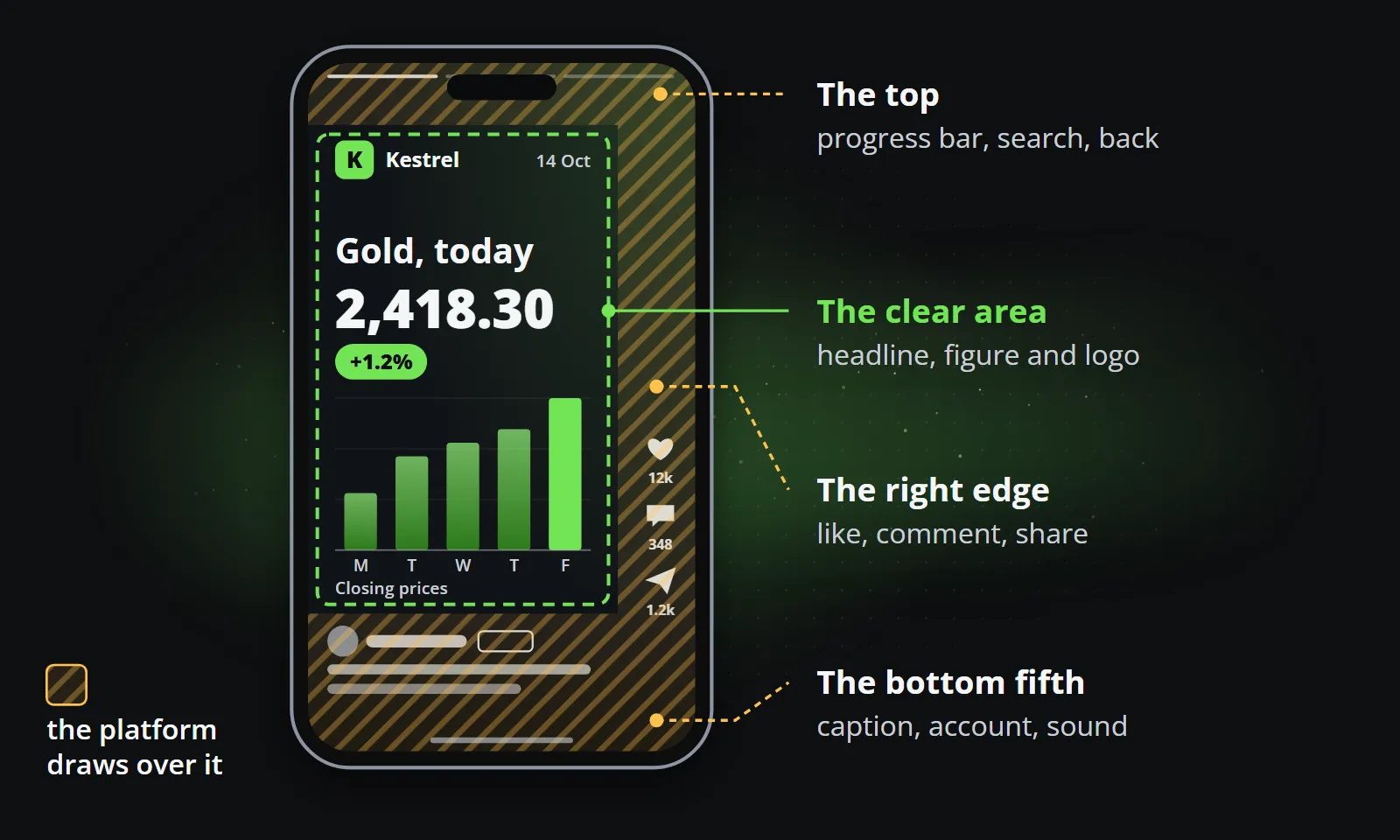
Vertical platforms draw their own interface on top of your video. The exact areas differ by platform and change from time to time, but the pattern is stable:
- The bottom fifth or so carries the caption, the account name and the sound.
- The right edge carries the like, comment and share buttons.
- The top carries the progress bar, the search or the back button.
Anything important placed there is covered at least some of the time. A composition that reflows keeps the headline, the figure and the logo inside the area every platform leaves clear, and uses the edges only for background and colour.
On a vertical clip that leaves a band at the top, a column on the right and the bottom fifth to the platform, and a clear area in the middle for everything that has to be read.
One post in five shapes: a worked example
Take a simple post: a logo, a headline, one large figure with its change, and a small bar chart.
| Shape | How the same elements are arranged |
|---|---|
| 9:16 | Logo at the top, headline below it, the figure large in the middle, the chart beneath, all clear of the bottom fifth |
| 4:5 | The same order, with less vertical room, so the chart is shorter and the figure slightly smaller |
| 1:1 | Headline across the top, figure and chart side by side underneath |
| 16:9 | Headline and figure on the left, chart filling the right half, logo in a corner |
| 2:3 | Close to 9:16, with a little more room for the chart, which suits a pin people save |
Nothing was cropped, and nothing was redesigned. The elements and their reading order stayed the same; only the arrangement changed. That is the whole idea, and it is why a correction to the headline style reaches all five at once.
Languages are the second axis
Aspect ratio is not the only thing that changes a layout. The same headline is often a third longer in German than in English, and a right-to-left language reverses the reading order. A composition built as rules handles that in the same way it handles shape: the text is set to fit its box, and a headline too long for the shape is refused by name before it is drawn, rather than clipped on a published clip.
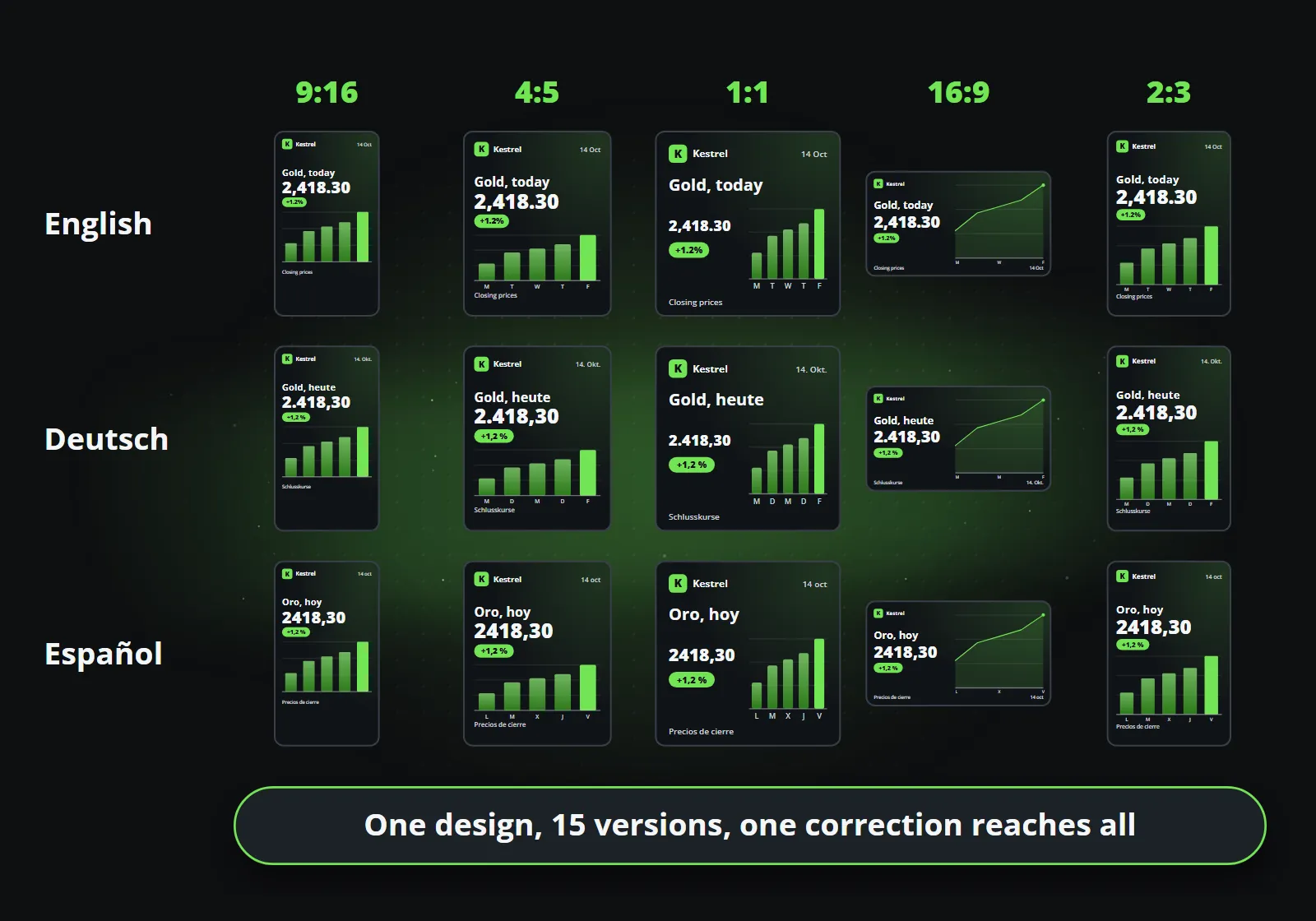
So one template covers a matrix: every shape the channels need, times every language the brand publishes in. For a brand in three languages on five platforms, that is the difference between one design and fifteen.
Here is that matrix for English, German and Spanish. The words, the date and the way the figure is written follow each language; the arrangement for each shape stays exactly as it was.
What this buys
The point is not only the hour saved on re-cutting. The point is that the vertical clip is the same clip: same brand, same type, same colours, same animation, and the same correction when you fix something.
That last part matters more than it sounds. A channel that keeps its shapes as separate files drifts: the square version gets the new logo, the vertical one does not, and the German widescreen still has last quarter’s disclaimer. With one composition, a correction is made once and reaches every version at the next render. Your thousandth clip should look like your first explains why that consistency is worth so much.
How Reelwire does it
Every Reelwire template is a composition of this kind. A channel names its platform and shape, the template lays the content out for that shape, and the brand, logo, colours, fonts and badge, is applied to each. One post sent to channels on Reels, the Instagram feed and YouTube comes out as three correctly composed videos from the same content, in every language those channels publish in, with no cropping anywhere.
Data to video explains where the content comes from, and the free plan lets you render one of your own posts in every shape.
Frequently asked questions
What aspect ratio should I use for Instagram, TikTok and YouTube?
Use 9:16 vertical for Instagram Reels, TikTok and YouTube Shorts, 4:5 or 1:1 for the Instagram and Facebook feeds, 16:9 for regular YouTube videos and widescreen LinkedIn posts, and 2:3 for Pinterest pins.
Can I crop a 16:9 video to 9:16?
You can crop footage, because it has no required content. A video with text, a chart or a logo loses part of them when cropped, so it should be laid out again for the vertical shape instead.
What are safe zones in vertical video?
Areas near the top, bottom and right edge of a 9:16 video where the platform draws its own interface: the caption, the account name and the like and share buttons. Text and logos placed there are covered, so a good vertical layout keeps them clear.
How do I make one video in several aspect ratios automatically?
Design it as a composition whose layout is defined per shape, then render each shape from the same content. Reelwire templates work this way: one design produces 9:16, 4:5, 1:1, 16:9 and 2:3 versions with the same brand, text and animation.

Co-founder of Reelwire. Every organisation has facts worth showing, its prices, results, releases and warnings, and the vision is that every one of them can show those facts every day, on brand, in every format and language, without a production team behind each post. Your data, in motion: correct, recognisable and consistent from the first clip to the thousandth.