Data to Video: How to Turn Live Data, RSS and APIs Into Short Videos Automatically
Data-to-video turns prices, results and releases into finished short videos with nobody editing. How the pipeline works and how to connect your own data.

Key takeaways
- Data-to-video means a short video is made automatically when new data arrives: an event fills a template, the clip is drawn in every aspect ratio, and the post is handed over when it is due.
- The data can come from a ready-made feed, from your own system over an API, or from a list of posts somebody writes in advance. Nothing downstream can tell which.
- The best data for video is frequent, predictable, numeric and sliceable by place, product or language. It does not have to be about your product; it has to be worth seeing.
- Because a template refuses data that does not fit, a pipeline can run unattended without publishing a clipped headline or a wrong field.
Data-to-video is a simple idea: when new data arrives, a finished video comes out, and nobody opens an editor. A price moves, a match ends, a release ships, a week’s offers are confirmed, and a short video in your brand is ready to post within minutes. It is sometimes called programmatic video or automated video creation, and for any brand that has something new to say every day, it is the difference between a channel that runs and a channel that waits for somebody to have time.
This article explains how a data-to-video pipeline works, which data suits it, and the three ways to feed it, including RSS and your own API.
How a data-to-video pipeline works
Every data-to-video system does four things. In Reelwire they look like this:
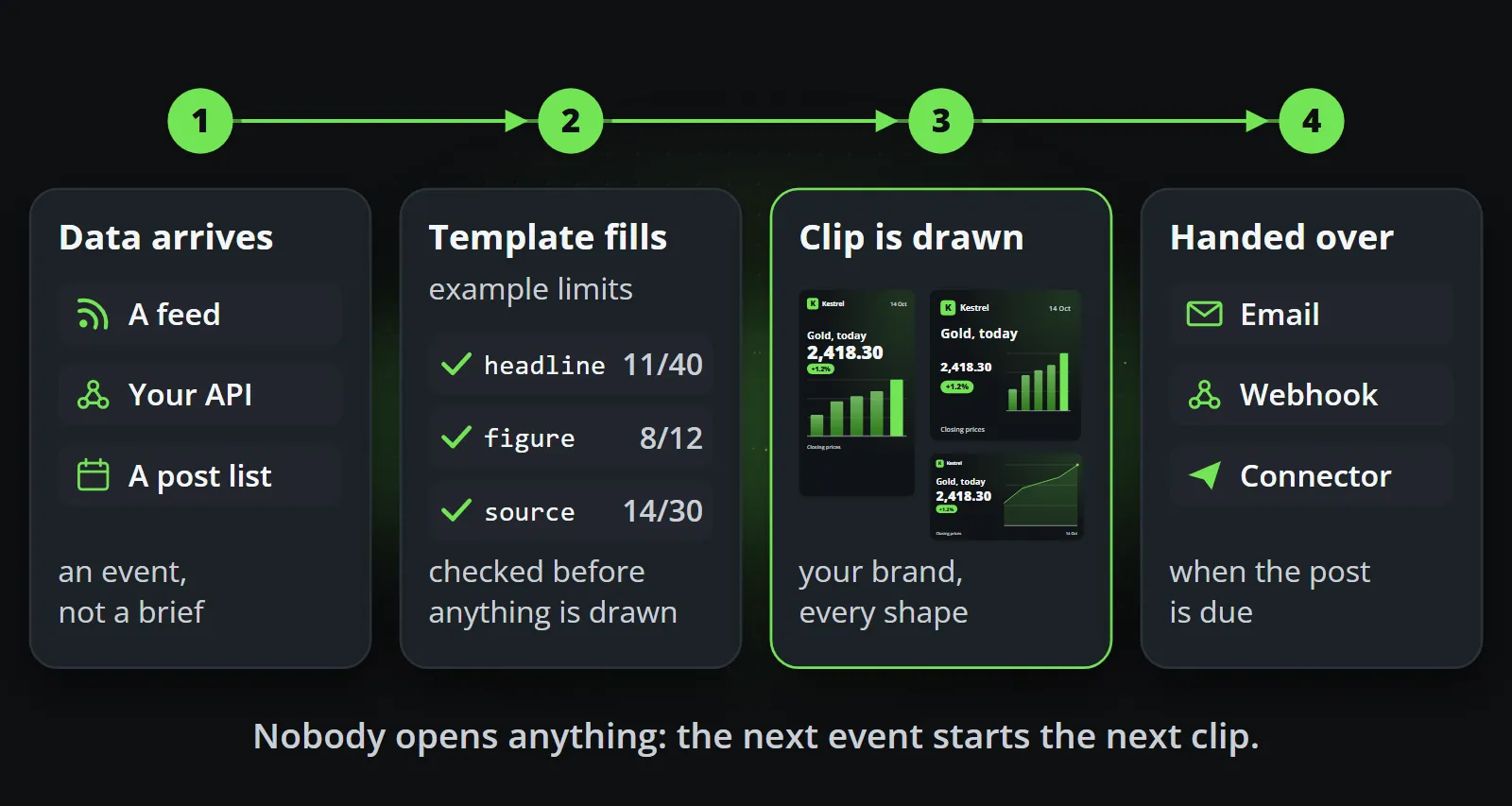
- Something happens. An event arrives: a price, a result, a name, a date, a headline. It is data, not a video brief.
- It fills a template. A channel is subscribed to that source, and the subscription names an exact template version. The event’s fields are checked against what the template accepts before anything is drawn, so an over-long headline is refused by name rather than clipped on a published clip.
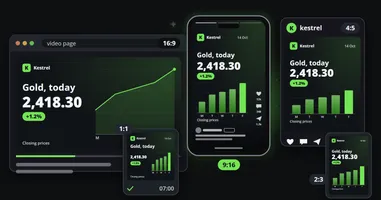
- It is drawn, wearing your brand. The template receives exactly three things: your brand, the channel and the content. It is drawn frame by frame in every aspect ratio and language the channel publishes in, from the same composition.
- It is handed over. When the post is due, after an approval if you asked for one, it goes out by email with a kit to post it from a phone, by webhook to your own system or a posting service, or directly to Discord, LinkedIn, Slack or Telegram.
The template is the part that makes this safe. It is designed once by a person, so the layout, the type, the logo position and the animation never depend on the data being well-behaved. The data only decides what is written in the fields. From event to post, in four steps follows a single event all the way through.
Three ways to get data in
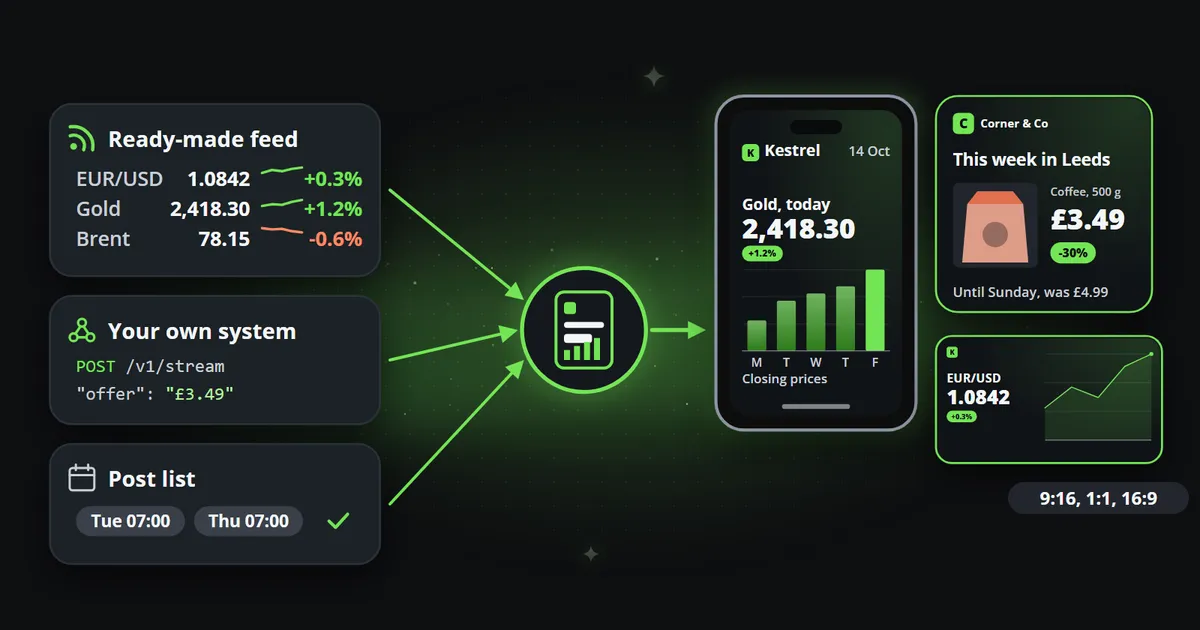
Most teams do not have a perfect data feed, and they do not need one. There are three ways in, and a channel can use all three.
1. A ready-made feed
The quickest start. Reelwire carries feeds that are already shaped for its templates: market data, calendars, public information and more. You switch a feed on, choose a template and a channel, and the posts start. Nothing to build.
2. Your own data over the API
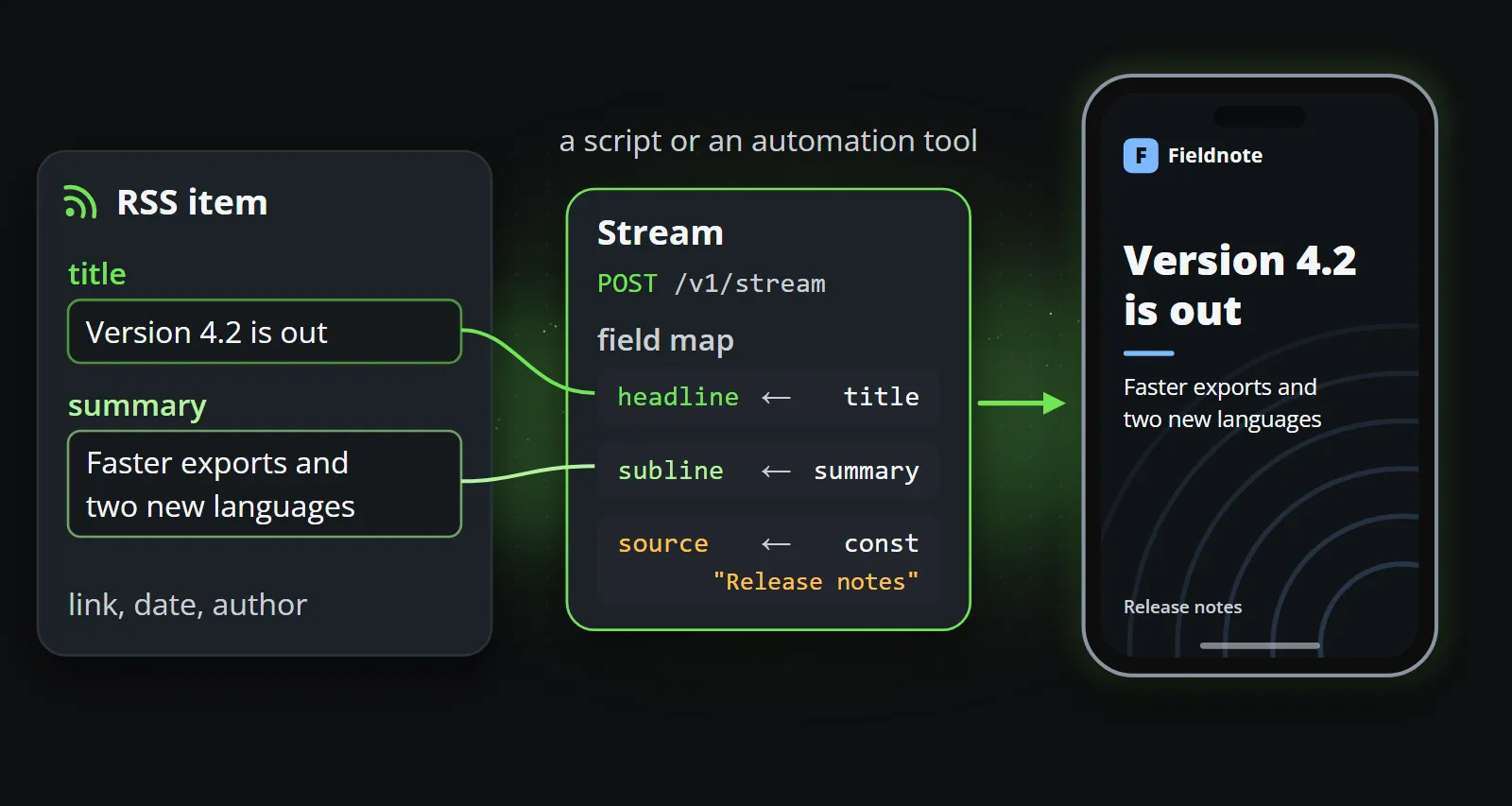
Your own systems know things no ready-made feed does: a release, a shipment, a price change, a new listing, a reading from a sensor. A stream is an address your systems send those events to. Each event is one HTTP request:
curl https://app.reelwire.io/v1/stream \
  -H "Authorization: Bearer rw_your_key_here" \
  -H "Content-Type: application/json" \
  -d '{
    "streamId": "st_0123456789ab",
    "eventId": "01JB6R3ZK8Q4T7X2M9N5P1V6WC",
    "occurredAt": "2026-10-06T07:55:00Z",
    "locale": "en",
    "data": {
      "clipData": {
        "headline": "Version 4.2 is out",
        "subline": "Faster exports and two new languages",
        "source": "Release notes"
      }
    }
  }'
The eventId makes sending idempotent: send the same event twice and it is made once. If your system
already has its own field names, a field map on the stream says where each of the template’s inputs
lives in your document, so you do not have to reshape anything. The
streams reference and
sending events have the details.
RSS to video works the same way: a small script, or an automation tool such as Make, Zapier or n8n, reads the feed and sends each new item as an event, with the item’s title as the headline and its summary as the text. Your news page, your changelog and your blog become a video channel without anybody rewriting them.
3. A list of posts somebody writes
Not everything worth posting arrives as data. A post list is a queue of posts a person writes in advance, each with its content and its time. When the time comes, the post goes through exactly the same pipeline as an event from a feed. This is the right way to plan a campaign, a week of tips or an announcement, and it uses the same templates as everything else.
And for a single video with no channel at all, a clip for a presentation, an email or a screen at an event, Reelwire’s Clip studio renders a template directly and lets you download the result.
The important property is that all three paths converge. A post from a feed, from your API or from a list is the same kind of object from the moment it arrives, so approvals, scheduling, captions and hand-over work identically.
Which data makes good video
Data-to-video works with almost any structured data, but some data makes much better channels than other data. The best sources share six properties:
| Property | Why it matters | Examples |
|---|---|---|
| Daily or faster | No person keeps up with it by hand, which is where automation wins | Prices, weather, results, traffic |
| Predictable | The channel can be planned and viewers learn when to look | Opening and closing figures, weekly offers, calendars |
| Event-driven | Routine data also breaks news when something moves | A record high, a warning, a sell-out |
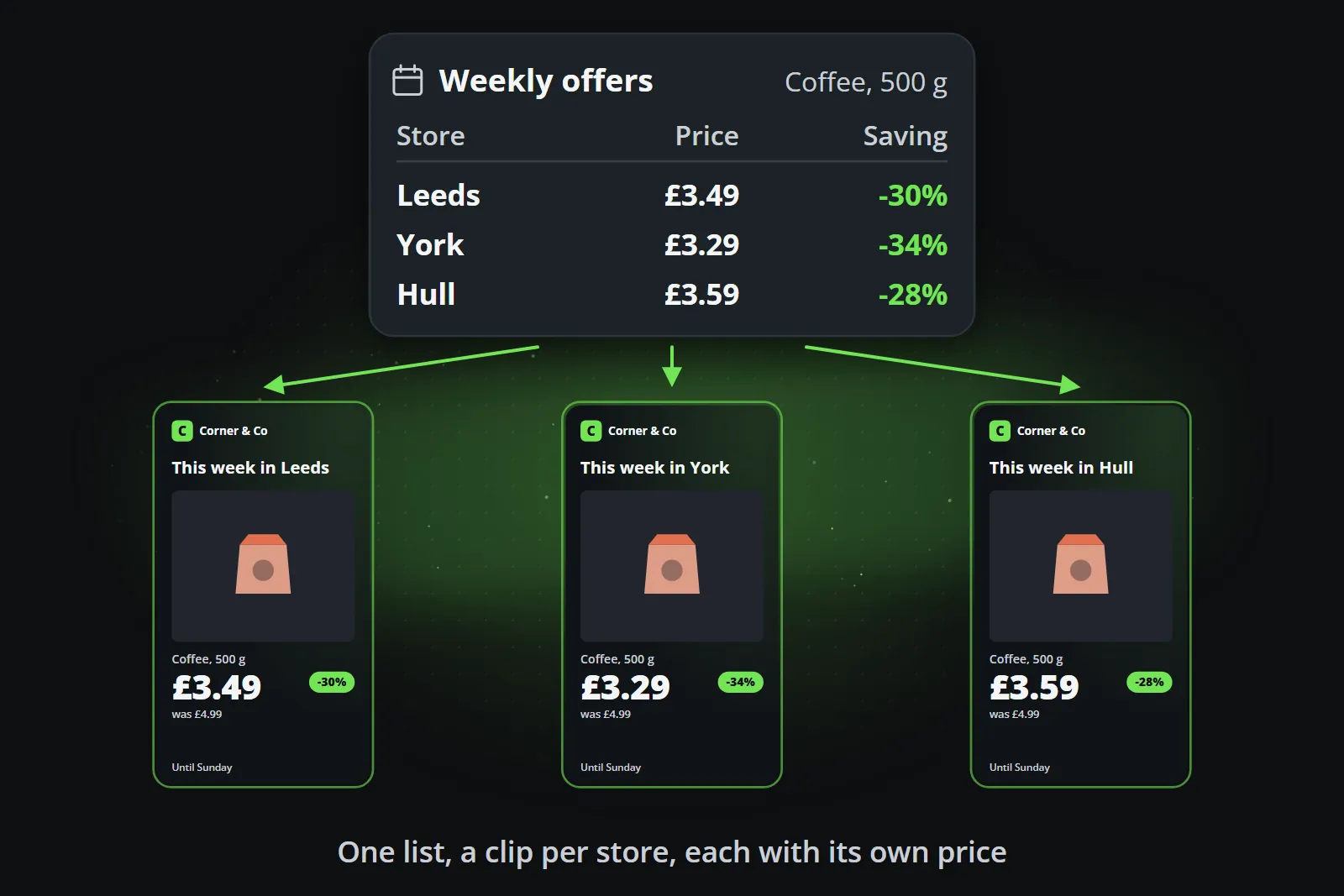
| Sliceable | One source becomes many posts, per region, store, product or language | Prices per branch, results per league, levels per river |
| Numeric | Numbers, states and rankings fit template fields cleanly | Rankings, changes, counts, percentages |
| Decomposable | Short fields recombine into many formats | Headline, figure, unit, date, picture |
Sliceable is the property that multiplies a channel: one list of offers becomes a clip per store, each with its own price.
The data does not have to be about your products. It has to be worth seeing, and it has to keep your brand present. A hardware shop that posts the weekend weather with a matching offer, or a software company that posts its release notes in thirty seconds, is using data its audience already cares about.
Why a template and not a generator
It is tempting to send the data to an AI video generator with a prompt and let it make the clip. For anything with figures in it, that fails in predictable ways: generated lettering is pixels that look like letters, digits change between frames, and logos drift. Each attempt is also priced per second on graphics hardware, and a usable clip often takes several. AI video generator vs template video compares the two in detail.
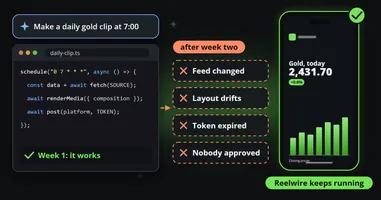
A template draws exactly what it is sent, in your typeface, and the same data always produces the same clip. That determinism is what lets a pipeline run unattended: you approve the template once, and every clip made from it is covered.
What happens when something goes wrong
An unattended pipeline is only as good as its failures. A few rules keep a data-to-video system trustworthy:
- Refuse, don’t clip. A field that does not fit the template is rejected with its name, before rendering. A missing post is better than a wrong one.
- Idempotent events. The same event sent twice produces one post, so retries are safe.
- Exact template versions. A channel uses a fixed template version, so a clip published last quarter can always be explained.
- Optional approval. For channels that need it, a person approves each post before it goes out; otherwise posts flow straight through.
- Recall and correct. A post that went out wrong can be updated or withdrawn through the same hand-over, by email or webhook.
Getting started
- Pick one source you already have: a feed, a news page, a price list, a calendar.
- Pick one template whose fields match it.
- Create a channel, choose how its posts are handed over, and subscribe it to the source.
- Watch a week of posts before adding more channels, languages or sources.
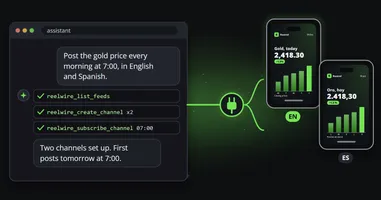
Reelwire’s free plan is enough for a first channel, and if you would rather let an assistant do the setup, MCP for video shows how Claude or ChatGPT can configure it for you.
Frequently asked questions
What is data-to-video?
Data-to-video is the automatic production of videos from structured data. A template defines where each value goes and how it moves; each new record fills the template and becomes a finished clip, without anybody editing it.
Can I turn an RSS feed into videos automatically?
Yes. A script or an automation tool reads the feed and sends each new item to a video pipeline over its API, mapping fields such as the title and summary to the template's headline and text. Reelwire's streams accept exactly this, with a field map so your own field names do not have to change.
What kind of data works best for automated video?
Data that changes often, arrives predictably, is mostly numbers or short text, and can be split by region, product or language: prices, results, schedules, releases, offers, measurements and rankings.
Is data-to-video the same as an AI video generator?
No. An AI video generator invents the picture from a prompt. Data-to-video draws a designed template with your real values in it, so the figures are exact and the same data always makes the same clip.
Do I need a developer to automate videos from data?
Not necessarily. Ready-made feeds and post lists need no code at all. Connecting your own system needs one HTTP request per event, which an automation tool such as Make, Zapier or n8n can send without custom code.

Co-founder of Reelwire. Every organisation has facts worth showing, its prices, results, releases and warnings, and the vision is that every one of them can show those facts every day, on brand, in every format and language, without a production team behind each post. Your data, in motion: correct, recognisable and consistent from the first clip to the thousandth.