From Event to Post in Four Steps: How an Automated Video Workflow Runs
What happens between something occurring in your data and a finished video being handed over: four steps, and the checks that let it run unattended.

Key takeaways
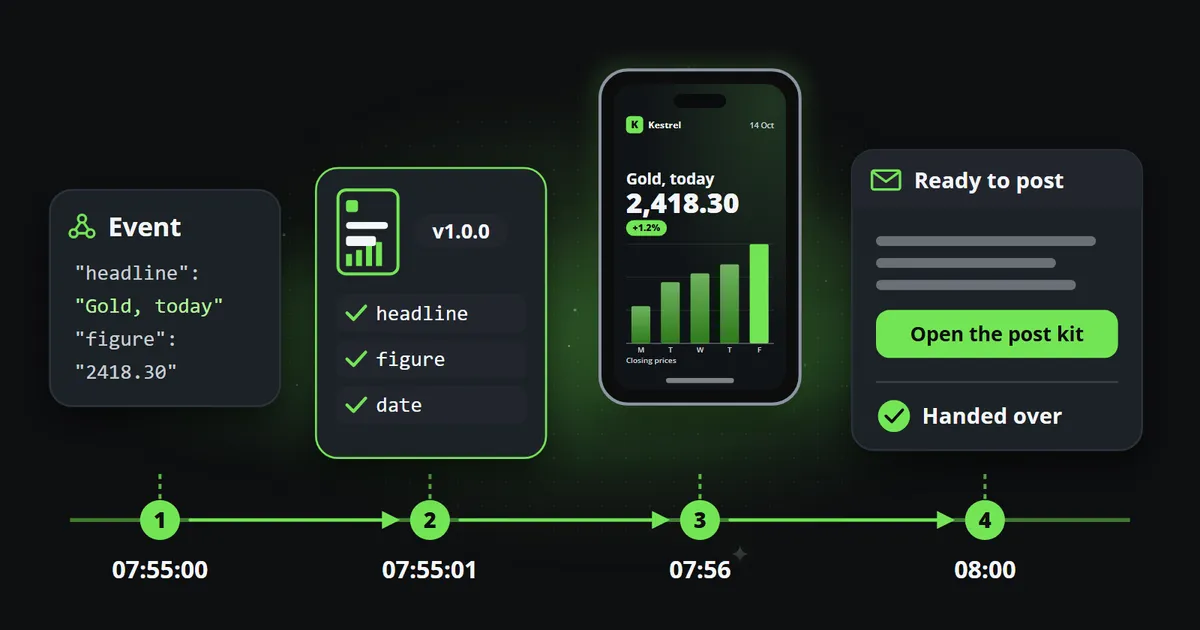
- An automated video workflow has four steps: an event arrives, it is matched to a template, it is drawn in your brand, and the finished post is handed over when it is due.
- Each step has a check that lets the whole thing run unattended: validation before drawing, exact template versions, an optional approval, and a record of every hand-over.
- A post is not "published" when Reelwire hands it over. It is published when whoever posts it says so, which keeps the record honest.
- Updates, corrections and withdrawals travel the same way as the original post, so fixing a mistake is as automatic as making the post.
An automated video workflow sounds like a black box: data goes in, posts come out. It is worth understanding what happens in between, because every feature that matters, approvals, corrections, reliability, is one of the steps done carefully. This article follows a single event through the four steps from data to a published post, and the check at each step that lets the workflow run unattended.
Step 1: something happens
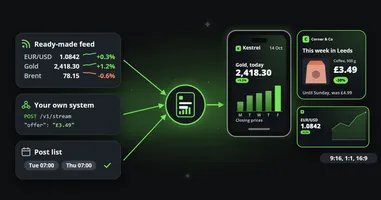
An event arrives. It might be a price from a ready-made feed, a release your own system sends over the API, or a post somebody wrote in advance in a post list and scheduled for nine o’clock. Whichever it is, it is data, not a video brief: a headline, a figure, a date, a name, a picture.
From this moment the three sources are indistinguishable. Approvals, scheduling, captions and hand-over work the same way for all of them, which means a new source of content never needs a second process. Data to video describes the three sources and the kind of data that suits them.
The check: every event carries its own identifier, so the same event sent twice is made once. A retry after a network error cannot produce a duplicate post.
Step 2: it is matched to a template
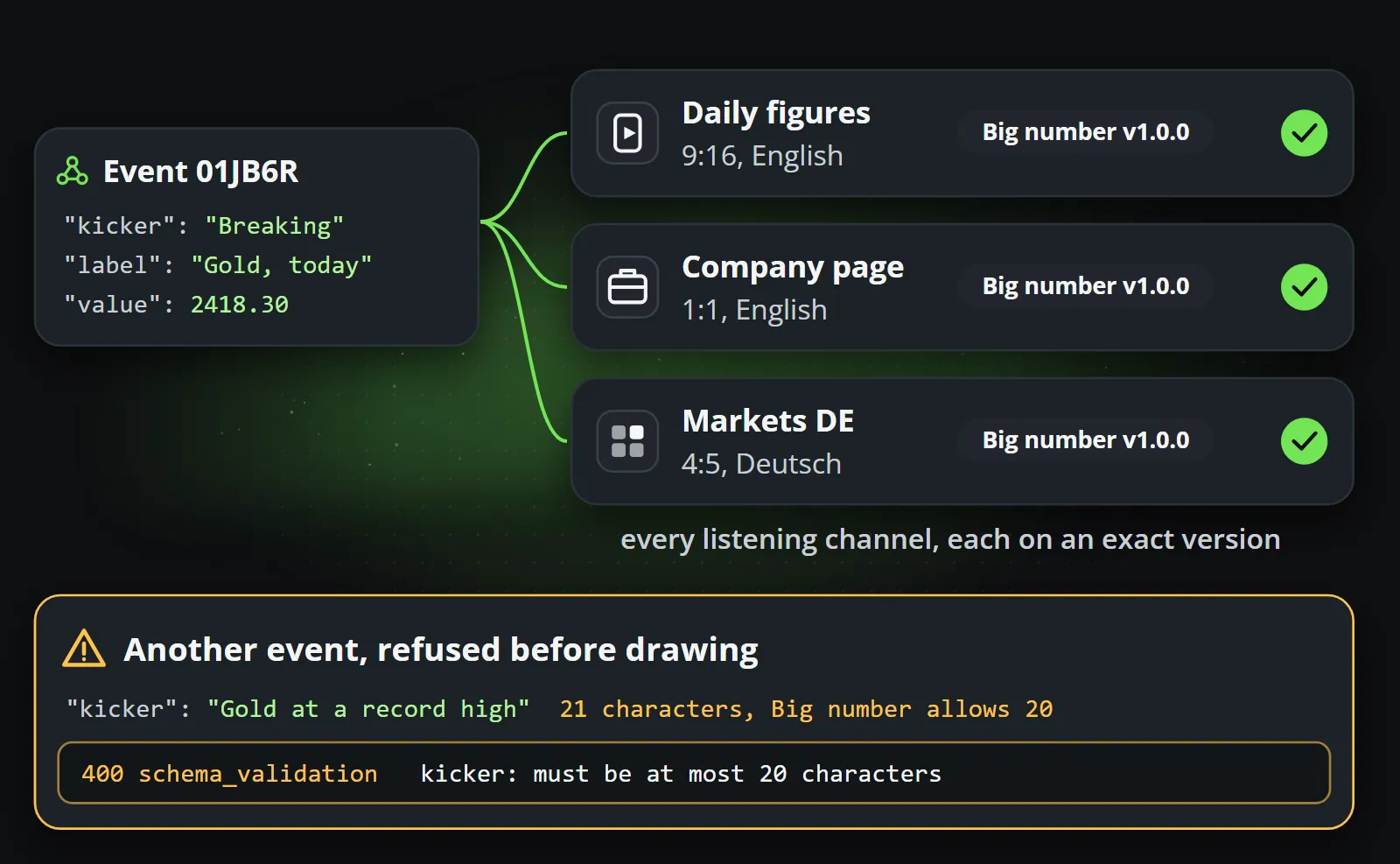
Channels subscribe to sources. When an event arrives, every channel listening to its source receives it, and each subscription names an exact template version: not “the latest”, an exact version, so that a clip published last quarter can still be explained today.
Before anything is drawn, the event’s fields are checked against what that template accepts. A headline longer than the template allows, a missing figure, a picture of the wrong kind: each is refused by name, before rendering, rather than clipped on a published video.
The check: nothing that does not fit the approved design is ever drawn. A refused event is a visible error with a reason, not a silently broken post.
In the picture, one event reaches three channels, each subscribed to an exact version of the same template, while a second event, whose kicker is one character over the template’s limit, is stopped before anything is drawn, with the field and the limit named in the answer.
Step 3: it is drawn, wearing your brand
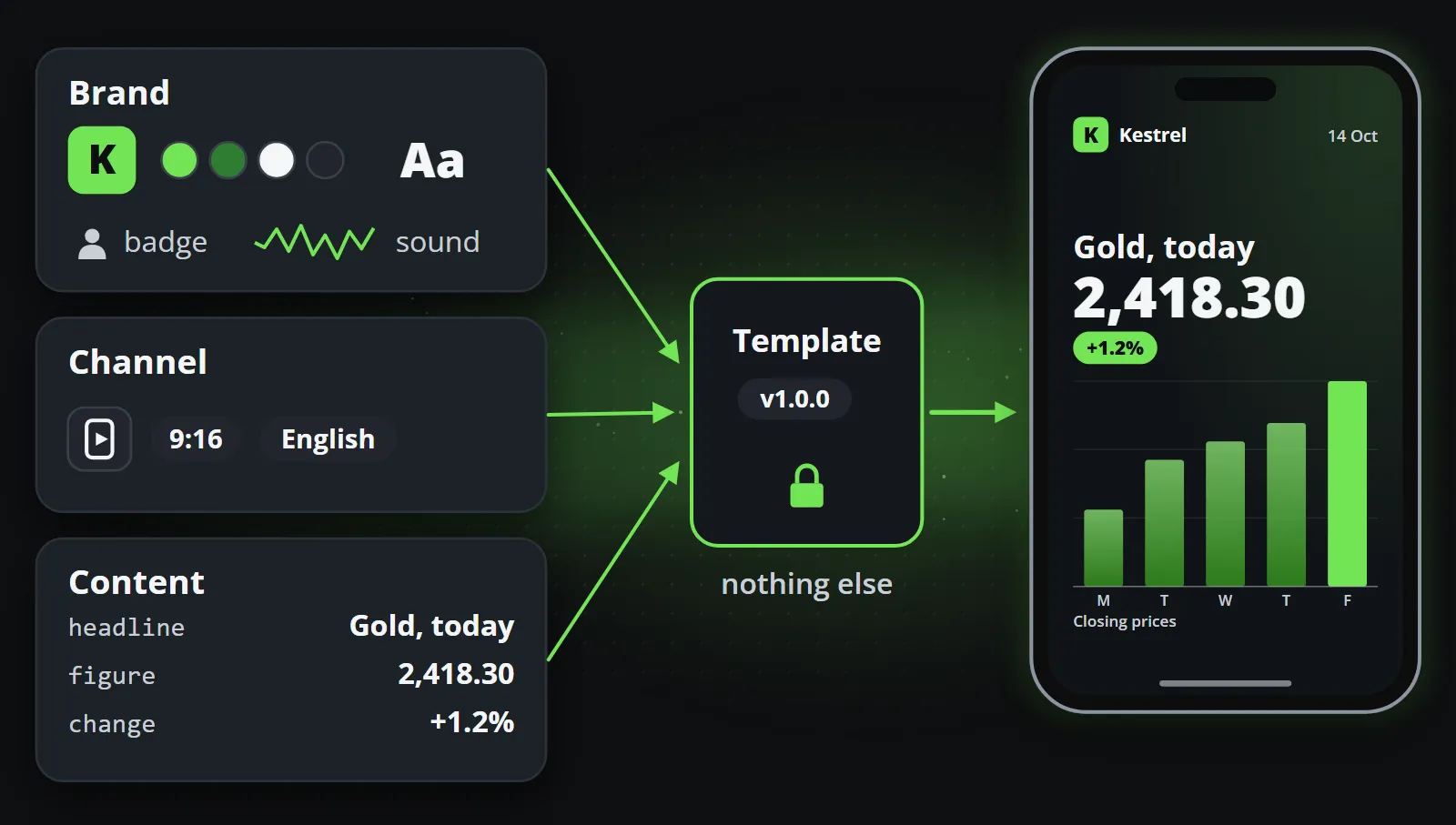
The template receives exactly three things: your brand, the channel, and the content. Nothing else. A template cannot know which customer it is drawing for, which is deliberate: a template that could would eventually be written to behave differently for one of them.
The brand supplies the logo, colours, fonts, badge, background, outro and soundtrack. The channel supplies the platform and the shape. The content fills the fields. The clip is drawn frame by frame, in the channel’s aspect ratio and in each language it publishes in, and the caption goes with it in the length that platform allows.
Drawn out, the three inputs look like this. Anything that is not in one of them, such as which customer the clip is for, the template never sees.
The check: the same data always makes the same clip, so the approved template version covers it. If a channel needs more, its posts wait for a person to approve each one before they go further.
Step 4: it is handed over
When a post is due, and after its approval if the channel asked for one, it is handed over. Posts that came from the same event go out together once all of them are rendered (a sibling still rendering holds the others for 30 minutes at most), so the people who publish get one delivery rather than a trickle. There are three ways out, and each channel chooses its own:
| Way out | What happens | Good for |
|---|---|---|
| One email per hand-over to the people who publish, with a button to a post kit: a page with each channel’s video and text, ready to post from a phone | Teams who post by hand and want it fast | |
| Webhook | A signed call to your own system or a posting service, with links to every clip | Teams with their own tools or a posting service |
| Platform connector | Reelwire posts directly to Discord, LinkedIn, Slack or Telegram | Those platforms, fully unattended |
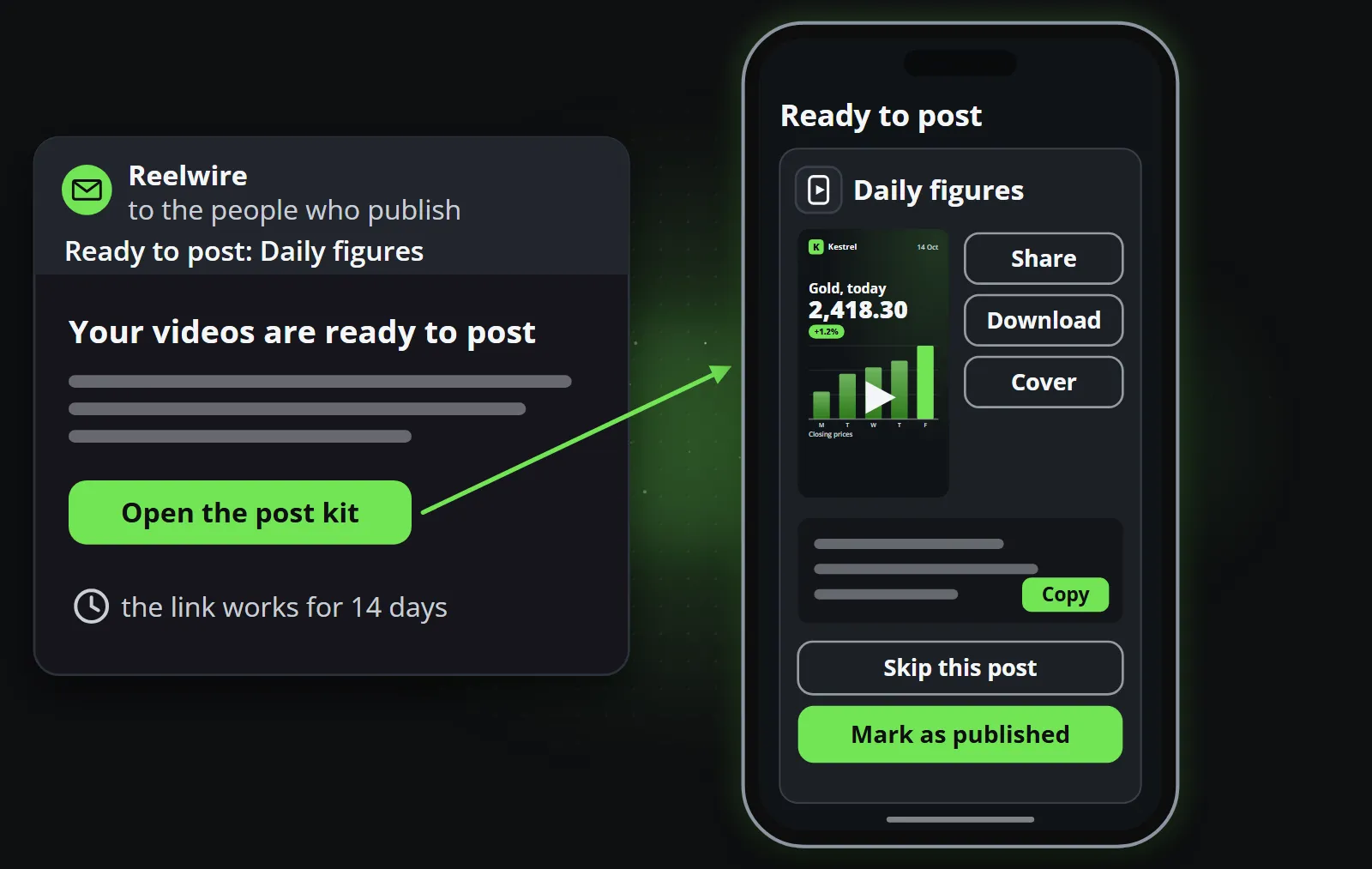
The email goes to the workspace’s owner and to the colleagues who hold the Operations permission, the people who publish. Its button opens the post kit, a page built for a phone: a card for each channel with the video to download or share, the text with a Copy button, and two answers, Mark as published or Skip. The link works for fourteen days, after which the posts are still on the Posts screen.
The letter itself carries no video, only which posts are ready for which channels and the button to the kit. Everything needed to post is on the kit, one card per channel, ready to use on a phone.
A webhook call carries the same information for a machine: which posts, for which channels, with links to each clip and its text, signed so the receiver can check it came from Reelwire. Whatever receives it, your own system or a posting service, posts the clips and reports back.
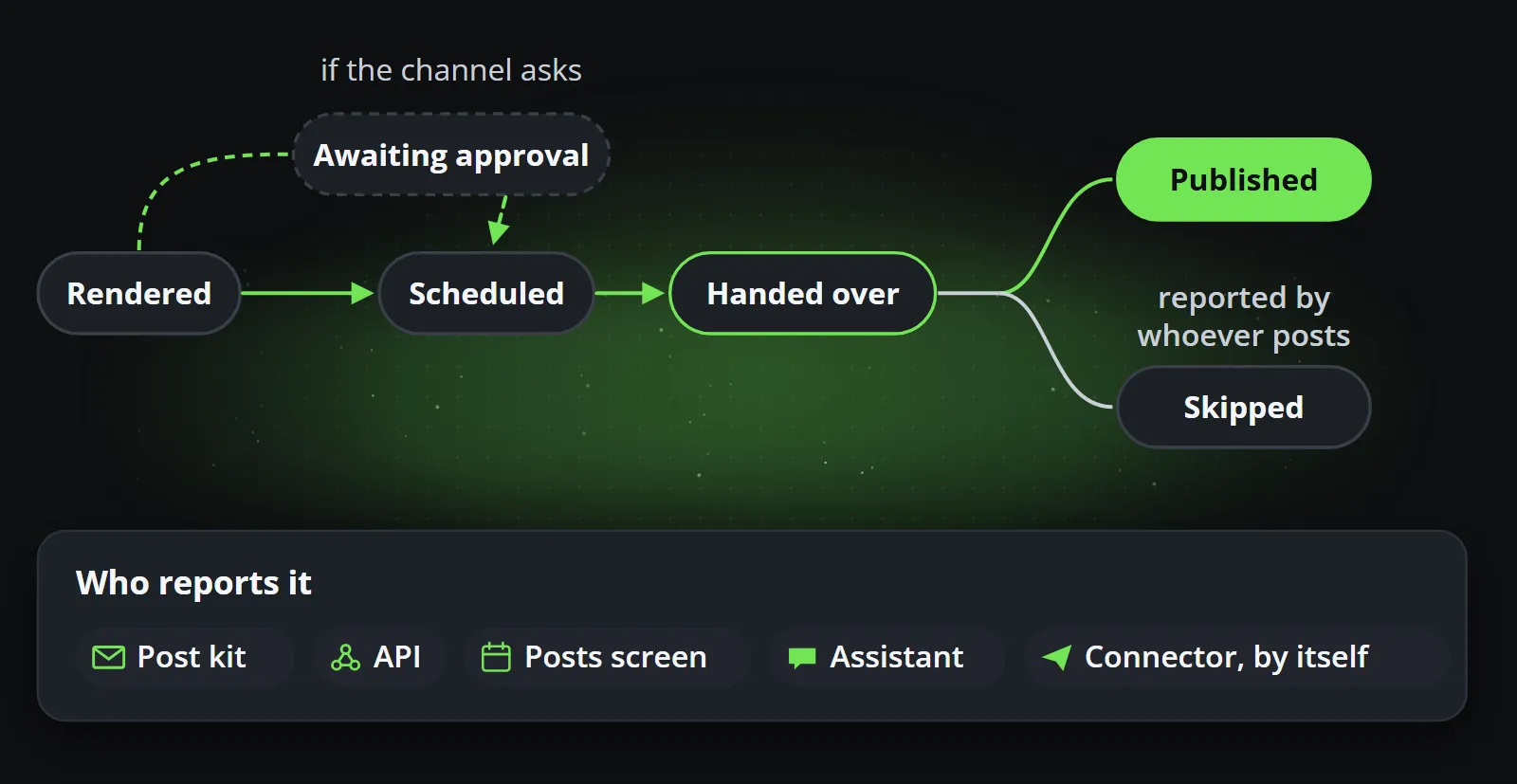
The check: a handed-over post is not yet called published. It becomes published, or skipped, when whoever posts it says so, from the post kit, through the API, on the Posts screen or through an assistant. A connector reports it by itself, with the link.
Along the way, a post moves through a handful of states: rendered, awaiting approval where the channel asks for it, scheduled, handed over, and finally published or skipped, which only whoever posts it can say.
When something needs to change
A workflow that runs on its own needs a way to correct itself. In Reelwire, an update to a post, a resend or a request to delete it is handed over exactly like the post was, by the ways the channel uses, so the person or system that published it receives the correction in the same place. A post whose hand-over failed can be retried without making a new one.
Because every clip records which template version, which brand version and which event it came from, the question “why does this post say that?” always has an answer.
Four steps, and what they add up to
Put together, the four steps give a workflow that can be left alone:
- Duplicates are ruled out, because events are identified.
- Broken layouts are ruled out, because data that does not fit is refused.
- Off-brand clips are ruled out, because the design is fixed and approved.
- Lost posts are visible, because every hand-over is recorded until somebody reports it published.
Everything else Reelwire does is one of those four steps, made harder to get wrong. To see them on your own data, start with the free plan, or read how it works for the whole product in one page.
Frequently asked questions
What is an automated video workflow?
A process in which a video is produced and delivered without anybody editing it: data arrives, a template is filled, the clip is drawn in every format needed, and the finished post is handed to whoever or whatever publishes it, at the scheduled time.
How do automated posts get approved?
At two levels. A template version is approved once, so every clip from it follows the approved design. For channels that need it, each post can also wait for a person to approve it before it is handed over.
What happens if an automated post contains a mistake?
The post can be updated or withdrawn, and the change is handed over the same way the post was, by email or webhook, so whoever published it can correct or delete it. Because each clip records its template version, brand version and data, the cause is easy to find.
Does Reelwire post to social media directly?
Mostly it hands posts over, by email with a kit to post from a phone or by webhook to your own system or a posting service. For Discord, LinkedIn, Slack and Telegram it can post directly through a platform connector you switch on.
Make your first clips today
The free plan makes 15 clips a month and asks for no card. Add your logo and colours, pick a template, and see a finished clip in your own brand before you decide anything.

Co-founder of Reelwire. Every organisation has facts worth showing, its prices, results, releases and warnings, and the vision is that every one of them can show those facts every day, on brand, in every format and language, without a production team behind each post. On brand, every day: correct, recognisable and consistent from the first clip to the thousandth.