
How it works
From your data to a posted clip
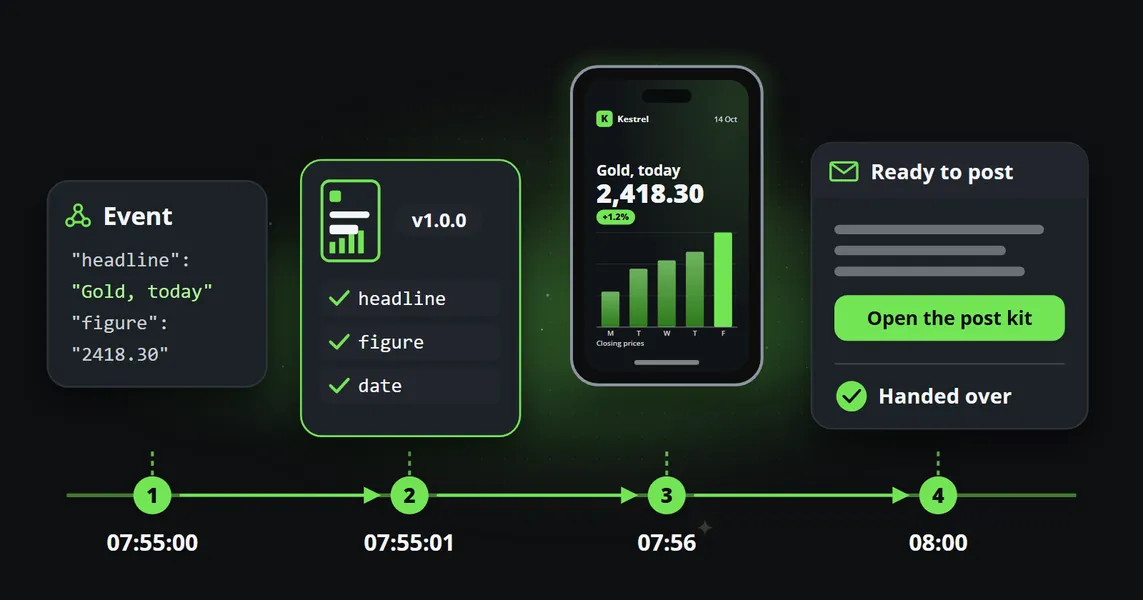
Set up your brand and your channel once. Then your data comes in, Reelwire makes the clip, a person approves it if you want, and it is posted or handed over. Or make a single clip in Clip studio.
Two ways to use it
Every day by itself, or one clip when you need it
Most teams set it up once and let it run. Or make a single clip in Clip studio.
Set it up once, and it runs
Choose where the content comes from, how it looks and where it goes. From then on every update becomes a clip. Steps 1 to 4 show how.
One clip, made when you need it
Pick a template, fill it in, choose the shapes and languages and download the videos, to use anywhere: an ad, a slide, a website or a longer video.
Video guide
Getting started in seven minutes
How a video is built, then your brand, your channel and your first post, filmed in the dashboard step by step.
Before Step 1: once
Set up your brand and your channel
A one-time task of about twenty minutes. The brand is how every clip looks, and the channel is where it goes. Everything after this runs on its own.
-
Your brand
Logo, colours, fonts, a presenter, intro and outro, sound, a legal line and the text under each post. Every clip wears it. Brands in the manual
-
Your channel
One account you post to: its shape and language, the brand it wears, how its posts go out, and whether a person approves them first. Channels in the manual
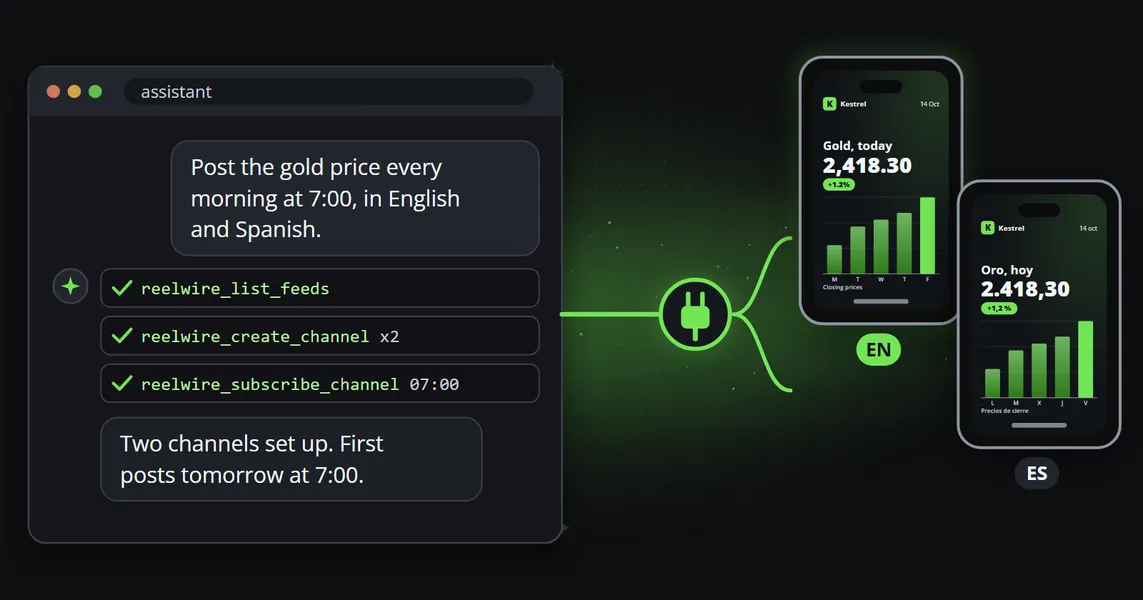
Your AI agent can do the same setup in a conversation. Connecting your AI in the manual
Step 1: Your data
Feeds, posts, your own data or your device
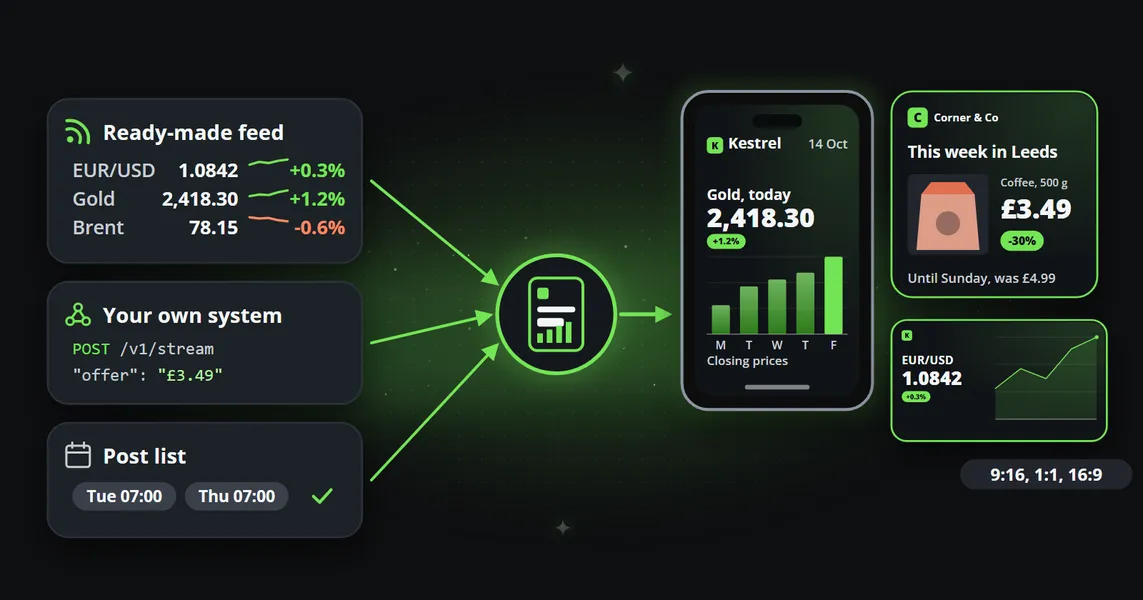
A channel can take content from several sources at once: ready-made feeds, posts you write, your own system's data and what somebody does on their device. Every clip is then made, approved and posted the same way.
-
Ready-made feeds
Hundreds of feeds we fetch and keep running, from markets and weather to holidays and tech news. When a source changes, we fix it. Ready-made feeds in the manual
-
Manual post composer
For news no feed has, like this week's offers. Write the post, pick a template and a time. The post composer in the manual
-
Custom feeds
Your shop, your website or a nightly script sends its data, and each update becomes a clip. Custom feeds in the manual
-
Reelwire Pocket
Somebody presses the button for what they just did, adds a photo or a few words, and Reelwire writes and draws the clip. From a phone, a tablet or a computer. Reelwire Pocket in the manual
Feed types
Three kinds of ready-made feed
The kind says how much AI touches the words and which plan includes it, so a regulated team knows which feeds it may use. Adding one to a channel is one step.
Step 2: The clip
A designer's template, your data, your brand
A designer made each template's layout and motion once. Reelwire fills it with your data, dresses it in your logo, colours and fonts, and makes every shape and language from that one design.
-
Formats, in several styles
A big number, a ranking, a chart, a countdown, an offer or a quote, each in the styles that suit it.
-
Looks for your brand
A stinger, an intro, an outro and a background, fifty styles each, switched on or off per brand.
-
Set up from one sentence
Your AI agent, connected through MCP, asks who you are, builds your brand from your website and plans your next weeks of posts. Connecting your AI in the manual
Styles
Every part of a clip, in many styles
Every format in its styles, and the stinger, intro, outro, background and overlay a brand can add. Watch them row by row.
Your brand
Your brand on it, not ours
Your logo, colours, fonts and presenter go on every clip, and many templates let you set the theme, the corners and the logo's size and place: one template, thousands of designs.
Backgrounds, presenters, pictures
A background, a presenter, and pictures that move
Beyond the logo: a background, a face and pictures of your own.
-
A background of your own
A colour, a picture, an animated drawing or a video, one for all shapes or one for each.
-
A presenter on the clip
A face, a name and a role on every clip, switched off where you want none.
-
Pictures in your content
Templates made for pictures show your photos, products and screenshots from the media library, with pins, captions and prices.
-
Drawings that move
An animated SVG plays as it is, like the changing skies in the weather clips.
Intro and outro
Your intro and outro, if you want them
A brand can open its clips with a stinger or an intro and close them with an outro, each switched on or off. The same offer, eight ways.
Step 3: Approval, optional
If you want, a person approves each post
Approval is off until you switch it on for a channel. Where it is on, nothing goes out until somebody approves it. From Small business.
-
Approve or reject each post
Small business and EnterpriseSwitch it on for a channel, and every post there waits. The approver gets an email, sees the clip and its text, and says yes or no.
-
A change waits too
Small business and EnterpriseChanging a post that is already out needs approval too, so nobody can swap an approved post for something else. Deleting never waits.
-
Two approvers, and a record that proves it
EnterpriseNobody approves their own post, a channel can ask for two people, and every post is sealed for ten years. What the record holds
Approval, the compliance record, syndication and Stop everything, on the features page
Step 4: Posting
Reelwire makes the post. You choose who posts it.
Where a platform has a built-in connector, Reelwire posts by itself. Everywhere else it hands the post over when it is due.
-
Posted by Reelwire
Reelwire posts the clip and keeps its link, to change or delete it later where the platform allows.
-
By email
Your team gets each video and its text, ready to post from a phone. One click marks it published.
-
To your own system
A signed call with each video and its text, tried again for about three hours. For teams whose logins stay in-house.
-
Into a posting service
Connect that call to Make, n8n, Zapier or a short script, and a posting service posts each video.
Questions
What people ask before they start
Yes, where the platform has a built-in connector: switch it on for a channel, and Reelwire posts by itself. Most connectors use an account you connect, which every paid plan includes. For other platforms, it hands each post over when it is due: by email, to your own system or to a posting service.
Yes. Send an update request on the post: a new title, text, hashtags or link, or even another video. It goes out the ways you choose. Where Reelwire posted it, the connector changes the text where the platform allows it; otherwise whoever posted it gets the change by email or webhook. On a channel with approval, the change waits for approval first.Updating a post in the manual
Yes, that is the whole point. Set up a brand once and give it to as many channels as you like. Change or update it, and every channel wearing it uses the new version from its next clip. So every video looks and feels the same, true to your brand, and the design does not drift as people in your team come and go, each with their own idea of it.Brands in the manual
Templates are versioned. When a new version comes, the old one stays in the system for good. Once a channel is set up with a template, you can rely on it staying the same: Reelwire never changes an existing version, it only adds a new one when something needs to change. So Reelwire itself never changes your design once it is set up.
No. Your AI agent sets up your brand from your website and plans your posts in one conversation, and the dashboard, the ready-made feeds, the post composer and Reelwire Pocket need no code either. A developer helps only if you want your own system to send its data through the API.
Reelwire checks every post against its template before the clip is made. A headline that is too long is stopped, and the field is named, so you can shorten it. It is never cut off on a clip that already went out.
186 languages to choose from, from English and Spanish to Arabic, Hindi, Korean and Chinese, and the layout fits itself to the words. A channel picks its language, and most ready-made feeds are translated into it.
Reelwire keeps trying for about three hours, with longer pauses between tries, and the post shows which try it is on. The email goes out anyway. If it gives up, you can send it again with one click.The long version: turning an event into a post.
Press Delete on the post. If Reelwire posted it itself, it removes it where the platform allows. Otherwise it asks whoever posted it, by email or webhook, to take it down, and shows Delete requested until they confirm. A person always decides: nothing is deleted on its own.
A ten-second clip at 1080 by 1920 pixels takes about a minute to make. If many arrive at once, they wait in a queue instead of failing. Enterprise clips go first.
Your clips stay yours, and you can still download them. But new clips and deliveries stop, so your channel goes quiet the same day.
From the blog
The mechanism, in practice
How an event becomes a post, how live data becomes a video, and how an AI agent runs a channel.
In full
Every step is in the manual
The manual explains each part, what the API accepts and what happens when something goes wrong. Or start free and try it on one channel.