Reelwire vs Creatomate, Shotstack and Plainly: Video Rendering APIs Compared
Creatomate, Shotstack and Plainly turn JSON into an MP4. Prices, triggers and posting compared, and what you would still build around one to run a channel.

Key takeaways
- Creatomate, Shotstack and Plainly are video rendering APIs: you send a template and data, they send back a video file. They are excellent components, and the render is usually the cheapest part of a channel.
- Each covers a different slice around the render: Creatomate a template editor and no-code connectors, Shotstack a JSON timeline and an editor you can embed, Plainly After Effects in the cloud with RSS and spreadsheet triggers and YouTube upload.
- None of the three documents post text cut to each platform or an approval step, and none posts to a social network by itself beyond Plainly's YouTube upload (Plainly and Shotstack can also send files to Vimeo). The data, the posting and the monitoring stay yours to build and to own.
- Choose an API when video is a feature of your own software and you have developers to own it. Choose Reelwire when the video is the channel and nobody should have to maintain the machine.
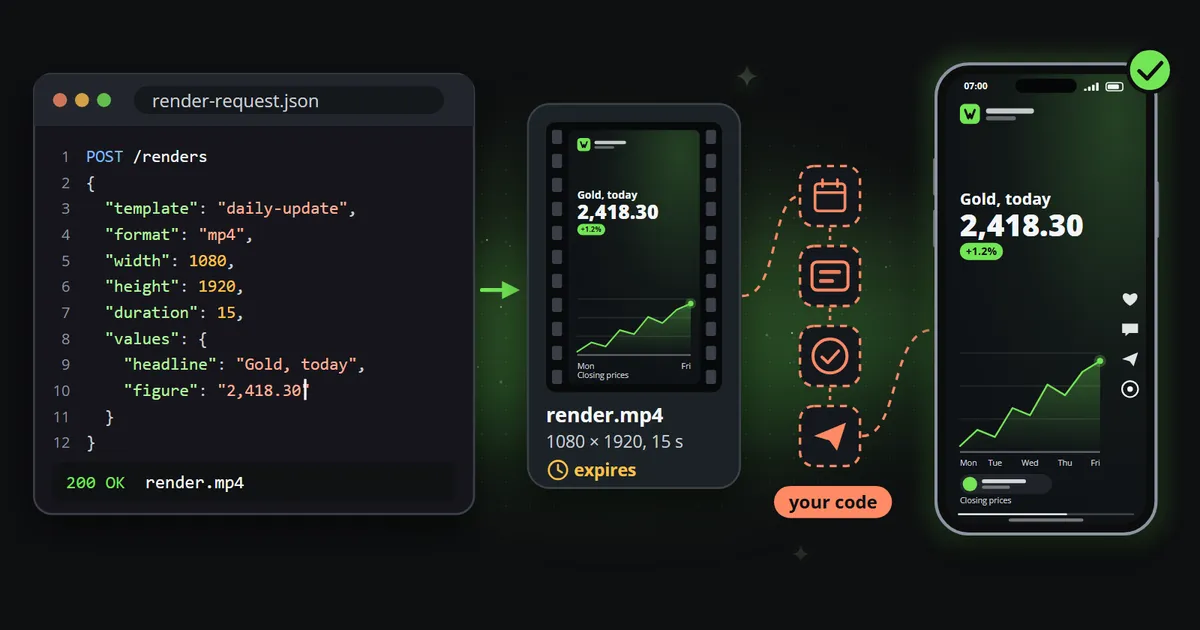
A video rendering API is one of the most useful building blocks a developer can have. You describe a video as JSON, a template plus the values to put in it, and a little later a finished MP4 is waiting at a web address. Creatomate, Shotstack and Plainly are three of the best known, and if you are thinking about automating short-form video, one of them has probably come up as the obvious way to build it yourself.
This comparison of Reelwire vs Creatomate, Shotstack and Plainly is for teams weighing exactly that: a video rendering API plus their own code, or a finished pipeline. The answer depends less on the render than on everything around it, and the render, as the numbers below show, is the cheapest part.
Reelwire vs Creatomate, Shotstack and Plainly at a glance
Checked on each vendor’s own pricing pages and documentation on 13 October 2026:
| Creatomate | Shotstack | Plainly | Reelwire | |
|---|---|---|---|---|
| What it is | A template editor and rendering API | A video editing API with a JSON timeline | After Effects rendered in the cloud | Data to a posted video, end to end |
| How a video is defined | Visual editor, or RenderScript JSON | A JSON edit, or the Studio editor | An After Effects project you upload | A ready-made or custom template with named fields |
| Cheapest monthly plan | $54 for 2,000 credits | $39 for 250 minutes | $69 for 50 minutes | Free for 25 videos, then €69 for 75 |
| Data in | API, CSV feeds started by hand, Zapier, Make, n8n | API, Zapier, Make, n8n | API, RSS, Airtable, Google Sheets, Excel, forms, CSV | Ready-made feeds, your own events over the API, post lists, an AI assistant |
| What starts a video | Your code or an automation tool | Your code or an automation tool | Your code, or one of its triggers | The data arriving, on the schedule you set |
| Post text per platform | Not documented | Not documented | Not documented | Written once in up to four lengths, each platform gets the one that fits |
| Approval | Not documented | Not documented | Not documented | Once per template version, and optionally per post |
| Where the video goes | A file address, kept 30 days | Its own CDN, storage services or Vimeo | YouTube (with a publishing time), Vimeo, Slack, Teams, storage | Email with a post kit, a signed webhook, or posted to Discord, LinkedIn (a personal profile), Slack or Telegram |
“Not documented” means the vendor’s documentation did not describe it when checked, not that nobody could build it on top. Prices are as each vendor publishes them, in its own currency; Reelwire charges per video, whatever its length.
What a video rendering API gives you
All three do the same core job: they take a description of a video and render it on their servers, so you need no rendering machines and no video engineering to produce a file. The differences are in how you describe the video, and in how much they offer around the render.
Creatomate: a template editor with an API behind it
Creatomate, a company registered in the Netherlands, calls itself a media automation platform for developers and no-code users. You design a template in its drag-and-drop editor, and behind every template is a JSON format called RenderScript, so a developer can also write or change a video in code.
There are four ways in: a REST API, spreadsheet “feeds”, Zapier, Make and n8n, and an AI assistant through its MCP integration. The feeds are worth understanding before you plan around them: you import a CSV file, and a person selects rows and presses a button to render them. Creatomate’s own documentation says it has no scheduler and no social posting. Finished renders are hosted for 30 days and then deleted, so they have to be copied somewhere permanent.
Pricing is in credits, which grow with width, height, frame rate and length. According to its pricing page, Essential costs $54 a month ($45 billed yearly) for 2,000 credits, Growth $129 for 10,000 and Beyond $329 from 50,000. Credits do not roll over, and a trial gives 50 credits.
Shotstack: a video editor driven by JSON
Shotstack, from Sydney, is the most developer-shaped of the three. A video
is an “edit”: a timeline of clips, text, audio and effects written in JSON and sent to its Edit API.
A template is a saved edit with merge fields such as {{NAME}}. Around that sit Studio, a visual
timeline editor that can also be embedded in your own product under your name, an AI agent called
Director that builds timelines from a description, generated video, pictures, speech and music
through third-party models, and SDKs for Node, Python, PHP and Ruby.
It connects to Zapier and Make, and to n8n through a community node. Finished files are hosted on its own CDN or sent to a destination: Amazon S3, Google Cloud Storage, Azure, Google Drive, Akamai or Vimeo. None of the destinations is a social network.
It meters by rendered minute (pricing): pay as you go at $10 for 50 minutes, Starter at $39 a month for 250 minutes at up to 1080p, Pro at $99 for 750 minutes with 4K, Scale at $199 for 2,000 and Volume at $499 for 10,000. A free sandbox renders with a watermark. When the minutes run out, rendering pauses until you top up.
Plainly: After Effects, rendered in the cloud
Plainly, based in London, renders real Adobe After Effects projects. A motion designer builds the template in After Effects, uploads it with a plugin, marks the layers that change, and Plainly renders it on demand. That makes it the natural choice for a team whose look already lives in After Effects, and its motion is as good as the designer who built the project. Plainly also offers ready-made “Designs” by its own team, and can build templates for you.
Of the three it documents the most triggers that need no code: a new item in an RSS feed, a row in Airtable, Google Sheets or Excel, a form, or a CSV batch can start a render. On the way out it can upload to YouTube, with a scheduled publishing time, and to Vimeo, or send the file to Slack, Teams, cloud storage or a webhook. Its AI tool, VideoGenius, turns articles into videos.
It meters by the length of the exported video (pricing): Starter at $69 a month for 50 minutes ($48 a month billed yearly), Explorer at $134 for 100, Team at $259 for 200 and Pro at $649 for 600, with output up to 4K on every plan. The same page lists how long finished videos are kept, from 24 hours on Starter to seven days on Pro.
What does a rendered minute cost?
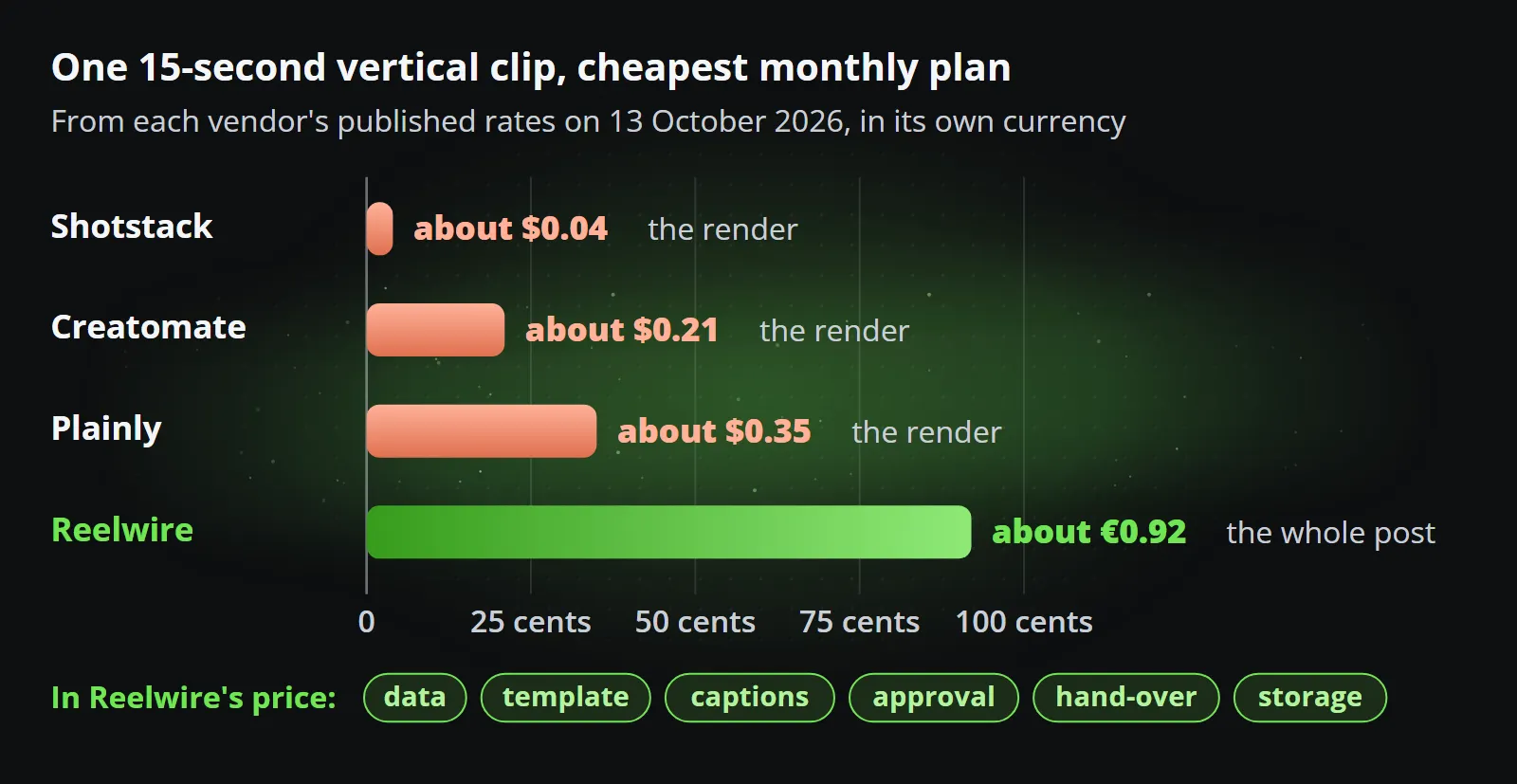
The three meter differently, so the fair comparison is one clip at the size you would publish. Here is a 15-second vertical clip at 1080 by 1920 pixels on the cheapest monthly plan, worked out from each vendor’s published rates on 13 October 2026:
| Cheapest monthly plan | Per rendered minute | One 15-second clip | |
|---|---|---|---|
| Shotstack | $39 for 250 minutes | about 16 cents | about 4 cents |
| Creatomate | $54 for 2,000 credits | about 84 cents at 25 frames per second | about 21 cents |
| Plainly | $69 for 50 minutes | about $1.38 | about 35 cents |
| Reelwire | €69 for 75 videos | priced per video, not per minute | about 92 euro cents |
On price per render the APIs win, and they should: they sell the render alone. Reelwire’s price, under a euro a video on a paid plan, includes the data, the template, the captions, the approval, the hand-over and the storage. So the question is not whose render is cheaper. It is what everything else costs when you build it.
What you still build around a rendering API
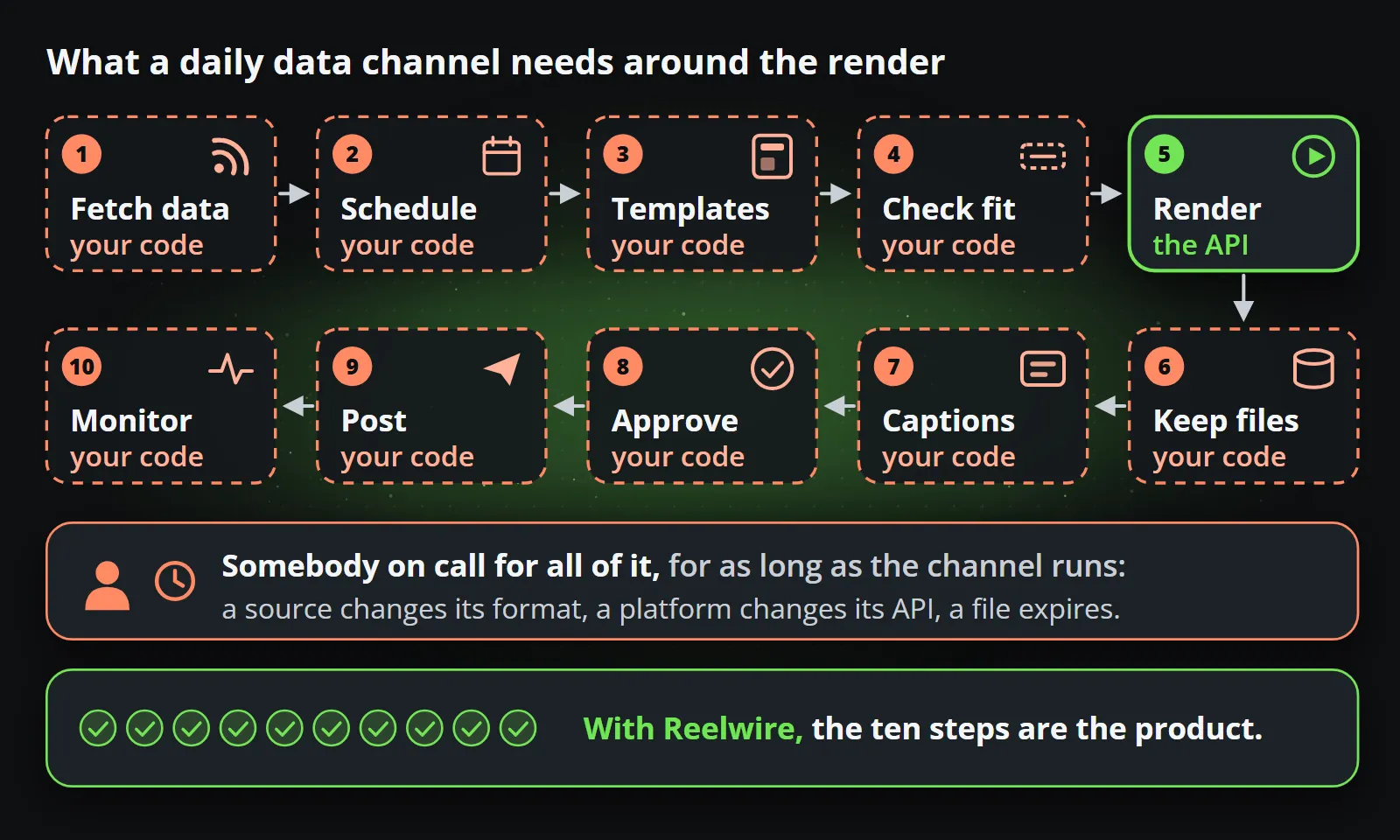
This is the pipeline a recurring data channel needs, step by step, and who does each part:
| Step | With a rendering API | With Reelwire |
|---|---|---|
| 1. Get the data | Your code polls a source, parses it and handles its errors | A ready-made feed, your own events over the API, or a post list |
| 2. Decide when to render | Your scheduler or automation tool | The data arriving, or a release schedule per source |
| 3. Design the template | You build it, for every shape you publish | Ready-made templates, or templates designed around your brand |
| 4. Check the content fits | Your code, or a clipped headline on a published video | Every field checked against its limit; an over-long one is refused by name |
| 5. Render every shape and language | One call each, and your own retries | Every aspect ratio and language from one post |
| 6. Keep the files | Copy them before they expire, after 24 hours to 30 days | Stored within your plan, links signed again on every hand-over |
| 7. Write the captions | Your code, for each platform’s limit | Written once in up to four lengths, each platform gets the one that fits |
| 8. Approve | Your own workflow, or nothing | Once per template version, optionally per post |
| 9. Post | A scheduler, an automation tool or each platform’s own API | Email with a post kit, a signed webhook, or posted directly to Discord, LinkedIn (a personal profile), Slack or Telegram |
| 10. Know it went out | Your own monitoring | Each post reported published, skipped or failed |
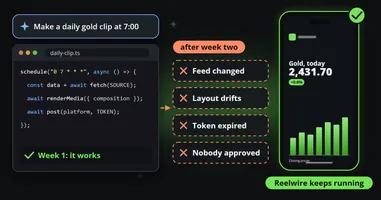
None of these steps is hard on its own. Together they are a product, and a product needs an owner: somebody who notices when a source changes its format, a platform changes its API, or a file expires before anybody copied it. That ongoing ownership, more than the first build, is the real cost of the build-it-yourself route.
Of the three, Plainly closes the most of this gap without code, with its RSS and spreadsheet triggers and its YouTube upload. Creatomate and Shotstack are closer to pure components, built to sit inside software you write. For a closer look at the whole chain, from event to post in four steps walks through it.
A worked example
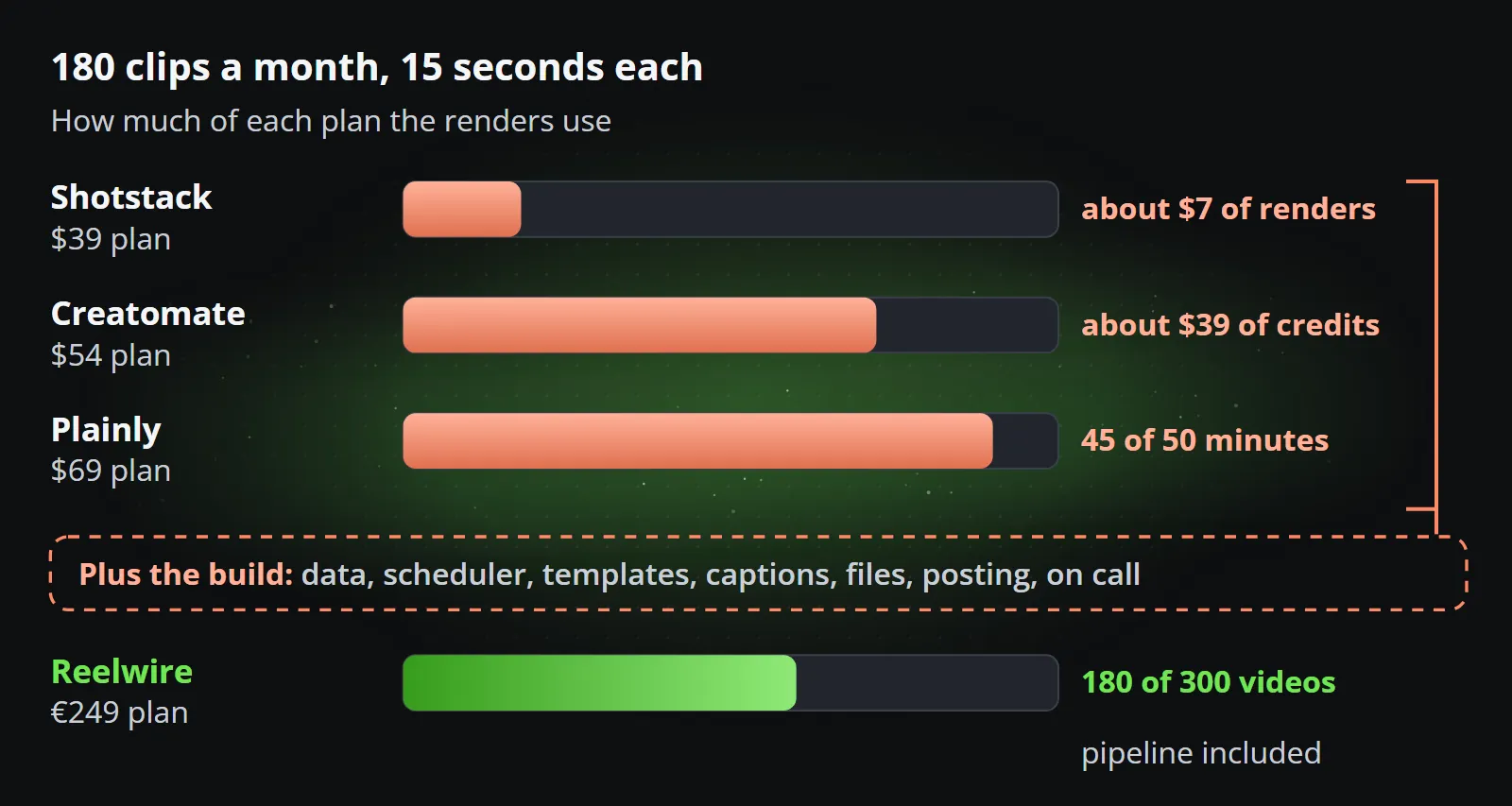
Say a team wants a daily update from its own figures in three shapes, 9:16, 1:1 and 16:9, and two languages: six clips a day, about 180 a month, each 15 seconds long.
- The renders alone come to roughly $7 a month on Shotstack, inside the $39 plan; roughly $39 of credits on Creatomate, inside the $54 plan; and 45 minutes on Plainly, inside the $69 plan.
- Then the build: a connector to the data, a scheduler, a template for each shape or one that adapts, the caption logic, file storage, a posting route for each platform, and somebody on call for all of it, for as long as the channel runs.
With Reelwire, 180 videos a month fit within the Small business plan, 300 videos for €249 a month, and the pipeline is the product. If a developer already owns a similar system, adding video through an API is cheaper. If nobody does, the API’s low price is the price of a component, not of a channel.
When a rendering API is the right choice
This part matters, because for some teams an API is the better answer and Reelwire would be the wrong one:
- Video is a feature of your own product. Your users press a button in your app and get a video. The render belongs inside your software, under your name, with your interface around it, and Shotstack’s embeddable editor is built for exactly that.
- Every frame is bespoke. You want to control the timeline clip by clip, or have a model build edits, rather than fill a designed template.
- Your look lives in After Effects. If a motion team already builds everything there, Plainly renders their projects as they are. Reelwire vs video editors looks at After Effects itself.
- You have developers who want to own it. A pipeline you build is one you can take in any direction, and some teams value that above everything else.
When Reelwire is the right choice
- The video is the channel. Daily or weekly posts built on figures, dates, prices and results, in every shape and language, out on time.
- Nobody should have to maintain the machine. Marketing owns the channel, and there is no developer whose job is the video pipeline.
- Approval matters. A reviewer approves a template version once, every clip made from it inherits that approval, and a check per post can be switched on for channels that need it.
- The data already exists. Reelwire carries ready-made feeds, and your own systems can send events to a custom feed with a few lines of code. Data to video shows the three sources.
Reelwire is an API too: your systems send events over REST, the finished post arrives at your webhook signed and with its captions, and an AI assistant can drive it over MCP. The developer page shows the calls. The difference is the level you work at: you describe your data, not your frames.
Questions to ask before you decide
- Who will own this in a year? If the honest answer is “whoever built it, if they are still here”, count that as a cost.
- How many shapes, languages and platforms? Each one multiplies the templates, the calls and the posting routes in a build.
- What happens when a source changes its format? With an API, your code breaks. With a pipeline, fixing it is somebody else’s job.
- Does a person need to approve posts? If so, the approval step is part of the build, with its own notifications, rights and history.
- Is the video part of your product or part of your marketing? Product: an API. A marketing channel: a pipeline.
Bottom line
Creatomate, Shotstack and Plainly are good at what they do, and what they do is one step of the chain: the render. If you are building video into your own software, start with one of them. If you want a channel that runs from your data every day without anybody owning the machinery, the render is the smallest part of the problem, and a pipeline that includes the rest is the better buy.
Before you write the first line of a pipeline, try the finished one on your own data: Reelwire’s free plan makes 25 videos a month with no card, and how it works shows the whole chain.
Frequently asked questions
What is a video rendering API?
A service that turns a description of a video, usually JSON naming a template and the values to fill it with, into a finished file, typically an MP4 at a web address. It does the rendering; the data, the trigger, the design and where the file goes next are up to whoever calls it.
Is Reelwire a Creatomate alternative?
For a recurring social channel built on data, yes: Reelwire includes the data sources, templates, captions, approval and hand-over you would otherwise build around Creatomate. For video rendered inside your own app, where your developers want control of every frame, Creatomate is the better tool.
Which is cheapest per minute, Creatomate, Shotstack or Plainly?
On the cheapest monthly plans on 13 October 2026, Shotstack came to about 16 cents per rendered minute, Creatomate about 84 cents at 1080p and 25 frames per second, and Plainly about $1.38. They meter differently, by the minute, by pixels and time, and by exported seconds, so compare at the size you publish.
Can Creatomate, Shotstack or Plainly post to TikTok or Instagram?
Not by themselves, according to their own documentation on 13 October 2026. Creatomate's docs say it has no scheduler and no social posting, Shotstack delivers to storage services and Vimeo, and Plainly uploads to YouTube and Vimeo. Posting anywhere else needs a scheduler, an automation tool or your own code.
Does Reelwire have an API?
Yes. Your systems send events to a custom feed over a REST API, a signed webhook delivers each finished post with its clips and captions, and an MCP server lets an AI assistant drive the same functions. The difference is the level: you describe your data, not your frames.

Co-founder of Reelwire. Every organisation has facts worth showing, its prices, results, releases and warnings, and the vision is that every one of them can show those facts every day, on brand, in every format and language, without a production team behind each post. Your data, in motion: correct, recognisable and consistent from the first clip to the thousandth.