Reelwire vs Video Editors: Canva, Adobe After Effects, CapCut and Adobe Express Compared
Canva, After Effects, CapCut and Adobe Express all need a person in every clip. What each does best, and when a video channel should run without an editor.

Key takeaways
- Canva, After Effects, CapCut and Adobe Express are editors: a person opens one and makes each clip. They differ in skill and polish, not in that.
- After Effects is the quality benchmark for motion design; Canva and Adobe Express are the fastest way for a non-designer to make something presentable; CapCut is the quickest editor on a phone.
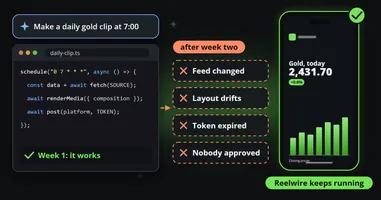
- Each can be pushed towards automation (bulk create from a spreadsheet, an API, a render server), but the data, the trigger and the posting stay somebody's job.
- Keep your editor for the twenty percent a person should make. Reelwire is for the recurring, factual eighty percent that should not need anybody to open anything.
Every team that wants more video starts with the tools it already has. For most, that is one of four editors: Canva, Adobe After Effects, CapCut or Adobe Express. They are very different in skill and polish, from a phone app that cuts a clip in a minute to the program film studios animate titles in, and all four are good at what they were made for.
They share one assumption, though: a person opens the editor and makes each clip. This comparison of Reelwire vs video editors is for teams who have noticed that assumption, usually around the hundredth post, and want to know where each editor fits and when a channel should run without one.
Reelwire vs Canva, After Effects, CapCut and Adobe Express at a glance
Checked on each vendor’s own pages on 13 October 2026. Prices vary by country, so the figures are the ones each vendor published, in the currency it showed:
| Canva | Adobe After Effects | CapCut | Adobe Express | Reelwire | |
|---|---|---|---|---|---|
| Built for | Anybody designing in a browser | Motion designers | Quick edits, mostly on a phone | Anybody designing, in Adobe’s family | Nobody having to open anything |
| Who makes each clip | A person | A motion designer | A person | A person | The data, when it arrives |
| Making many from data | Bulk Create from a sheet, started by hand | Data files read by expressions; one render per data set | No data import found | Bulk create from a CSV, up to 249 variations | Ready-made feeds, your own events, post lists |
| Automation for developers | Connect APIs, including Autofill | A command-line renderer, plus third-party tools | No public editing API | Express API and Embed SDK | REST API, signed webhooks, MCP for AI assistants |
| Posting | Content Planner, one platform per design | None, it exports a file | Share to TikTok or YouTube on export | Content Scheduler, seven networks | Email with a post kit, a webhook, or posted to Discord, LinkedIn (a personal profile), Slack or Telegram |
| Aspect ratios | Resize, then check the layout | A composition per shape | Reframe, clip by clip | Resize, then check the layout | All five shapes laid out from one template |
| Price from | Free; paid plans per person | US$22.99 a month | Free; paid plans by country | Free; Premium US$9.99 a month | Free for 25 videos; €69 for 75 |
| Strongest at | Campaigns, one-offs, slides | Hero pieces, intros, brand motion | Fast edits of filmed footage | Quick designs for Adobe teams | Daily and weekly posts built on facts |
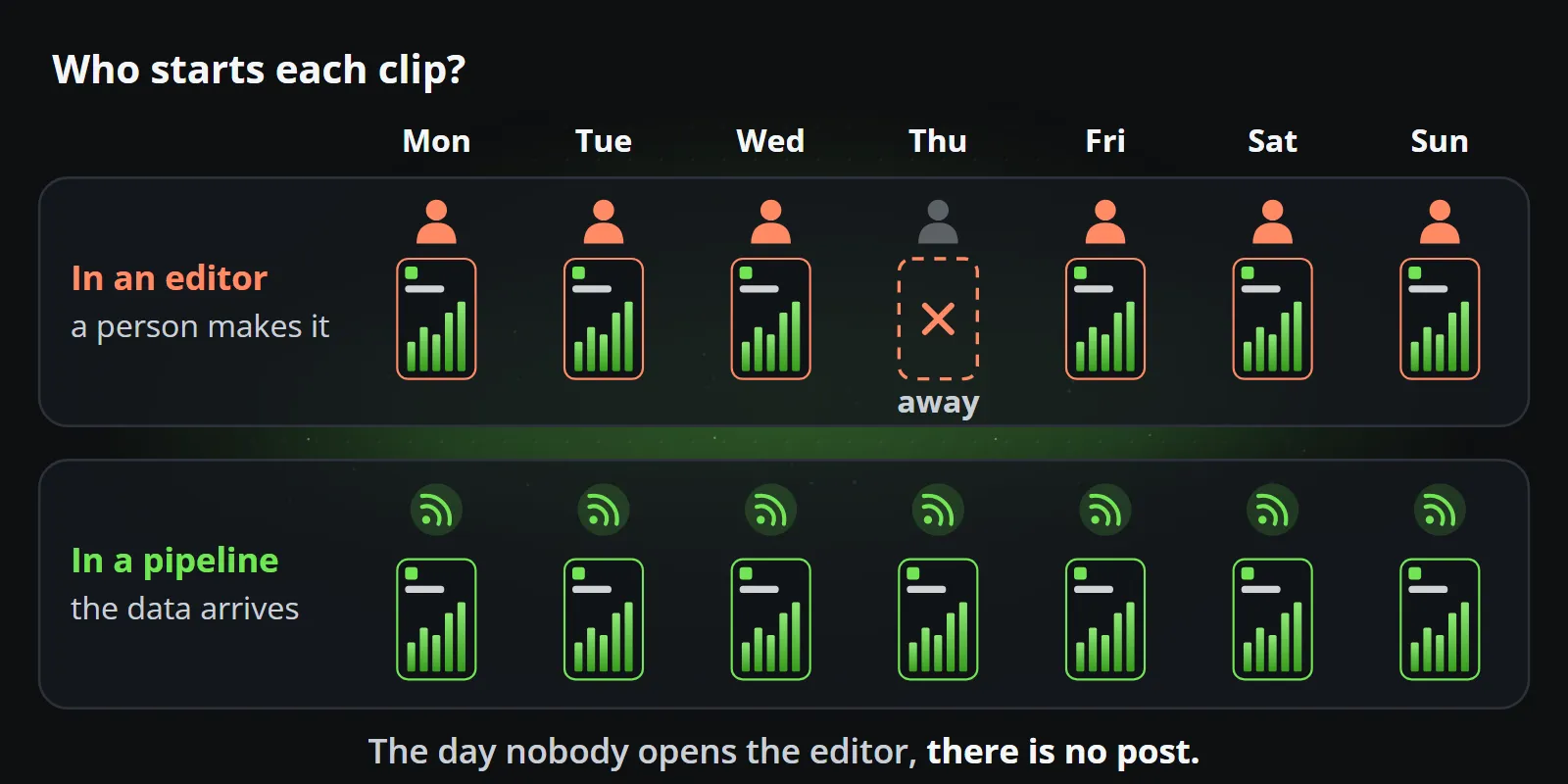
The question that sorts them: who starts each clip?
The differences between the four editors are real, but they are differences of degree: how much skill a clip takes, how good it can look, how fast a person can make it. The difference to Reelwire is of kind. In an editor, a clip exists because somebody made it. In a pipeline, it exists because the data changed.
That matters most for the posts that repeat: the weekly offer, the daily figure, the result, the release, the warning. Each takes a person a few minutes in a good editor, and those minutes come back every day, in every shape and every language, for as long as the channel runs. That is the eighty percent of a channel that should not need anybody, and keeping it on brand at that volume is its own problem: your thousandth clip should look like your first.
Canva: the fastest way for a person to make something presentable
Canva needs little introduction. It runs in a browser, has a template for almost everything, and lets a non-designer make a decent social video in minutes. Plans are Free, Pro, Business and Enterprise, priced per person and by country; Business launched at US$20 per person per month in October 2025.
For volume it offers Bulk Create, on paid plans and on a desktop: connect a design to a CSV or Excel file, a Canva Sheet or a data app, and it makes one design per row, video designs included. A person prepares the data and starts every run, and each design is still exported and posted. For developers there are the Connect APIs, whose Autofill fills a brand template with text, images or video and chart data on behalf of a user on a paid plan, and the Content Planner schedules finished designs to social accounts, each design to one platform at a time.
Where it fits: campaigns, one-offs, presentations, anything a person should make. Reelwire vs Canva goes through it in detail, including the price trap: the comparison is not Canva against Reelwire, it is Canva plus somebody’s afternoon, every week.
Adobe After Effects: the benchmark for motion
After Effects is what Adobe calls a motion design and visual effects app, and it is the standard that motion graphics are measured against. Title sequences, logo animations, broadcast graphics and the polished explainer all come out of it. It costs US$22.99 a month on its own (yearly plan, billed monthly) or comes in Creative Cloud Pro at US$69.99, both on Adobe’s page on 13 October 2026.
It is also a professional’s tool. Nothing in After Effects is a template you fill in a minute: a
motion designer builds compositions, keyframes, expressions and render settings, and the result is as
good as that person. Teams that want editors to change text without touching the design export a
Motion Graphics template, a .mogrt, which a video editor then fills in Premiere Pro, one clip at a
time.
Can After Effects run from data?
More than most people expect. Data-driven animation
lets a composition read JSON, CSV or TSV files through expressions, and swapping the file updates
the animation. There is a command-line renderer,
aerender, for batch jobs, and a small industry around it: Dataclay’s
Templater plugin renders a version per row of data, the
open-source nexrender drives renders from scripts, and Plainly, covered in the
comparison of rendering APIs, runs After Effects projects
in the cloud from an API, a spreadsheet or an RSS feed.
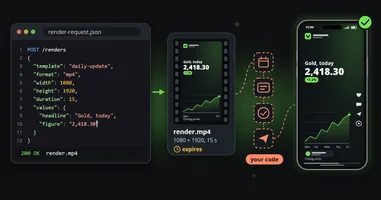
What it does not do by itself is the rest of the channel. One render is one data set; the data files are static unless somebody replaces them; and the finished file leaves through the render queue with no captions, no schedule and no posting. Somebody builds and runs that machinery, and if you plan to render on servers, read Adobe’s licence terms for that use first.
Where it fits: the hero piece, the brand’s intro and outro, the launch film, the motion identity other clips borrow from. A Reelwire channel can open and close every clip with exactly those: an intro and an outro, made in After Effects or anything else, run around each clip as part of the brand.
CapCut: the quickest editor on a phone, with licences to read
CapCut is the editor many short-form creators learnt on: fast on a phone, full of templates, effects and automatic captions, with a desktop and web version and sharing straight to TikTok and YouTube on export. Its global terms are with ByteDance Pte. Ltd.; users in the United States are under separate US terms. Paid plans (Pro, Teams and above) are priced by country, and Teams adds a brand kit and shared brand templates.
For volume there is little to work with. CapCut’s own pages describe no import of spreadsheet or feed data and no public API for making videos, and its terms of service say users may not “use automated scripts or other technologies to collect information from or otherwise interact with the Services”. A clip in CapCut is made by a person, every time.
What the licences say
For a business account, two documents are worth reading before the first post. Not legal advice: a summary of the global texts as they stood on 13 October 2026.
- The material you use. CapCut’s materials licence, updated 22 January 2026, makes everything not marked otherwise personal and non-commercial. Material marked for commercial use may be used for limited commercial purposes, but a video that mixes it with non-commercial material counts as non-commercial. The regular sounds library is personal use only, and commercial sounds may be shared only within CapCut, TikTok and TikTok for Business.
- What you upload. The terms, updated 15 April 2026, say in section 10 that CapCut does not own your content, but you grant the company and its affiliates a non-exclusive, royalty-free, transferable, sub-licensable, perpetual and worldwide licence to use it to operate, develop and provide the services, and the right to use your name and likeness as its source, including in sponsored content.
Many businesses use CapCut happily with commercial-cleared material. The point is that the editor’s templates and music are not automatically yours to use for a brand, and a team should know which they are using.
Where it fits: quick edits of filmed footage, behind-the-scenes clips, trend formats a person shoots and cuts on the spot.
Adobe Express: Canva’s closest twin, in Adobe’s family
Adobe Express is Adobe’s answer to Canva: a browser and mobile app with templates, brand kits, Firefly’s generative AI and a scheduler. On Adobe’s US page it is free, Premium costs US$9.99 a month, and Teams costs US$4.99 per licence a month in the first year, then US$7.99, for at least two licences, adding brand controls and template locking. Premium also comes with most Creative Cloud plans, so many Adobe teams already have it.
Its bulk create makes up to 249 variations of one design from a CSV file, video designs included, though pictures for each row are uploaded by hand. The Content Scheduler posts to Facebook, Instagram, LinkedIn, TikTok, Pinterest, YouTube and X. For developers, the Express API generates variations of tagged documents and exports them as MP4, and the Embed SDK puts the editor inside your own app.
Like Canva, it is a fast editor with automation attached: a person prepares each CSV, starts each run, checks each variation and schedules each post.
Where it fits: teams that live in Adobe’s tools and want Canva’s speed without a second subscription.
A worked example: one daily post, made four ways
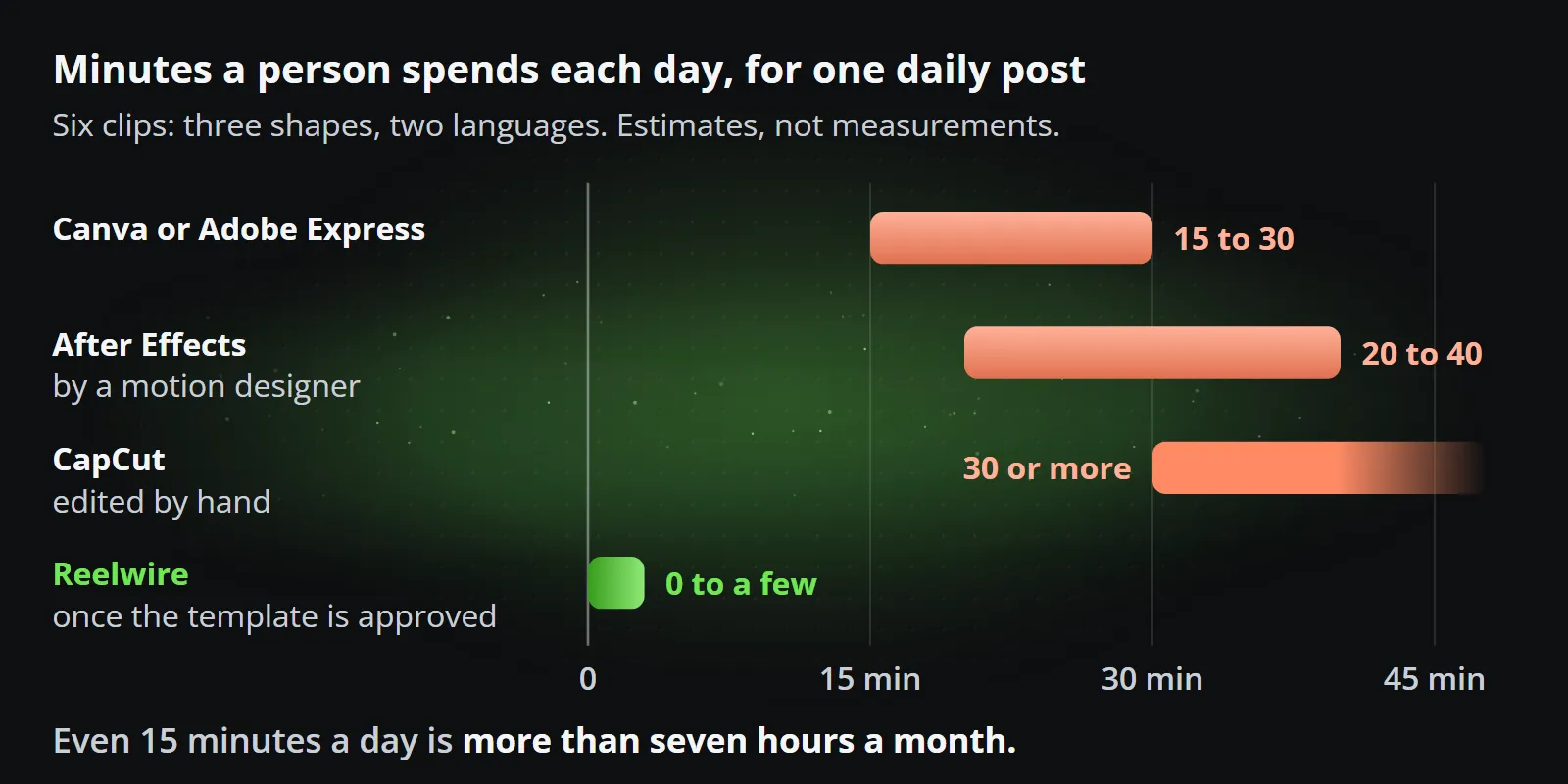
Say a team publishes one post a day built on new figures, in three shapes (9:16, 1:1 and 16:9) and two languages. That is six clips a day, about 180 a month.
| What a person does each day | Roughly | |
|---|---|---|
| Canva or Adobe Express | Update the sheet, run bulk create per shape and language, check every variation, export, write captions, schedule | 15 to 30 minutes |
| After Effects | Swap the data file, render six versions, check them, export, caption and post | 20 to 40 minutes, by a motion designer |
| CapCut | Edit six clips by hand from a template, caption, post | 30 minutes or more |
| Reelwire | Nothing day to day once the template is approved; a look at each post if the channel’s check is on | 0 to a few minutes |
The minutes are estimates, not measurements, and a practised person may be faster. But even fifteen minutes a day is more than seven hours a month, the post depends on that person being at work, and every shape and language added multiplies it. With Reelwire, the 180 videos fit within the Small business plan, 300 videos for €249 a month, with nobody’s hours in them: the data arrives, the template renders all six, the captions are cut to each platform, and the post is handed over when it is due.
Keep your editor: where each one still belongs
Reelwire is not an editor, and it is not trying to replace one. It has no timeline to drag clips on, and a brand still needs things a person makes: the campaign, the launch, the filmed story. The usual setup is both:
- The editor for the creative twenty percent: Canva or Adobe Express for quick designs, CapCut for filmed clips, After Effects for the motion that defines the brand.
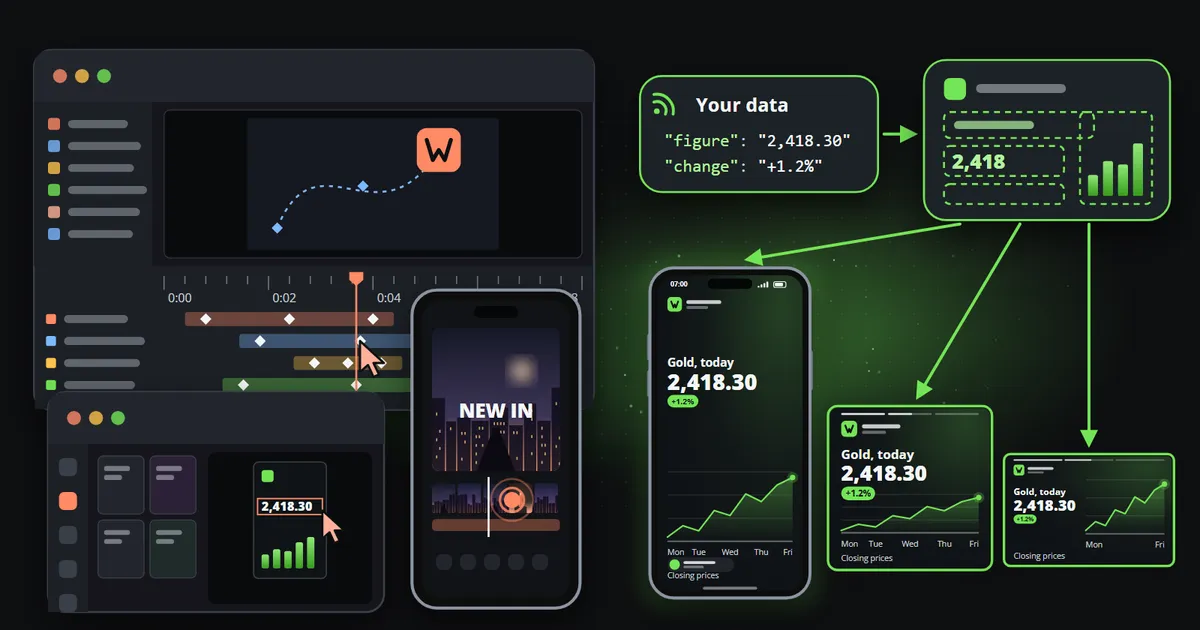
- Reelwire for the factual eighty percent: data arrives from a ready-made feed, your own system or a post list, a template fills, every shape and language the channels need is rendered, and the post is handed over by email, by webhook or straight to some platforms.
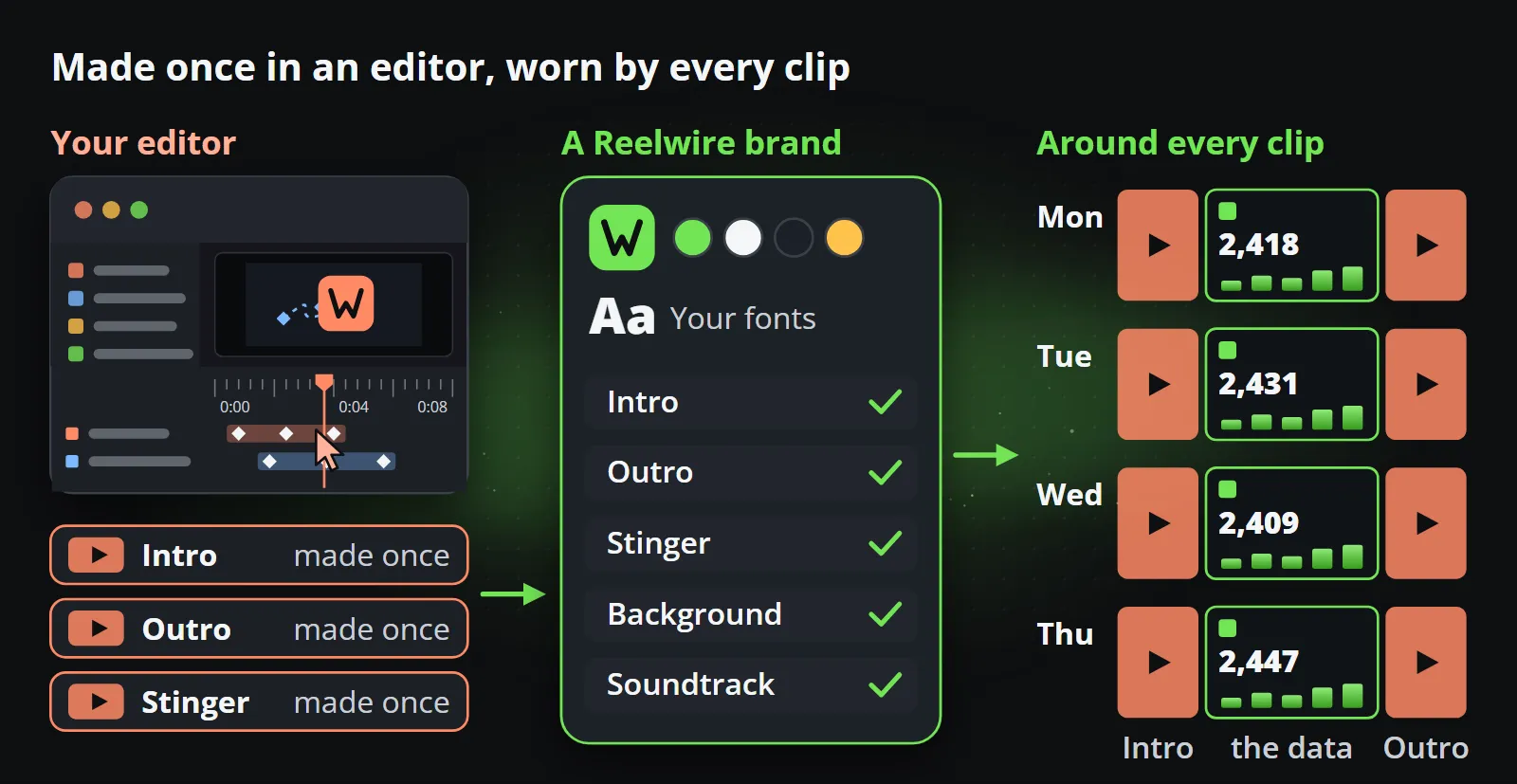
Your brand carries across in the way that matters: your logo, colours, fonts, background, intro, outro and stinger become a Reelwire brand, applied to every clip. A template is designed once, for data and every shape at once, and Reelwire can design templates around your brand if the ready-made ones are not enough.
When to choose which
| Choose an editor when | Choose Reelwire when |
|---|---|
| A person is making creative decisions | The post is the same kind every time, with new data |
| It is a one-off: a launch, an event, a campaign | It recurs: daily, weekly, every release |
| You are editing footage somebody filmed | The content is a figure, a date, a price, a result |
| The motion itself is the message | The message is the fact, on brand, on time |
| One shape and one language is enough | You need every shape and language at once |
Bottom line
Canva, After Effects, CapCut and Adobe Express are four good answers to the question “how does a person make a video?” For the posts that repeat, the better question is “why is a person making this at all?” Keep your editor for the work that needs one, and let the rest run from the data.
To compare on your own content, start with Reelwire’s free plan, 25 videos a month with no card, or see how it works.
Frequently asked questions
Is Reelwire a video editor?
No. There is no timeline to drag clips on. Reelwire takes data, from a ready-made feed, your own system or a post list, fills a designed template with it, and hands the finished clip over for posting in every shape your channels publish. An editor is where a person makes a clip; Reelwire is what runs when nobody is making one.
Can After Effects make videos from data automatically?
It can be driven by data: Essential Graphics and expressions can read spreadsheet or JSON files, and tools built around its renderer fill a project from data in bulk. Somebody still has to build and run that setup, collect the files and post them. It is a powerful kit, not a channel that runs by itself.
Is CapCut safe to use for a business account?
Many businesses use it, but check two things first: which templates, music and effects are cleared for commercial use, and what the current terms say about the licence you grant over what you upload. Both are in CapCut's own help pages and terms, and both have changed before.
Which is better for a daily data post, Canva or Adobe Express?
For a person making the post, either works and the choice is mostly about which one your team already pays for. For a post that should appear every day from new figures without anybody making it, neither is built for that; a pipeline that starts from the data is.
Can I keep my editor and use Reelwire?
Yes, and most teams should. Campaigns, launches and one-offs stay in the editor. The recurring posts built on facts move to Reelwire, wearing the same logo, colours and fonts.

Co-founder of Reelwire. Every organisation has facts worth showing, its prices, results, releases and warnings, and the vision is that every one of them can show those facts every day, on brand, in every format and language, without a production team behind each post. Your data, in motion: correct, recognisable and consistent from the first clip to the thousandth.