MCP for Video: Let Claude or ChatGPT Run Your Short-Form Channel
An MCP server lets an assistant plan, write and schedule short videos while templates keep every clip on brand. How to connect it and what to keep fixed.

Key takeaways
- MCP, the Model Context Protocol, is an open standard that lets assistants such as Claude and ChatGPT use outside systems as tools, with the rights you give them.
- Connected to Reelwire's MCP server, an assistant can set up brands and channels, write posts, schedule them and report on what went out, in plain language.
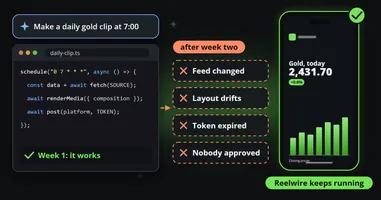
- The assistant decides what to say; the template decides how it looks. A model never adjusts the layout, so its copy either fits the approved design or is refused by name.
- Claude, on the web and in Claude Desktop, and ChatGPT connect by signing in, with no key to paste. Coding agents such as GitHub Copilot, Cursor, OpenAI Codex, Claude Code and Trae connect with a key whose permissions you choose, and most of them can sign in too.
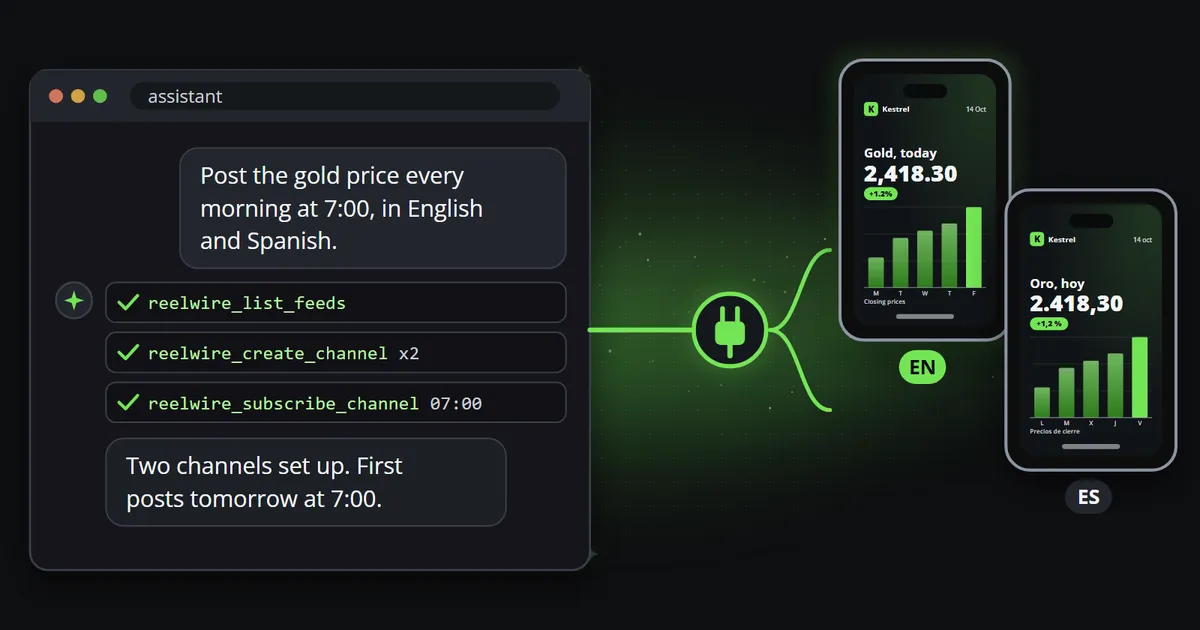
An MCP server turns a product into something an AI assistant can use. Connect Claude or ChatGPT to one, and instead of clicking through a dashboard you can say “set up a daily post from this feed in English and Spanish, hand it over at seven, and tell me every Friday what went out”, and the assistant does it with the same permissions a colleague would have. For short-form video, that makes the assistant something like a producer: it decides what to post, writes it and schedules it, while a template makes sure every clip looks exactly like your brand.
This article explains what MCP is, what an assistant can do with Reelwire’s MCP server, how to connect one, and the one rule that makes it safe to leave running.
What MCP is
MCP, the Model Context Protocol, is an open standard for connecting AI assistants to outside systems. Anthropic introduced it in late 2024, and it has since been adopted across the industry: Claude, ChatGPT and most coding agents can connect to MCP servers.
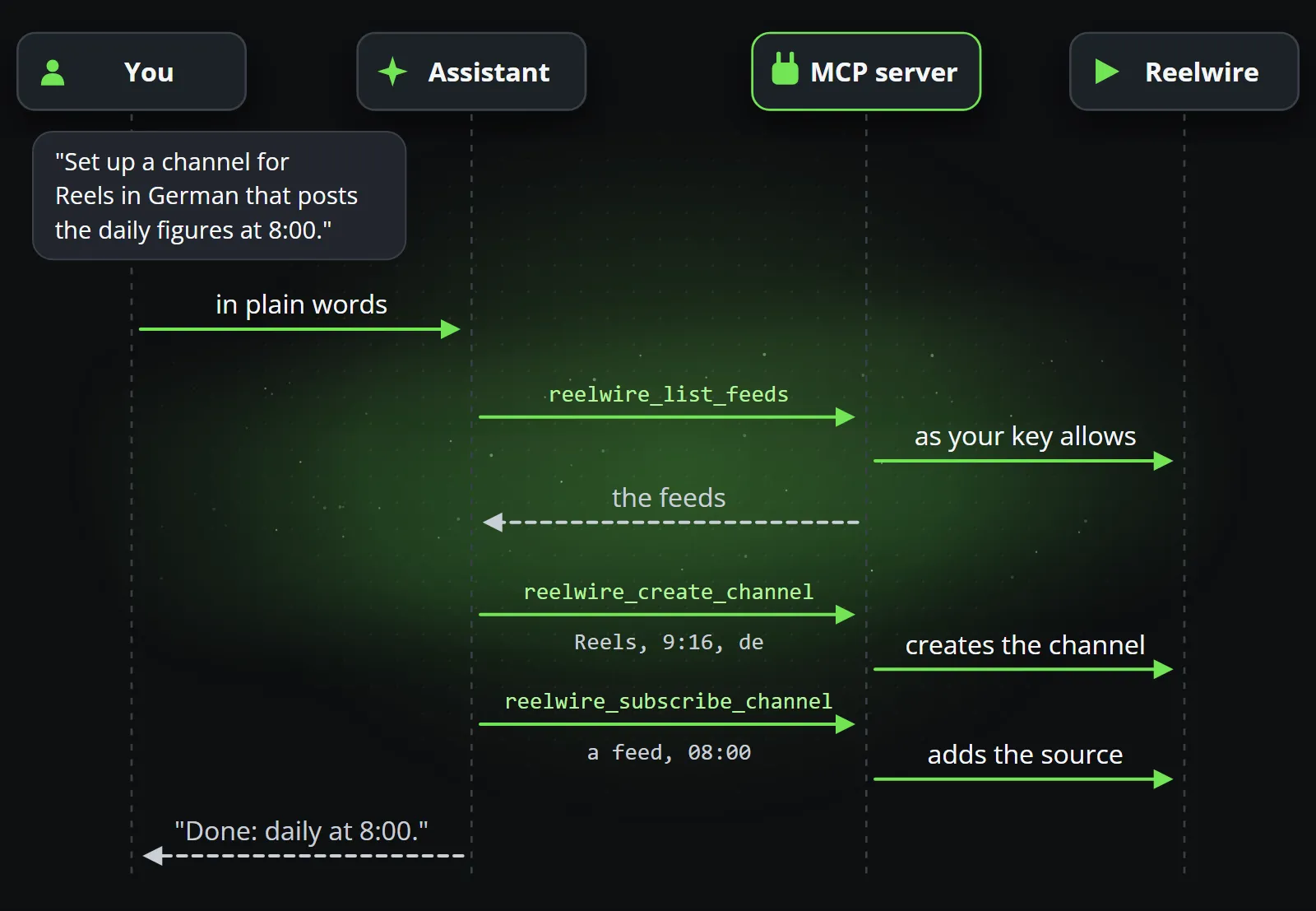
An MCP server describes a system’s actions as tools: “list my channels”, “create a post”, “approve this post”. The assistant reads those descriptions, decides which tools to call to do what you asked, and calls them with the rights it was given. It is the same idea as an API, written for a reader that understands language.
Followed through, one request becomes a few tool calls, and the MCP server makes each of them with exactly the rights of the key or connection behind it.
What an assistant can do with Reelwire
Reelwire’s MCP server at https://mcp.reelwire.io/mcp exposes well over a hundred tools, covering
almost everything the dashboard does. In practice that means requests like these:
| You ask | The assistant |
|---|---|
| “Set up a channel for Instagram Reels in German that posts the daily figures at 8:00.” | Creates the channel, chooses the platform and shape, subscribes it to the feed, sets the time |
| “Write next week’s posts about the trade fair, one a day, and schedule them.” | Writes five posts into a post list with their content and times |
| “Why did yesterday’s post fail?” | Reads the post, its render and its hand-over, and explains |
| “What went out this week, per channel?” | Lists the posts and their state, published, skipped or waiting |
| “Make the brand use the new logo and a darker background.” | Updates the brand, which every later clip wears |
| “Hand today’s posts to the new webhook as well.” | Changes how the channel’s posts are handed over |
| “Show me a preview of tomorrow’s post in 9:16.” | Renders it and returns the link |
The assistant also has the documentation as tools, so it can look up how something works before it does it, and guided prompts for common jobs, such as getting a new workspace to its first post.
The rule that makes it safe
There is one design decision that matters more than any permission setting: the assistant decides what to say, the template decides how it looks.
Writing is the assistant’s half. It reads the event, judges whether it deserves a post, finds the angle, drafts the text, and picks channels, languages and a time. Those are decisions about words, which is what a language model is built for.
A model should never decide the layout. If it could shrink the type to make its headline fit, move the logo, or leave out the legal line because it was in the way, then sooner or later, with the best intentions, it would publish something off-brand while nobody was watching.
So in Reelwire the composition is fixed and the copy is checked against it. A headline that does not fit is refused, and the refusal names the field and the limit, so the assistant can rewrite and try again. Every clip is drawn from a template that a person approved, which is why the figures stay exact and the brand stays intact however much the assistant writes. Letting an assistant run the channel goes deeper into where that line sits.
How to connect
Claude and ChatGPT: sign in, no key
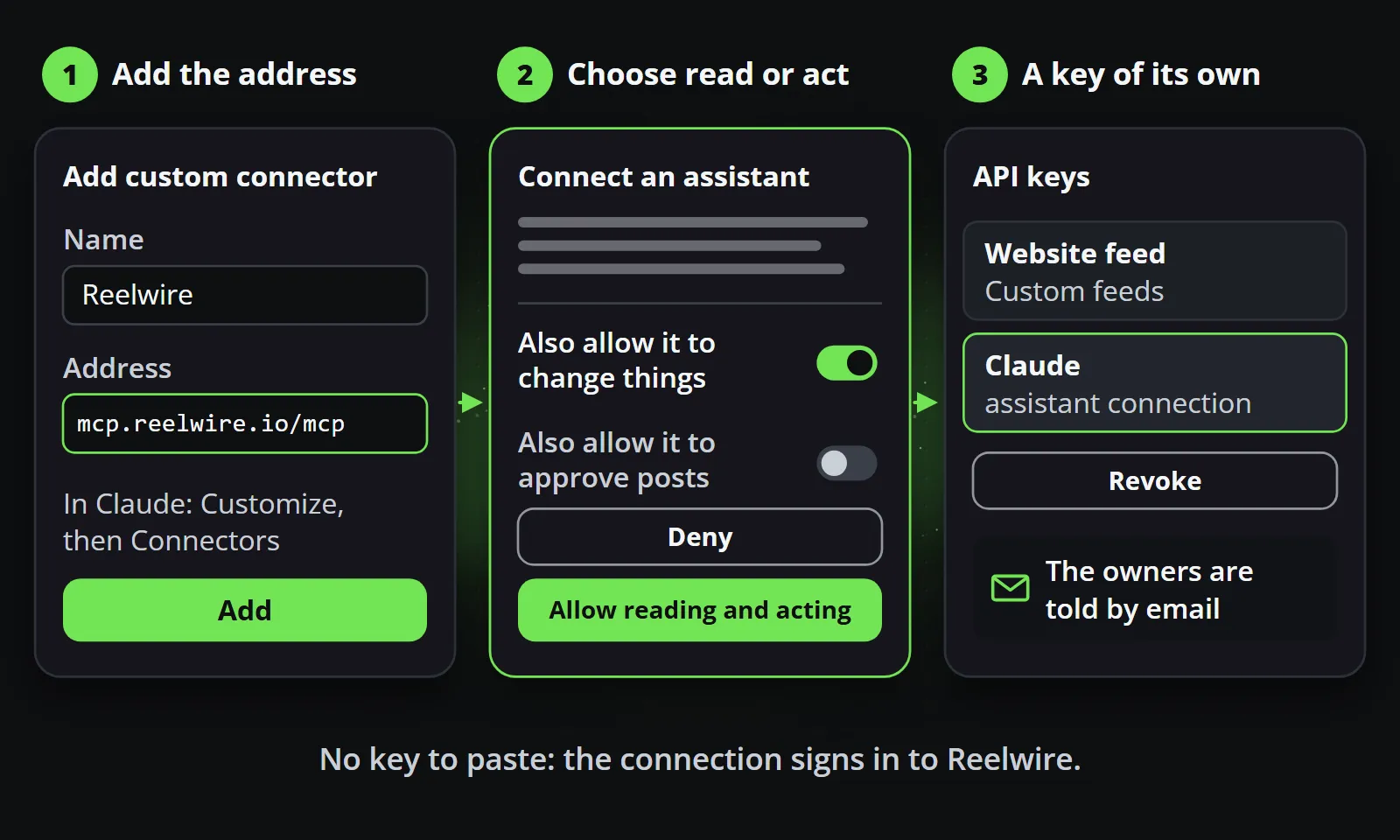
claude.ai, Claude Desktop and ChatGPT connect by signing in to Reelwire, so there is nothing to copy:
- In claude.ai or Claude Desktop, open Customize → Connectors (Settings → Connectors in older versions) and add a custom connector. In ChatGPT, add a custom connector in its settings (some plans ask you to switch on developer mode first) and choose OAuth.
- Enter the address
https://mcp.reelwire.io/mcp. - A Reelwire page opens. Sign in, and choose whether the assistant may only read, or read and act.
- You are back in the chat, connected.
The connection becomes a key of its own on Reelwire’s keys screen, renewed while you use it and revocable at any moment, and the workspace’s owners get an email saying an assistant was connected.
Coding agents: a key with the permissions you choose
GitHub Copilot, Cursor, OpenAI Codex, Claude Code and Trae take an API key, and all but Trae can sign in instead. Make a key on Reelwire’s keys screen, tick only the permissions it needs, and add the server. In Claude Code that is one line:
claude mcp add --transport http reelwire https://mcp.reelwire.io/mcp \
  --header "Authorization: Bearer rw_your_key_here"
A coding agent is worth connecting for a different reason: it can write the script that sends your own data into Reelwire, run it, and watch the posts arrive, without leaving the editor. Data to video explains what that script sends.
The full guide for every client is in the MCP install documentation.
What the assistant cannot do
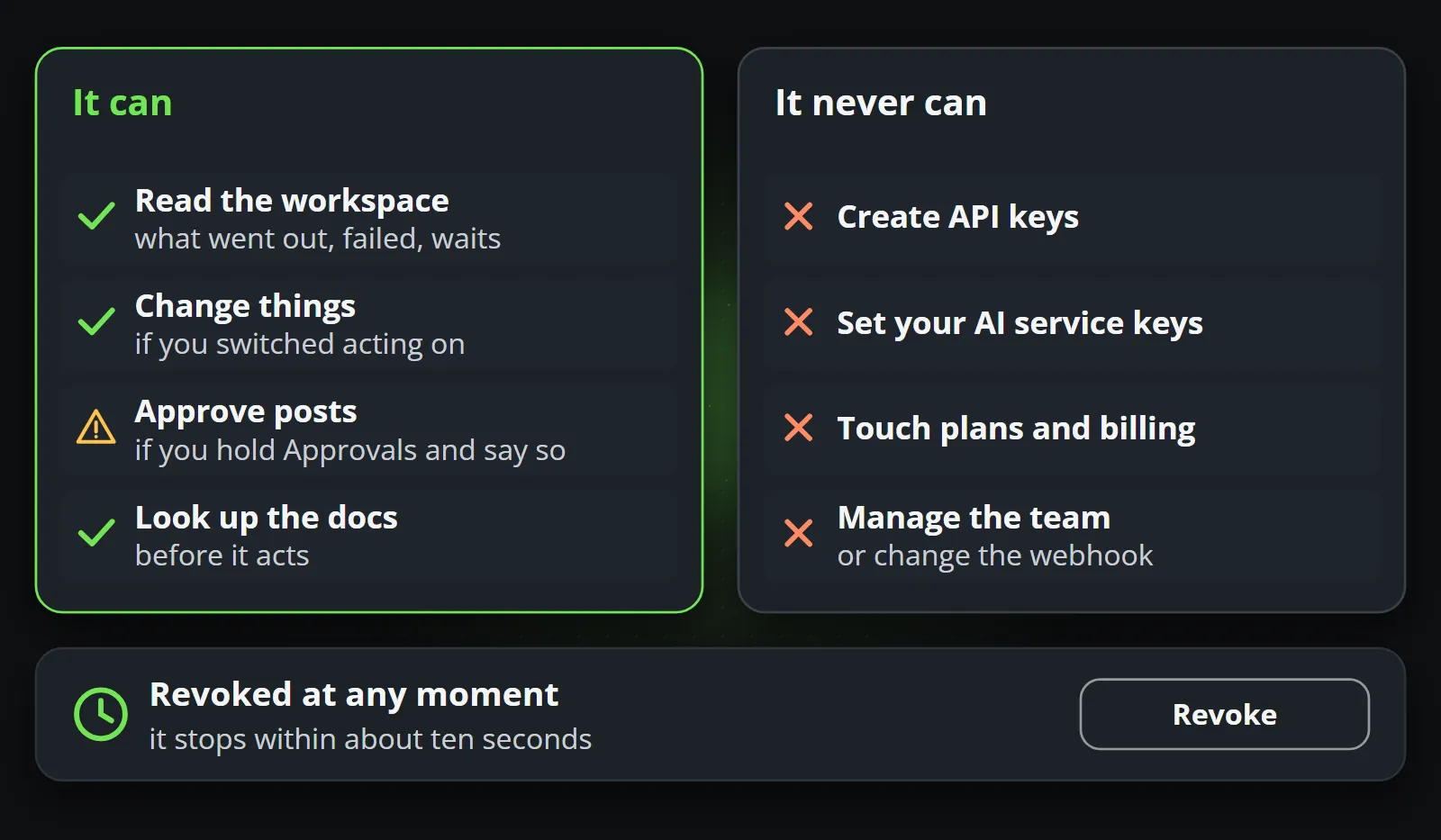
Permissions are where a cautious team should start, and the defaults are deliberately narrow:
- Read-only is a real option. An assistant that can only read can still answer what went out, what failed and what is scheduled. A week of read-only use is a sensible start.
- No keys, no money. A connected assistant can never create API keys, set the keys for your AI services, or touch plans and billing.
- No approvals it was not given. It can approve or reject posts only if the person who connected it holds the Approvals permission.
- Revocable at once. Revoking the connection stops it within about ten seconds.
Posting itself, through the assistant
Reelwire makes the post and hands it over. It does not post to most platforms itself: a due post goes out by email, with a kit to post it from a phone, or by webhook to your own system or a posting service, and only Discord, LinkedIn, Slack and Telegram can be posted to directly.
An assistant with a browser fills an interesting gap here. Given the finished clip and its text, it can post the way a person would, on any platform, without app approvals or API keys per platform. Every post kit Reelwire sends includes a prompt written for exactly that, covering every channel still to post. It is your account and your choice, and some platforms restrict automated use of an account, so read their rules first; where it is allowed, it can be the most flexible route there is.
A first week with an assistant
- Day one: connect read-only and ask questions. “What does this workspace look like? What would a daily post from this feed look like?”
- Day two: allow acting, and ask it to set up one channel with one source.
- Days three to five: let it write a few posts into a post list and schedule them. Approve them yourself.
- End of the week: ask for a summary of what went out, what failed and why. Decide what to widen.
Bottom line
MCP makes an assistant a capable operator of your video channel. It plans, writes, schedules and reports, while approved templates keep every clip exact and on brand. Connect Claude or ChatGPT to Reelwire in a minute, try it on the free plan, and see AI video generator vs template video for why the clip itself should never be left to a model.
Frequently asked questions
What is an MCP server?
An MCP server exposes a system's actions as tools an AI assistant can call over the Model Context Protocol, an open standard introduced by Anthropic in 2024 and now supported by Claude, ChatGPT and many coding agents. The assistant can then use the system the way a person would, within the permissions it was given.
Can ChatGPT or Claude make videos with MCP?
They can operate a video system that makes them. Connected to Reelwire's MCP server, an assistant writes and schedules posts, and Reelwire draws each clip from an approved template. The assistant never draws the video itself, which is why the figures and the brand stay exact.
How do I connect Claude to Reelwire?
In claude.ai or Claude Desktop, open Customize, then Connectors, add a custom connector with the address https://mcp.reelwire.io/mcp, and approve the connection on the Reelwire page that opens. A connector added in one appears in the other. In Claude Code, one command adds it with an API key.
Is it safe to let an AI assistant post for my brand?
It is as safe as the permissions and the design around it. A Reelwire connection can be read-only or allowed to act, never creates keys or touches billing, can approve posts only if the person connecting holds that right, and can be revoked at once. Every clip still comes from an approved template.
Does the assistant post to social media itself?
Reelwire hands a due post over by email or webhook, or posts directly to Discord, LinkedIn, Slack and Telegram. Separately, an assistant with a browser can post the handed-over clip the way a person would, and the post kit includes a prompt written for exactly that.

Co-founder of Reelwire. Every organisation has facts worth showing, its prices, results, releases and warnings, and the vision is that every one of them can show those facts every day, on brand, in every format and language, without a production team behind each post. Your data, in motion: correct, recognisable and consistent from the first clip to the thousandth.