How a Branded Short Video Is Put Together: Stinger, Intro, Clip and Outro
What a branded short video is made of: the stinger, intro, clip and outro, what a brand holds, and how content, template and brand fit together.

Key takeaways
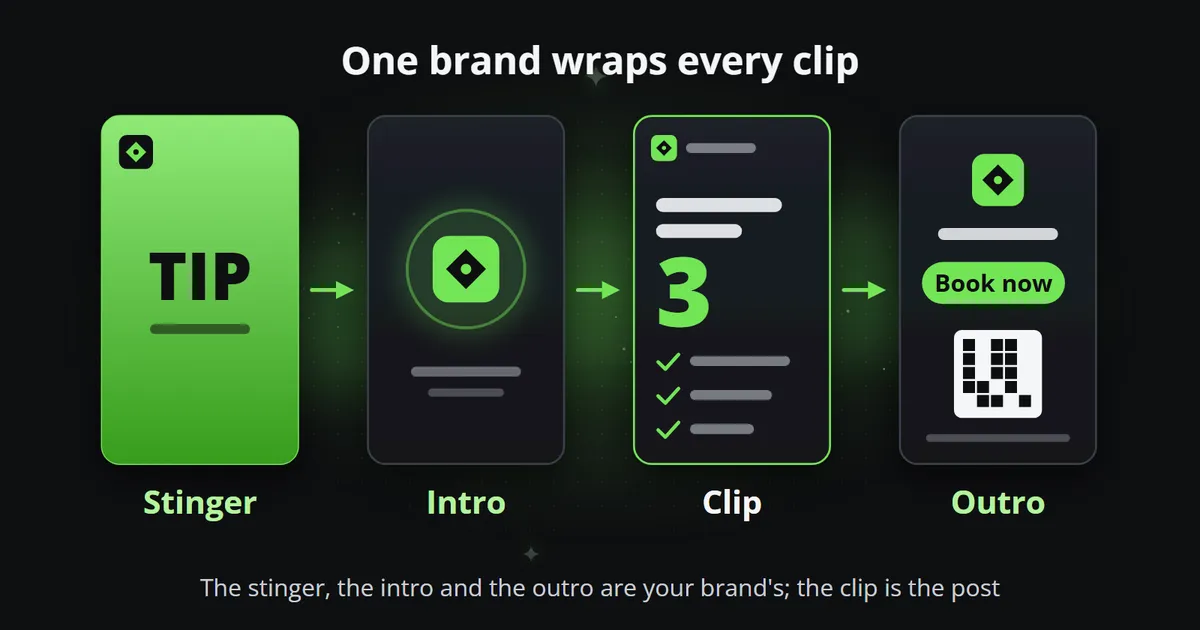
- A finished branded short video plays up to four parts in order: a stinger that says what kind of post it is, an intro that reveals the logo, the clip itself, and an outro with the website and a call to action.
- Only the clip changes from post to post. The stinger, the intro and the outro belong to the brand: each is made once, switched on, and then wraps every post the brand is used for.
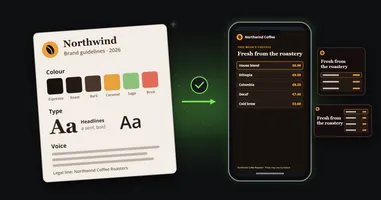
- A brand is a set of settings, not a file: its name and lines, logo, colours, typefaces, presenter, background, soundtrack, the three parts and the text under every post.
- Content says what a post says, a template decides how it is told, and the brand decides whose it is. Keep the three apart and the same post can go out for any brand, in any shape and language.
A branded short video looks like one piece, but in Reelwire it is put together from up to four parts, and only one of them is new each time. Knowing which part does what makes the rest of the product easy to follow: why a brand is set up once, why a post is mostly words and figures, and why the same post can go out in five shapes and several languages without anybody editing a frame. This article walks through the four parts of a finished video, what a brand holds, and how content, template and brand fit together. One word first: here the video is the whole thing that gets posted, and the clip is its middle part, the post itself.
What are the four parts of a branded short video?
A finished video plays its parts in this order:
- The stinger, a short title card at the very start that says what kind of post this is: TIP, NEW, WEEKLY RECAP. It carries that label, an optional line and the logo, and its first frame reads on its own, so it also works as the video’s cover. The label is set on the brand, one for the brand.
- The intro, a logo reveal: the logo assembled, unveiled or landing with an impact, the brand’s name beside it where wanted and its slogan under it.
- The clip, the post itself: what it says, shown by a template in the brand’s colours, typefaces and logo.
- The outro, an end card: the logo, the website, a call to action, up to four ways to get in touch, and where needed a QR code to the website and a legal line.
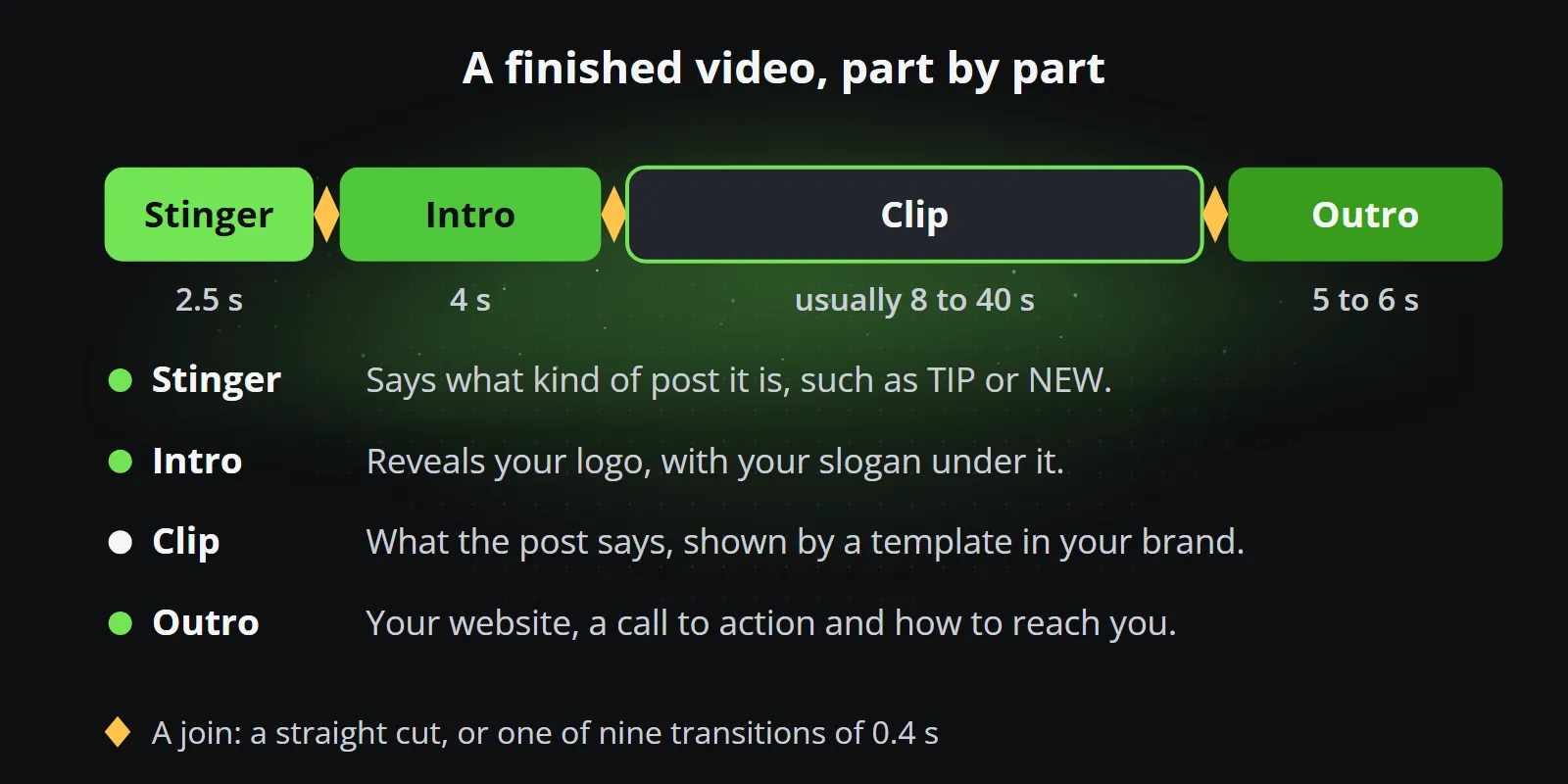
| Part | What it does | How long | How often it is made |
|---|---|---|---|
| Stinger | Says what kind of post it is | About 2.5 seconds | Once per brand |
| Intro | Reveals the logo, with the slogan | About 4 seconds | Once per brand |
| Clip | Says what the post says | Usually 8 to 40 seconds, set by its content | For every post |
| Outro | Website, call to action, contact | 5 to 6 seconds | Once per brand |
The clip’s length follows its content: a list of three points is shorter than a list of twelve, one figure shorter than seven, and a video of your own runs as long as it is, up to three minutes. Where two parts meet, the brand chooses a straight cut (no effect at all) or one of nine transitions, each 0.4 seconds long.
Why are the stinger, intro and outro made only once?
Because they belong to the brand, not to the post. A newspaper does not redesign its masthead for every article, and a channel does not need a new end card for every video. In Reelwire each of the three is a clip of its own, made with the template of the same name (Stinger, Intro or Outro, 120 styles each), copied into the media library and set on the brand. From then on every post the brand is used for is wrapped in them, on every channel that uses the brand.
Each one has its own switch on the brand, and each can come in two forms. A shape is the video’s aspect ratio: 9:16 is the tall one for reels and stories, 1:1 the square, 16:9 the wide one, and 4:5 and 2:3 sit between. The three parts can be a file per shape, or one universal file with everything important in the middle, which fills any shape by cropping from the centre. The universal file is the quick start; a file per shape is for a brand that wants every shape exactly right. How one design serves every shape is the subject of one composition, every aspect ratio.
A short video is short, and the opening seconds are the ones everybody sees. A stinger that says TIP is over in two and a half; an intro adds four more before the post itself begins. Each has its own switch, so it is worth deciding on purpose which of them a channel uses.
What is a brand in Reelwire?
The most basic idea in the product is this: a brand is a set of settings, not a file. It is everything a video shows that is not the post itself, kept in one place and applied to every post on every channel that uses the brand.
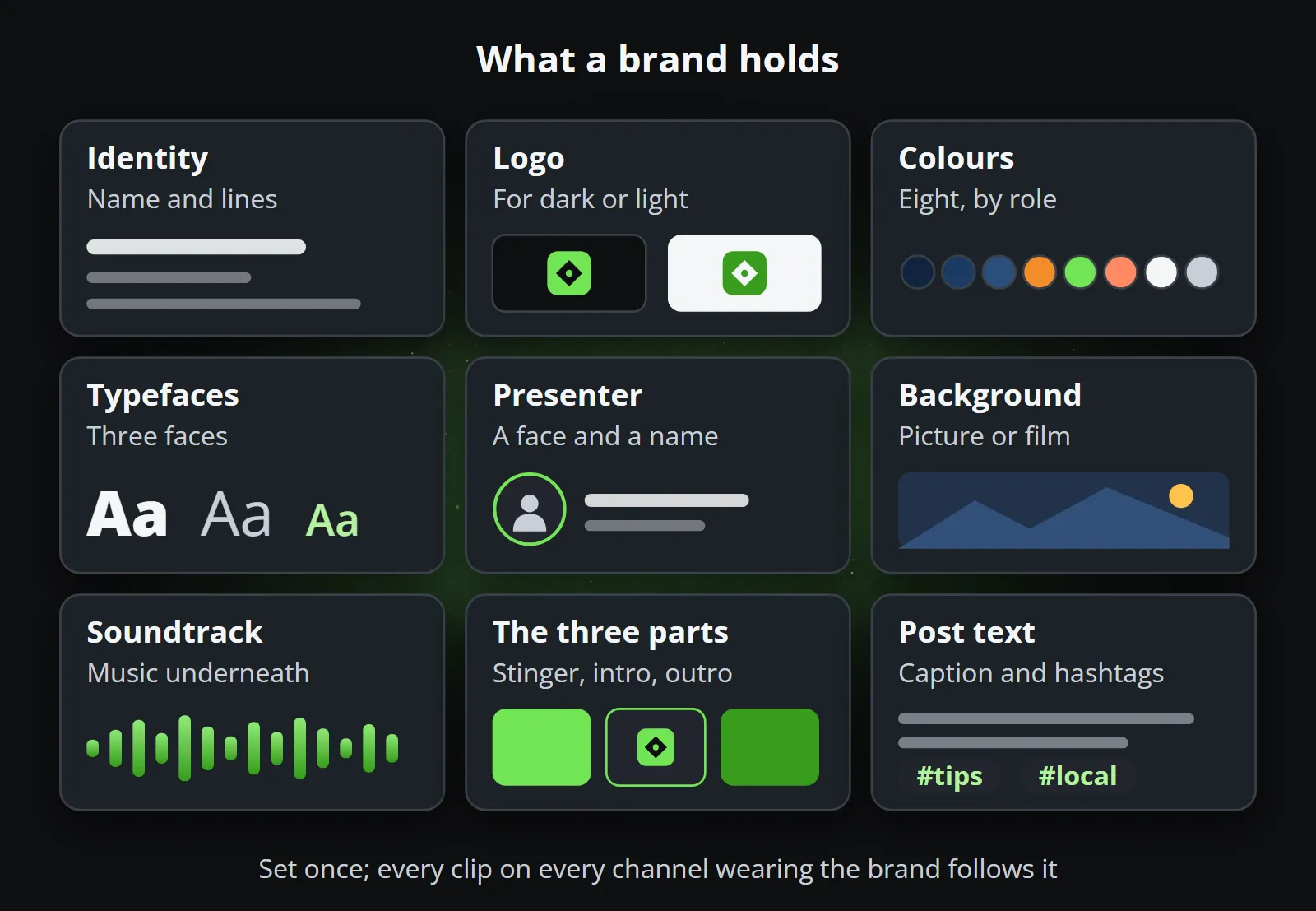
- Identity. The name, and the two lines a clip shows: the title line at the top (often the website) and the footer line at the bottom (the legal name, and a standing legal sentence where one is needed). Either line can be switched off.
- Logo. One file, made for a dark or a light background. A transparent logo shows its own colours on whatever is under it, which is why a clip is set to a light or a dark look to match the background the logo was made for.
- Colours. Eight, each with a role rather than a place: the background, cards and borders, the brand colour for what matters most, a colour for up and one for down, and two text colours that stay legible on the surfaces.
- Typefaces. Three: headlines, body text, and the frame (the title and footer lines). A font file of your own, or one of those already installed.
- Presenter. A picture of a person or a mascot, with a name and a role, shown on the clips.
- Background. A picture or a short film behind the clips, one for every shape or one for all.
- Soundtrack. Music under the video, and which of the four parts it plays over.
- The three parts. The stinger, intro and outro above, with the transition between them.
- Post text. What goes under every post on top of the post’s own words: a description, a link and hashtags.
None of it is required on the first day. A brand with a name, a logo and two colours already makes clips that look like one business; the rest can follow. Turning a full style guide into these settings, step by step, is the subject of how to create a video brand that matches your style guide.
How do content, template and brand fit together?
Every clip is the meeting of three things that are kept apart on purpose:
- The content says what the post says: the words, the figures, the pictures.
- The template decides how it is told: one figure counted up, a list arriving point by point, a countdown, a ranking. Each template is a format, and its variants are styles of that format.
- The brand decides whose it is: the logo, the colours, the typefaces and the three parts around it.
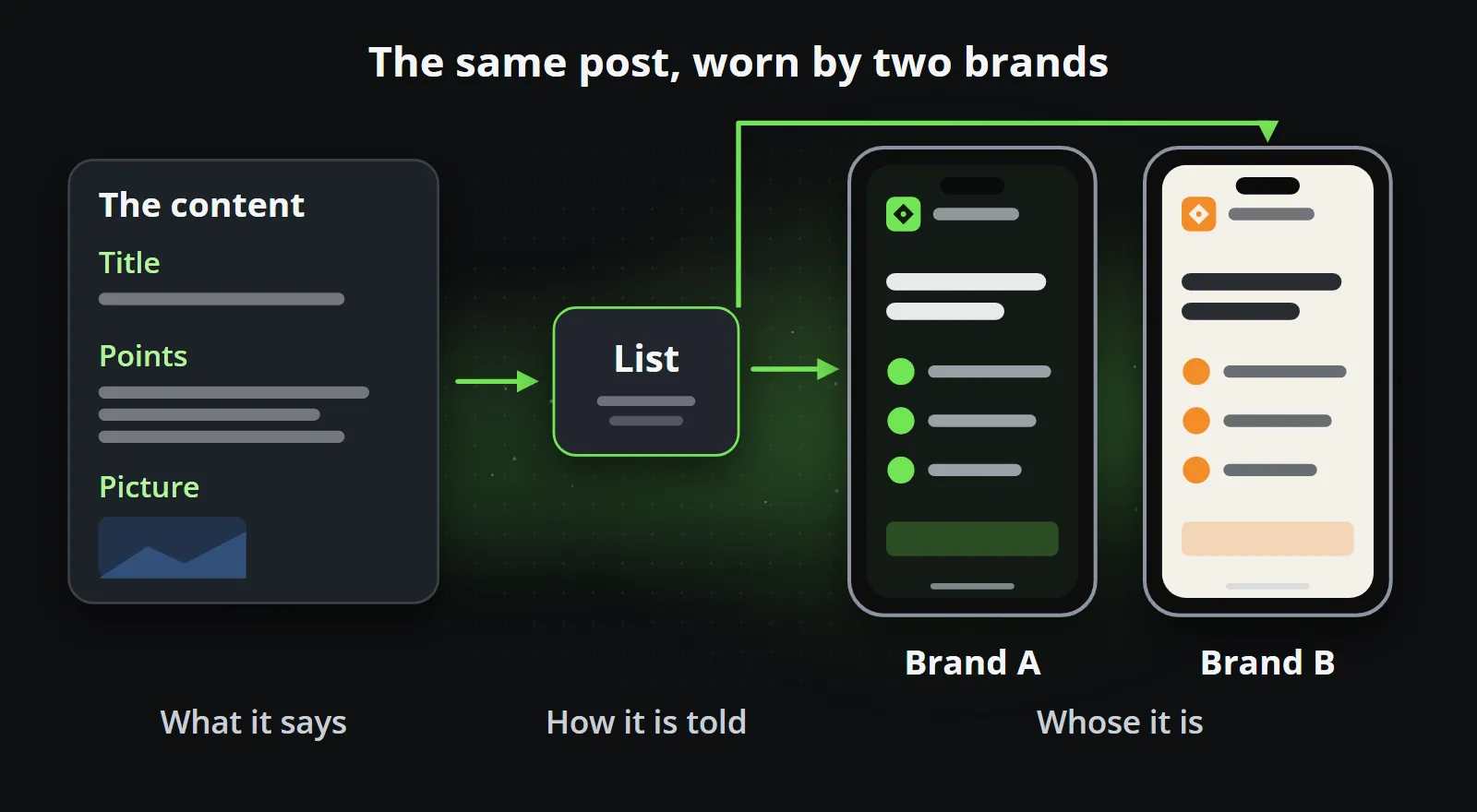
Because the three are separate, one post can go out for two brands and look like each of them, and one brand can carry a hundred different posts and still look like one channel. It is also why a post can be made in every shape and in several languages without anybody touching a frame: the content changes language, the template changes shape, and the brand stays the same.
Does every video need all four parts?
No. Only the clip is needed. Two cases are worth knowing:
- A video of your own. The Overlay template lays the brand over a video you filmed or a photo you took: the logo in a corner, a title, the presenter’s name, captions page by page and the footer line, clear of what the platforms draw over a reel. A video plays its own sound and goes out on its own, without the stinger, intro and outro, so a three-minute workshop clip is not padded with another dozen seconds. A photo becomes a clip of the length you choose, and gets the three parts like any other.
- Posts of several kinds. The stinger’s label belongs to the brand, so it says the same thing on every post: TIP for a channel of tips, NEWS for a channel of news. A channel that mixes kinds can leave the stinger off, or give each series a copy of the brand with its own stinger.
How do you set it up?
On the dashboard, the Brands screen holds every setting above. The stinger, intro and outro are made in Clip studio with the templates of the same name, from your logo and colours, and then set on the brand; each one is a render per shape you make it in, or one for the universal file.
With an AI assistant connected through Reelwire’s MCP server, the same happens in a conversation. The assistant asks who you are, reads your website for your logo and colours, proposes the brand, and shows you a free still of a post in it before anything is spent. Its ready-made prompt Make my brand complete goes through every part of a brand one at a time, and Make a stinger, intro or outro for a brand makes the three parts and puts them on the brand. Once that is done, the assistant can plan weeks of posts ahead, as described in the assistant runs the channel.
Set the brand up once, and every post after it is only the part that changes: what it says. How it works shows the whole chain from content to a posted clip, and every plan, Free included, starts with a brand. Compare the plans.
Frequently asked questions
What is a stinger in a video?
A stinger is a short title card of about two and a half seconds at the very start of a video, saying what kind of post it is, such as TIP or NEW, with the brand's logo. Its first frame reads on its own, so it also works as the video's cover.
What is the difference between an intro and an outro?
The intro opens the video with the brand's logo revealed and its slogan under it, in about four seconds. The outro closes it with an end card of five to six seconds: the website, a call to action, ways to get in touch and, where wanted, a QR code and a legal line.
Does every branded video need a stinger, intro and outro?
No. Only the clip is needed. The stinger, the intro and the outro each have their own switch on the brand, so a channel can use any of them, all of them or none. Four seconds of intro is a lot of a short video, so it is worth deciding on purpose.
What does a brand hold in Reelwire?
Its name and the lines a clip shows (a title line and a footer line), a logo, eight colours each with a role, three typefaces, a presenter, a background picture or film, a soundtrack, the stinger, intro and outro, and the description, link and hashtags added under every post.
Can I use my own video as the clip?
Yes. The Overlay template lays the brand over a video or a photo of your own: the logo, a title, a presenter's name, captions and the footer line. A video plays its own sound and goes out without the stinger, intro and outro; a photo gets them like any other clip.
Make your first clips today
The free plan makes 15 clips a month and asks for no card. Add your logo and colours, pick a template, and see a finished clip in your own brand before you decide anything.

Co-founder of Reelwire. Every organisation has facts worth showing, its prices, results, releases and warnings, and the vision is that every one of them can show those facts every day, on brand, in every format and language, without a production team behind each post. On brand, every day: correct, recognisable and consistent from the first clip to the thousandth.