Google Ads Auto-Generated Videos: Why They Are a Brand Risk, and How to Replace Them
With no video in a campaign, Google Ads can assemble one from your pictures and headlines and run it across its network. Why that is a brand risk, and the fix.

Key takeaways
- When a Performance Max asset group, an App campaign or a Demand Gen ad has no video, Google Ads may assemble one from your text and pictures, with a template and music its system picks and the font and colours of your brand guidelines where set, and host it on a channel you cannot edit.
- Those videos can run wherever the campaign shows video: YouTube and Shorts, and depending on the campaign, Discover, Gmail and the Display Network's millions of partner sites and mobile apps. Google does not publish where a given generated video ran.
- The brand risk is an argument, not a statistic: a generic video in a placement nobody chose can make a careful brand look cheap to its customers and low effort to everybody else.
- The reliable fix is your own videos in every shape the campaign uses, on brand and refreshed. Uploading them switches generated videos off in Performance Max and App campaigns; Demand Gen has its own switch.
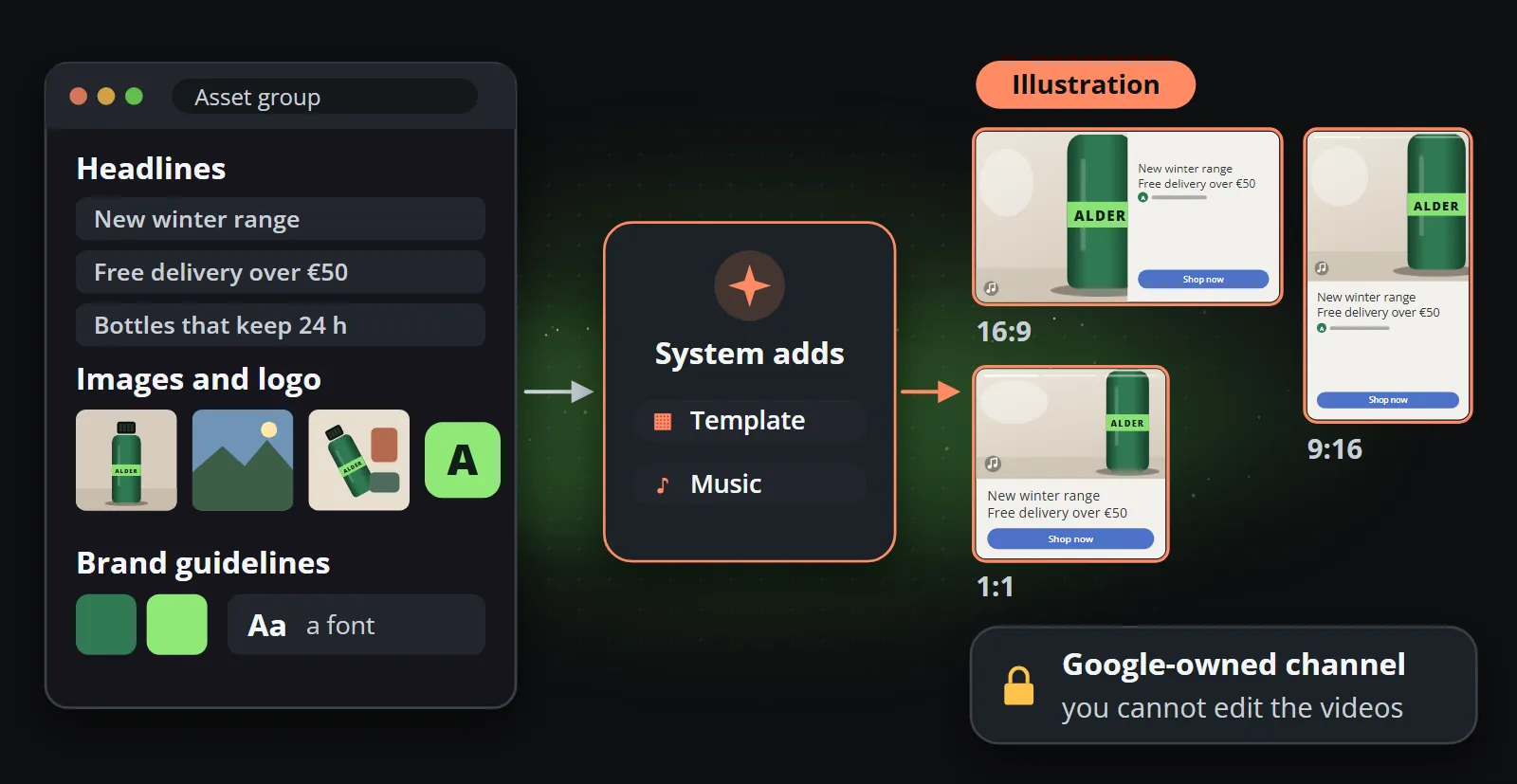
A Performance Max campaign without a single video in it can still show video ads. Google Ads auto-generated videos may fill the gap: the system takes the headlines, pictures and logo you gave it, adds a template and music, and makes videos in three shapes for you. Depending on the campaign, they can then run on YouTube, in Shorts and across the Display Network’s partner sites and apps.
For many advertisers that is a sensible default. For a brand that cares how it looks, it is a risk: the video nobody at the company made may be the one a customer sees, and Google does not document which generated video runs where. Facts about Google come from its own pages unless marked as trade press, checked on 14 October 2026; they change often, so check your account too.
What does Google Ads do when you give it no video?
Google’s help page About auto-generated video ads names three campaign types: Performance Max, where it works per asset group; App campaigns, per ad group; and Demand Gen, per ad. Video views, reach and action campaigns do not make them.
The ingredients are what you already supplied for something else: your text and image assets, your brand guidelines’ colours and font, your app store images in App campaigns, and the pictures in your product feed where a Performance Max campaign has one. From those the system picks the template, colours, font and music that, in Google’s words, “best match your brand”, and makes videos in horizontal, square and vertical. In Demand Gen, generative AI can now turn still images into 10-second clips.
Two details matter for a brand:
- The videos live on a Google-owned channel, separate from your own: “You won’t have the ability to manage or control this channel or make changes to the auto-generated videos.”
- They follow your assets. Edit or delete a picture or a headline, and the generated video is replaced by a new one made from your newest assets, which Google presents as keeping it “always up to date”. The page describes no step where you approve the new version.
Why does Google do it?
The same page gives the reasons: auto-generated videos let an advertiser “take full advantage of video ad inventory on YouTube”, and Google’s AI makes them “without any production costs or effort”.
In Performance Max it is also labelled and reversible: the videos are marked in the asset group and stop when you upload your own. For a small shop with no video at all, a generated clip may well be better than nothing. Whether it is good enough for your brand is a question only you can answer.
Where do Google Ads auto-generated videos run?
Wherever the campaign shows video, as far as Google’s pages say. Performance Max reaches “all Google Ads inventory, including YouTube, Display, Search, Discover, Gmail, and Maps”, though a campaign run through Google Ad Grants “may not be eligible to serve on all inventory”. The Display Network, in Google’s own description, is Google’s properties plus “a network of millions of partner sites and mobile apps”.
Google’s ad network for app developers is AdMob, which says on its own site that more than a million Google advertisers are on it. AdMob’s case study on Duolingo says Duolingo partnered with AdMob in 2015 to begin monetising its app, with native ads first and rewarded video from 2017. That shows the kind of app the network reaches; it does not show which ads run there, let alone generated videos.
App campaigns run on Search, Google Play, YouTube, Discover and the Display Network, “other apps” included. Demand Gen picks among YouTube in-stream, in-feed and Shorts, Discover, Gmail, the Display Network and Maps, which serves only with a location extension (channel controls). It can also reach Google video partners, “leading publishers in games, sports, entertainment, news, and more”, where mobile video can be a rewarded or interstitial ad; that surface is off by default and has to be switched on when the campaign is set up.
No Google page confirms where a generated video actually ran; that depends on the campaign, its channels and each placement’s formats. A generated clip could be a YouTube pre-roll, a Short or a sponsored card, and where a campaign reaches partner apps or games, possibly an ad inside one: what the documentation allows, not what it shows.
| Campaign type | When Google makes a video | Where video can run | How to stop it |
|---|---|---|---|
| Performance Max | An asset group has no video | YouTube, Display, Discover, Gmail and more, from one campaign | Upload your own videos |
| App campaigns | An ad group has no video | Google Play, YouTube, Discover and the Display Network, including other apps | Upload your own videos |
| Demand Gen | An ad has generated videos switched on | YouTube, Discover, Gmail, Display; Maps and video partners on conditions | Switch it off on each ad |
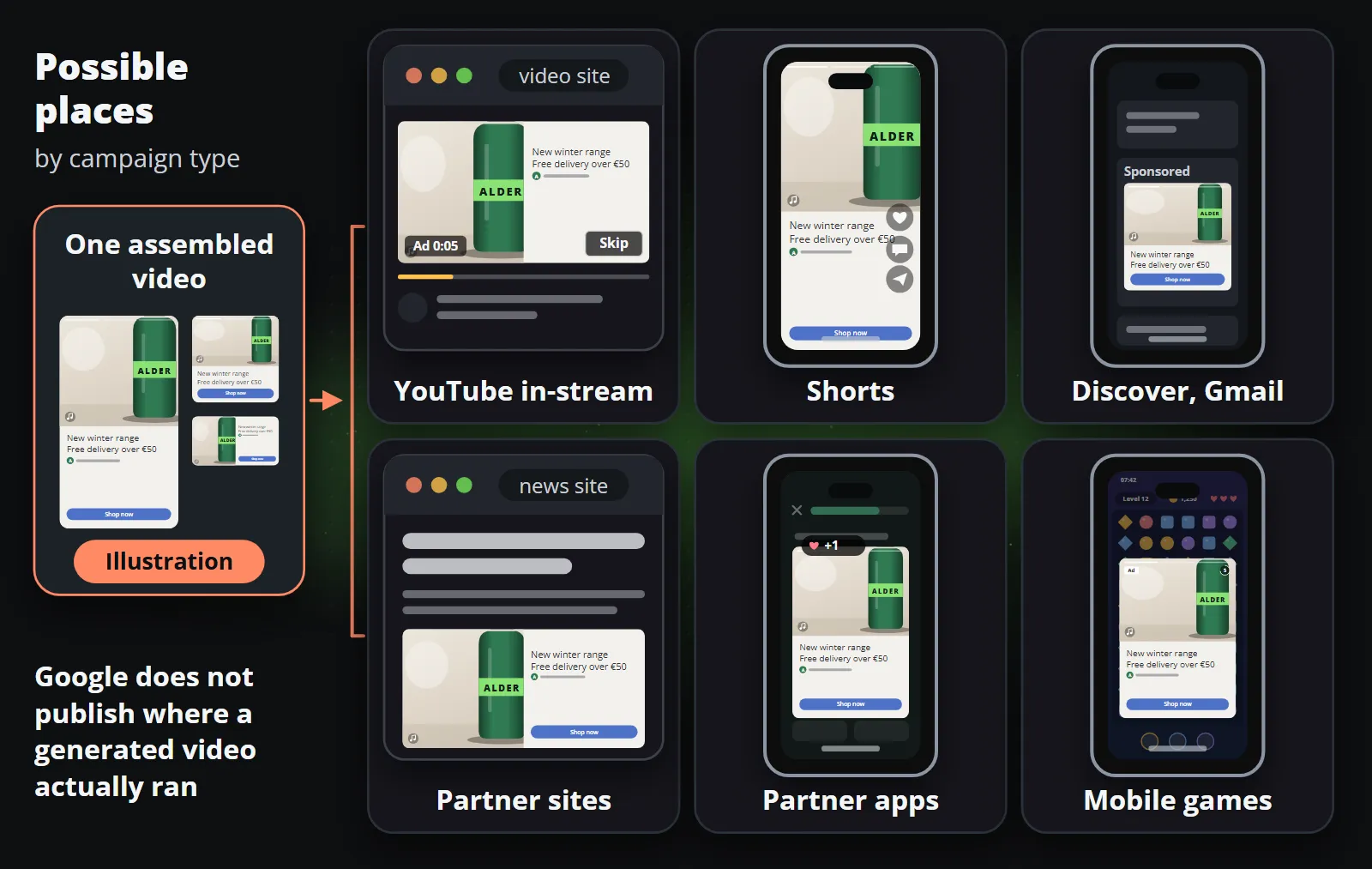
Why is an auto-generated video a brand risk?
None of this is measured: it is an argument about how people read ads, to test against what you know of your own customers.
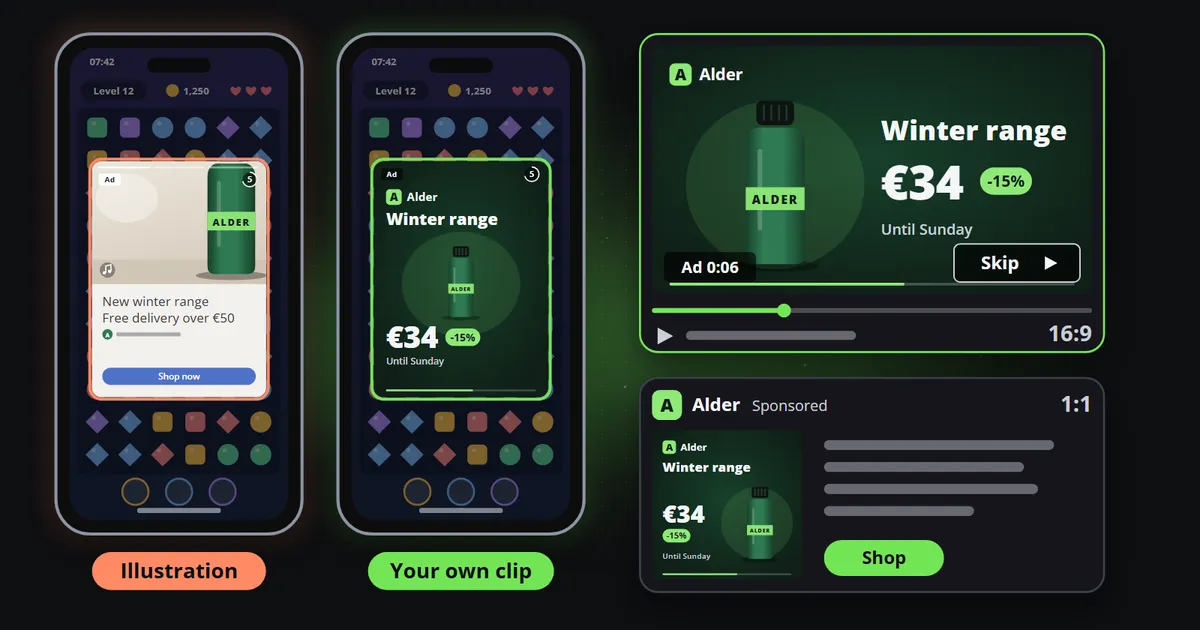
It is assembled, not designed. A template and music picked by a system to “match your brand” risk being a near match at best, and Google’s brand guidelines page warns that “not every creative type will support rendering with your specific brand guidelines”. Years spent on a typeface, a palette and a way of moving may not come back from three product photos, a headline and two colour codes. Your thousandth clip should look like your first explains why recognition depends on exactly those details. And pictures put through the same kind of template share a rhythm, photo, headline, logo, button, music, that viewers can learn to skip.
It may run where you did not look. An ad somebody waits through to get back to a game or an app is a moment they did not choose. A brand may accept that for a clip made for it; a slideshow it never saw is another matter.
Two audiences read it differently. A customer who knows you compares the clip with the shop and the packaging, and a generic version can read as a cheaper brand than the one they chose. A viewer who has never heard of you has nothing to compare it with, and may file you with the low-effort ads they skip. The first risks your standing; the second, a first impression.
Generated motion has known weak spots. Where Demand Gen animates a still picture with generative AI, the usual limits of video models apply to lettering, logos and prices; what generative video still cannot do explains why.
Google names one failure itself: its page on building an asset group warns that campaigns using auto-generated videos “may show customers who visit your landing page a different product” than the one featured in the video, and suggests product filters as the remedy.
What can you control?
Here is what Google documents, checked on 14 October 2026:
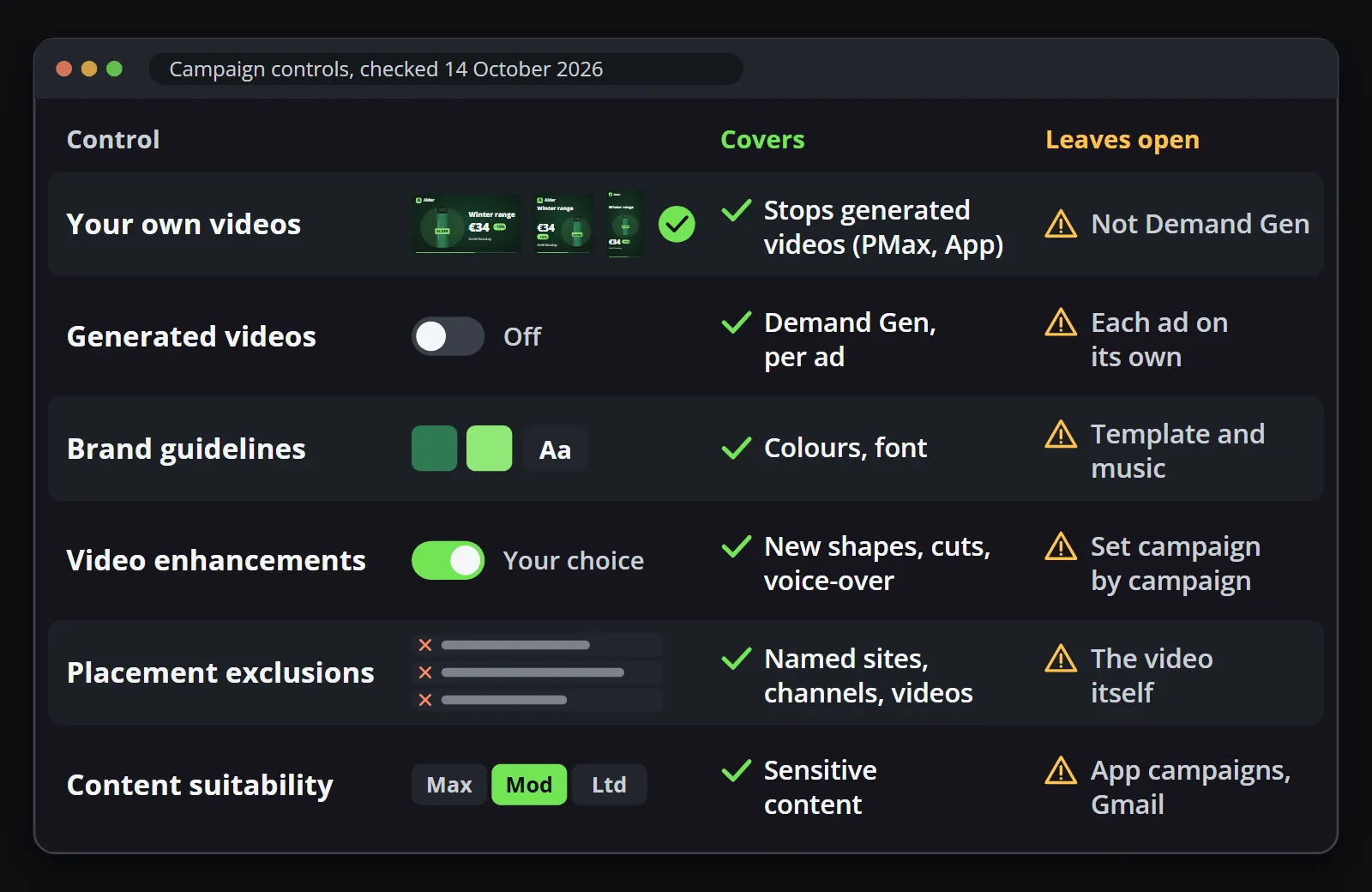
- Upload your own videos. In Performance Max and App campaigns, “the system automatically disables auto-generated video ads if you upload your own videos”. Google’s overview also calls them “a campaign-level setting”, so check the campaign’s settings too.
- Switch generated videos off in Demand Gen. Demand Gen has a setting per ad. Trade press (PPC News Feed, 23 August 2026) found it under asset optimisation on the original ad, and notes that pausing the generated ad is not enough.
- Look at them. Performance Max marks them “Automatically created” in the asset group details; Demand Gen shows them in its assets report. In App campaigns, Google says, “your auto-generated videos will not be visible.”
- Set brand guidelines. Performance Max takes your business name, one to five logos, a font and two colours, and applies the font and colours to auto-generated videos on YouTube and to responsive display ads, where the format supports them.
- Control what Google does to your own videos. Google’s AI may flip a horizontal video into square or vertical versions, cut shorter ones from videos over 15 seconds and add a voice-over from one of your text assets, “only available for accounts and assets in English” (video assets, automation controls). Each is reviewed before publishing for issues “such as cropped text or logos”, and Performance Max offers campaign-level control, a bundled control for all enhancements, reporting and a one-click experiment with and without one.
- Exclude placements and content. Account-level placement exclusions cover every campaign, Performance Max included, and list websites, YouTube channels and videos, up to 65,000 per account; that page does not mention apps, while Google’s page on excluding placements describes excluding apps and app categories in Display campaigns. Content suitability sets how much sensitive content you accept, from Maximum to Limited, on YouTube, the Display Network and video partners. It does not apply to App campaigns or Gmail, and Google says it “may provide limited coverage” of in-feed ads, Shorts, Discover, and mobile and connected TV inventory.
From trade press only: on 19 August 2026 PPC News Feed relayed a LinkedIn post of a Google email announcing generative AI to create missing aspect ratios of existing Performance Max videos, with an opt-out by 4 September 2026. That date has passed: it is background, not a control you can still use.
Performance Max advertisers “can’t directly control budget allocation per channel”, and Google’s channel report page suggests content suitability and placement exclusions instead, warning that they “might reduce overall reach”. Exclusions decide where an ad runs, never what a generated video looks like.
How do you replace Google’s video with your own?
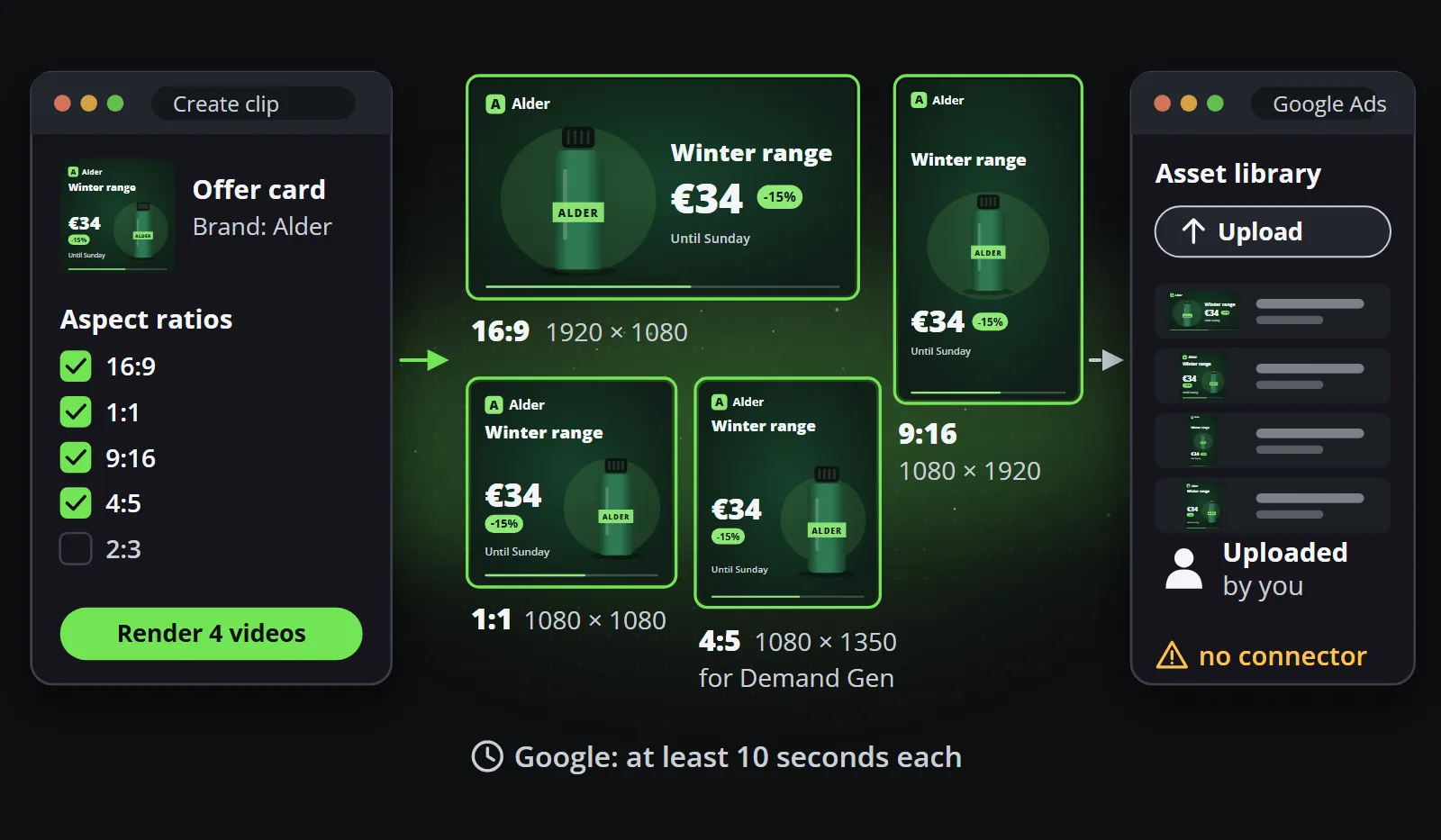
Every shape the campaign uses. Google’s specification for Performance Max is one video in each orientation: horizontal 16:9 at 1920 by 1080, square 1:1 at 1080 by 1080 and vertical 9:16 at 1080 by 1920, each at least 10 seconds, with at least one vertical video of 10 to 60 seconds for Shorts. Demand Gen also takes 4:5 at 1080 by 1350, from 5 seconds, though a video under 10 seconds cannot run as a YouTube in-stream ad. A missing shape is a shape Google may make from another one, so supply all of them. One composition, every aspect ratio explains why a wide video cropped to vertical rarely survives the trip.
On brand. Your typeface, your colours, your logo where it belongs, and the price that is on the landing page.
Kept fresh. An ad seen ten times can read as wallpaper, and last week’s price can read as a mistake. Replace the set monthly or weekly, then check that the asset group’s “Automatically created” rows are gone.
| Auto-generated by Google | Your own videos | |
|---|---|---|
| Made from | Your headlines, pictures and logo | A design made for video |
| Template and music | Picked by the system | Yours |
| Font and colours | From your brand guidelines, where set | Yours |
| Shapes | Three, made for you | Each laid out for its frame |
| Can you edit it? | No: it sits on a Google-owned channel | Yes |
| Can you see it first? | Not in App campaigns | Always |
| When it changes | Whenever your assets change | When you replace it |
| Cost | No production cost | Production time, unless it is automated |
How do you make them every week without a production team?
This is where Reelwire fits. It draws finished clips from a template and your brand in five aspect ratios, 9:16, 4:5, 1:1, 16:9 and 2:3, all four that Google asks for among them. Your brand’s logo, colours and fonts go on every clip, so the shapes are one design rather than four. How it works shows the whole chain.
The simplest route to a Google Ads set is Clip studio: choose a template, fill it in, tick the shapes and languages you need and render them together; the videos download one by one or as a zip. For a set that refreshes itself, a channel can hand new clips over on a schedule by email, with a page to download them from, or by webhook to your own system.
Reelwire has no Google Ads connector. The upload is yours: the asset library under Tools and Asset studio takes a video from your computer and asks whether to put it on the ad storage channel YouTube creates for you or on your own (Google’s steps).
Two practical notes. A template’s length follows its content and some run under ten seconds, so give it enough to say or add your brand’s intro or outro. And three shapes refreshed weekly are about thirteen videos a month, inside the free plan’s 25.
Bottom line
Google’s reason for auto-generated videos is plain: video inventory on YouTube without production costs. But the videos are assembled from parts supplied for something else, hosted where you cannot edit them, and may run in places you never see. For a brand that cares how it looks, the fix is not a setting. It is your own videos, in every shape, on brand and fresh.
To make that set from your own brand, start with Reelwire’s free plan: 25 videos a month in every aspect ratio, with no card.
Frequently asked questions
Does Google Ads create videos automatically?
Yes, in three campaign types, according to Google's help page on auto-generated video ads (checked on 14 October 2026): Performance Max, App and Demand Gen. When there is no video, the system may build videos in horizontal, square and vertical from your text and image assets. Video views, Video reach and Video action campaigns do not make them.
How do I stop Google Ads from making auto-generated videos?
In Performance Max and App campaigns, upload your own videos: Google says the system then switches the generated ones off. In Demand Gen, turn the generated videos setting off on each ad. Changes Google makes to your own videos, such as new shapes, shorter cuts and voice-over, have their own controls.
Where do Google Ads auto-generated videos appear?
Wherever the campaign serves video: YouTube and Shorts above all, and depending on the campaign type and its settings, Discover, Gmail and the Display Network, whose partner inventory Google describes as millions of sites and mobile apps. No Google page says where a given generated video actually ran.
Can I see an auto-generated video before it runs?
In Performance Max, in the asset group details, marked "Automatically created" in the Source column; in Demand Gen, in the assets report. Google says the generated videos of App campaigns are not visible. None of them can be edited.
What video sizes does Performance Max need?
Google's specification, checked on 14 October 2026, asks for one video in each orientation: horizontal 16:9 at 1920 by 1080, square 1:1 at 1080 by 1080 and vertical 9:16 at 1080 by 1920, each at least 10 seconds, up to 15 per asset group, with at least one vertical video of 10 to 60 seconds for Shorts.
Can Reelwire upload videos to Google Ads?
No. Reelwire has no Google Ads connector. It makes on-brand clips from a template and your brand in every aspect ratio; you download them, or receive them by email or webhook, and a person or your own system uploads them to the Google Ads asset library.

Co-founder of Reelwire. Every organisation has facts worth showing, its prices, results, releases and warnings, and the vision is that every one of them can show those facts every day, on brand, in every format and language, without a production team behind each post. Your data, in motion: correct, recognisable and consistent from the first clip to the thousandth.