What Generative Video Still Cannot Do: Text, Numbers, Logos and Charts
Video models make beautiful footage but still get lettering, figures, logos and charts wrong. Why that happens, and what to do instead.

Key takeaways
- Video models are extraordinary at footage, where nothing has to be exactly right. Brand posts are mostly made of things that do: text, figures, logos and charts.
- The failures are structural, not occasional. A model draws letters and digits as pixels that look right, and keeps frames consistent only statistically, so straight lines wobble and numbers drift.
- Overlaying the text afterwards in an editor fixes the clip and brings back the person the generator was meant to remove.
- The split that works: a model for language and judgement, a designed template for everything that must be exact.
Watch any generative video showreel and you will see the same kinds of shot: a drone over a coastline, a slow push into a face, a product turning in studio light. They are genuinely beautiful, and they are all the same kind of thing. They are footage. Nothing in them has to be exactly right.
The video a business needs on an ordinary Tuesday is a different object. It is a number that went up, a fixture list, a price change, a new opening, a result. That kind of post is made almost entirely of the things generative video still cannot do: exact text, exact numbers, an exact logo and a chart that is the data. This article explains why AI video gets those wrong, and why the problem is structural rather than a matter of waiting for the next model.
The four things a brand post must get exactly right
| Element | What “right” means | What a model tends to produce |
|---|---|---|
| Text | Your words, in your typeface, spelt correctly in every frame | Letter-like shapes that are close, until they are not |
| Numbers | The figure from the data, identical from first frame to last | A plausible figure that can change between frames |
| Logo | Your file, in your colour, at your size, inside the safe area | Something that resembles your logo, with drifting edges |
| Chart | Bars and lines that are the values, on straight axes | A chart-shaped drawing whose geometry breathes |
Every one of these is a hard requirement for a brand, and every one sits where a generative model is weakest. That is not bad luck; it follows from how the models work.
Why it happens
Text is drawn, not set
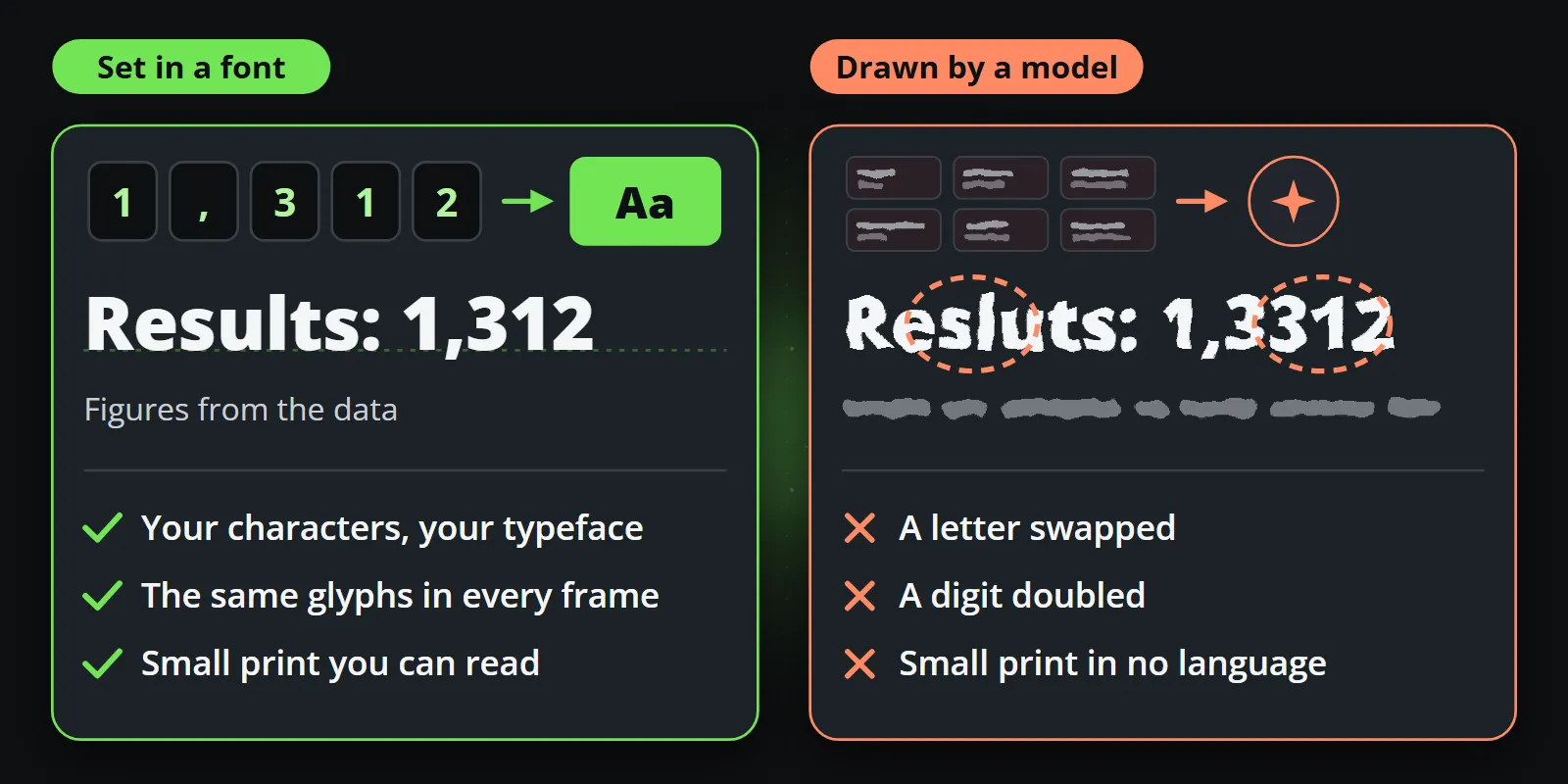
A design tool sets text: it takes your characters and your font and lays out exact glyphs. A video model does not have characters or fonts. It has learned what text looks like in millions of images, and it paints pixels that resemble it. Short, common words often come out right. Long words, brand names, numbers and small print, which is exactly what a brand post contains, are where it slips: a letter swapped, a digit doubled, a line of small print that is legible in no language.
Every frame is approximated from its neighbours
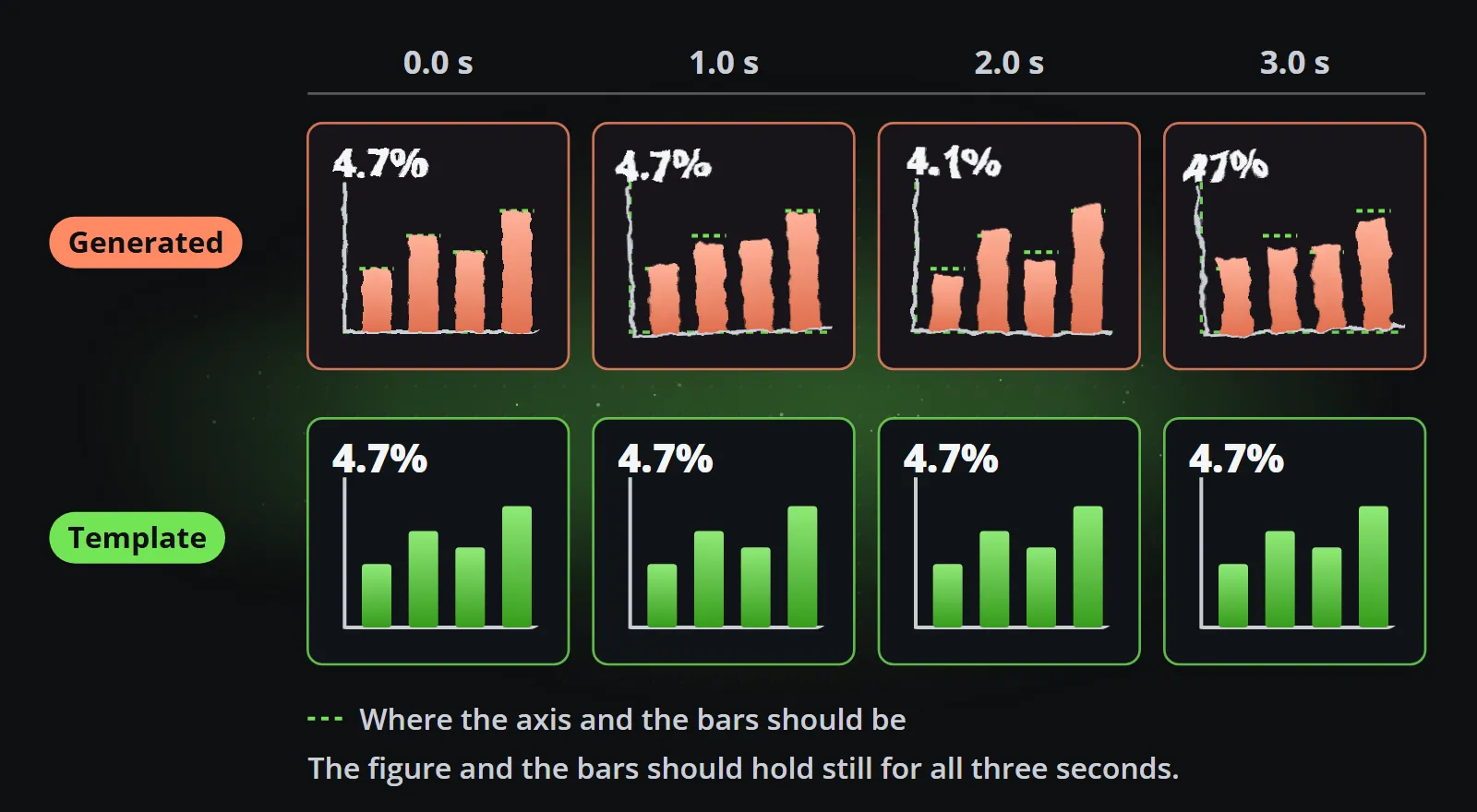
A video model keeps a clip coherent by making each frame consistent with the frames around it. That consistency is statistical, not geometric. For a face or a wave it is invisible. For a straight axis, a bar that must hold its height, or a figure that must stay the same for three seconds, small differences between frames show up as wobble and drift, and viewers notice them within a second.
The model has no data
When a generated clip shows “4.7%”, nothing in the system knows what the value should be. There is no feed behind it, only a prompt. So the figure is not wrong occasionally; it is unsourced every time, even when it happens to match. For a regulated business that is a compliance question, not a design one.
Motion is plausible, not specified
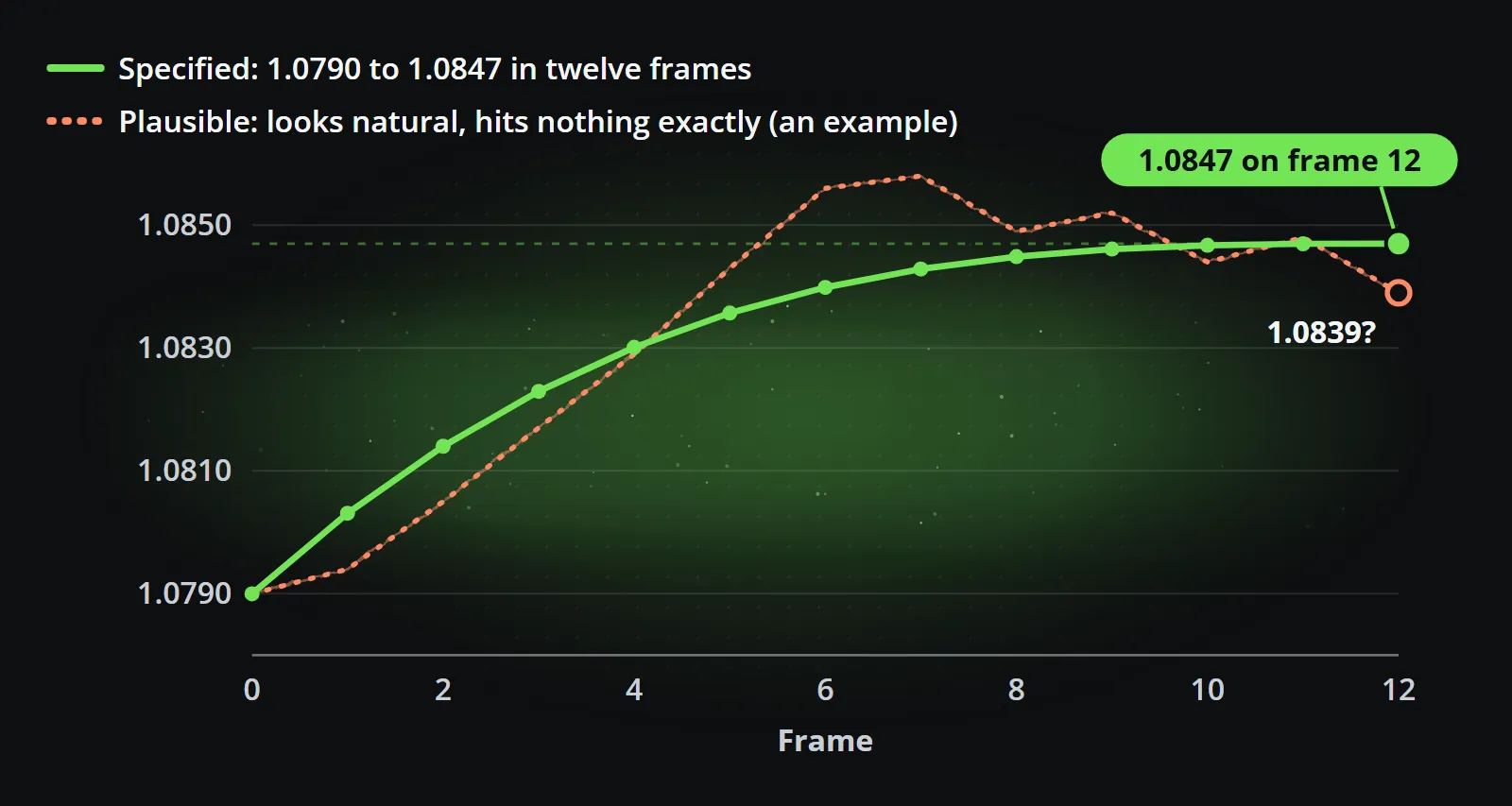
Data animation is a specification: a value counts from 1.0790 to 1.0847 over twelve frames, a bar grows to exactly its value, a ranking reorders in a defined sequence. A model produces motion that looks natural, which is a different goal. It cannot be instructed to hit a number on a frame.
Try it yourself
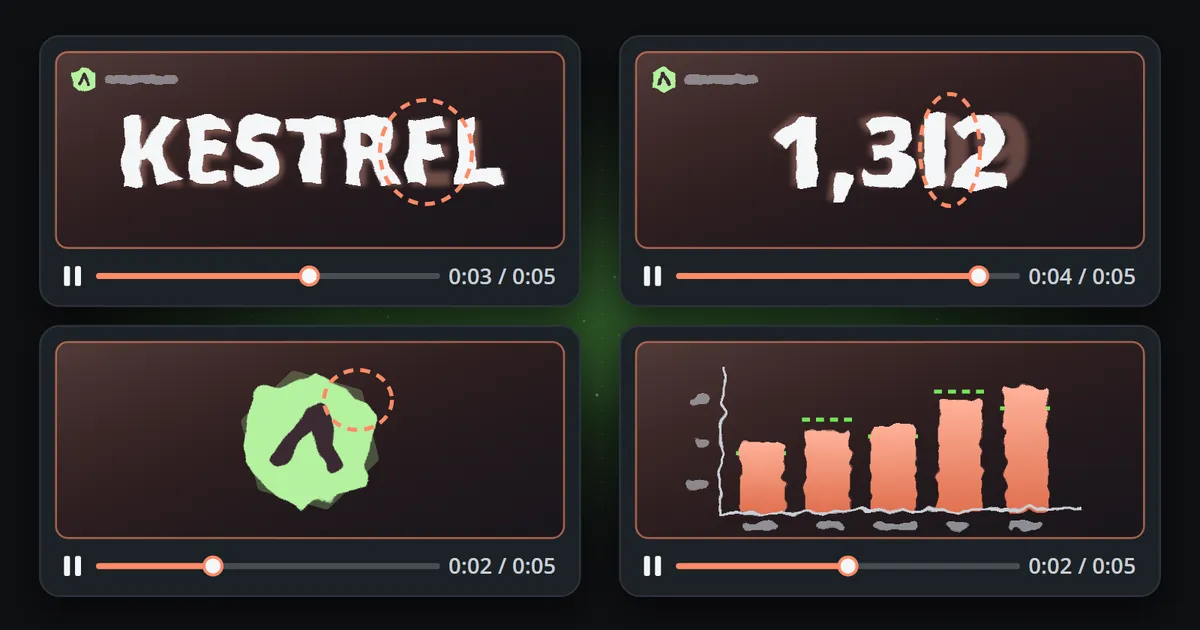
If you want to see this in your own context, a ten-minute test is enough. Ask any current video model for these four clips:
- Your company name written large on a plain background, for five seconds.
- A counter that rises from 1,250 to 1,312 and stops.
- Your logo, supplied as a reference picture, revolving once.
- A bar chart of five values you give it, with labels.
Pause each clip on its worst frame. That frame is what a screenshot of your brand will look like.
The usual workaround, and why it does not scale
The common fix is to generate the footage without text and add the words, numbers and logo afterwards in an editor. It works, and the result can look good. But look at what happened: the generator made the background, and a person made the post. The part that took the time, laying out the text, checking the figure, placing the logo, captioning and resizing for each platform, is back on somebody’s desk.
That is fine for an occasional clip. For a channel that posts every day, it means the generator saved the cheapest part of the work and left the expensive part where it was.
The split that works
The useful answer is not that AI cannot help with video. It is that the job has two halves that belong in different places.
Language and judgement belong to a model. Reading an event, deciding it is worth a post, choosing the angle, writing a short headline, picking the channels and the time: that is judgement over text, and it is exactly what an assistant is for.
Everything exact belongs to a template. A composition designed once by a person decides where the number sits, how the chart animates, what happens when the headline is long and how the whole thing reflows from 16:9 to 9:16. It sets your text in your font, places your logo file, and draws bars as tall as their values.
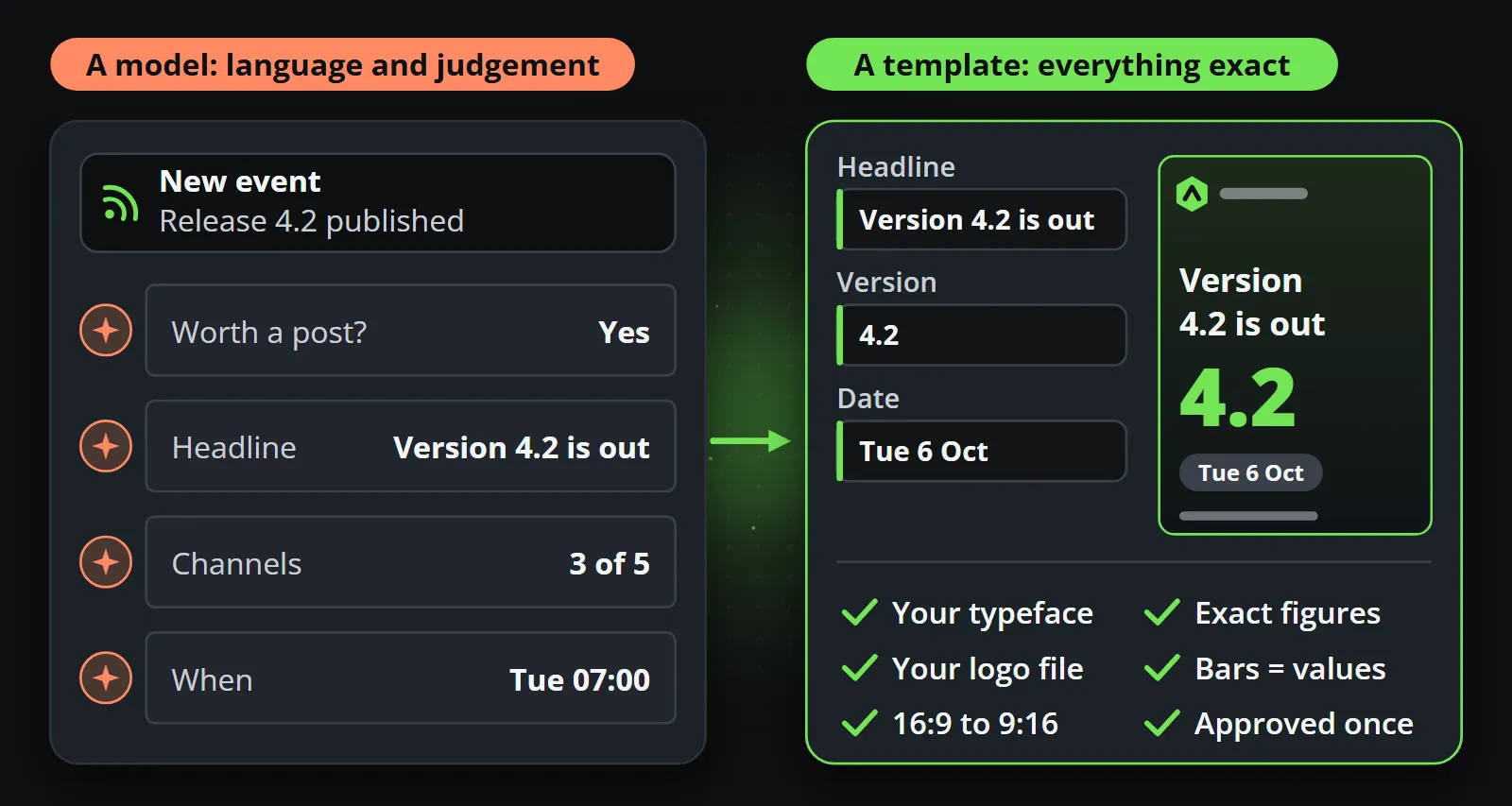
Give the assistant the first half and the template the second, and the result is a video that is both worth publishing and safe to publish without watching every frame first. That is how Reelwire is built: an assistant can run the workspace over MCP, and every clip is still drawn from an approved template. AI video generator vs template video compares the approaches on cost and consistency, and MCP for video shows the assistant half.
What this means for review
Every one of these failures can be caught by a careful person watching each clip frame by frame. That is the catch: a process that depends on catching them depends on that person, every time, at the speed the channel publishes. At one clip a week it is manageable. At several a day, across shapes and languages, it is a full-time job, and the day it is skipped is the day the wrong figure goes out. A review process that scales checks the design once and trusts the data, which is only possible when nothing in the clip is improvised.
Will the next model fix it?
Models will keep improving at text, and some already render short headlines well. Two things will not change with a better model. A generated figure will still have no data behind it, so it will still need checking. And a probabilistic model will still give a different result each time, so every clip will still need checking before it goes out. A template is deterministic: the same data always makes the same clip, which is what lets a reviewer approve it once and trust it afterwards.
Use generative video where approximation is a feature, for footage, backgrounds and ideas. Use templates where it is a risk. The free plan is enough to see the difference on your own figures.
Frequently asked questions
Why does AI-generated video get text wrong?
Video models do not set text in a font; they draw pixels that resemble letters, learned from images. Short, common words often come out right, but long words, names, numbers and small print drift or change between frames.
Can AI video generators show the correct numbers?
Not reliably. A model has no data behind the number it draws, and digits can change from frame to frame. For a price, a result or a statistic, the figure should come from data and be set by a template.
Can AI video reproduce my logo exactly?
Usually only approximately. Edges, spacing and colour can drift between frames even when the logo is given as a reference picture. A template places your actual logo file, so it is identical in every frame and every clip.
What is generative video good for?
Footage where approximation is fine: establishing shots, b-roll, abstract backgrounds, concepts and moodboards. A background loop generated once can be reused by every templated clip.
Make your first clips today
The free plan makes 15 clips a month and asks for no card. Add your logo and colours, pick a template, and see a finished clip in your own brand before you decide anything.

Co-founder of Reelwire. Every organisation has facts worth showing, its prices, results, releases and warnings, and the vision is that every one of them can show those facts every day, on brand, in every format and language, without a production team behind each post. On brand, every day: correct, recognisable and consistent from the first clip to the thousandth.