Sora Is Gone. What Brands Should Use Instead for Short-Form Video
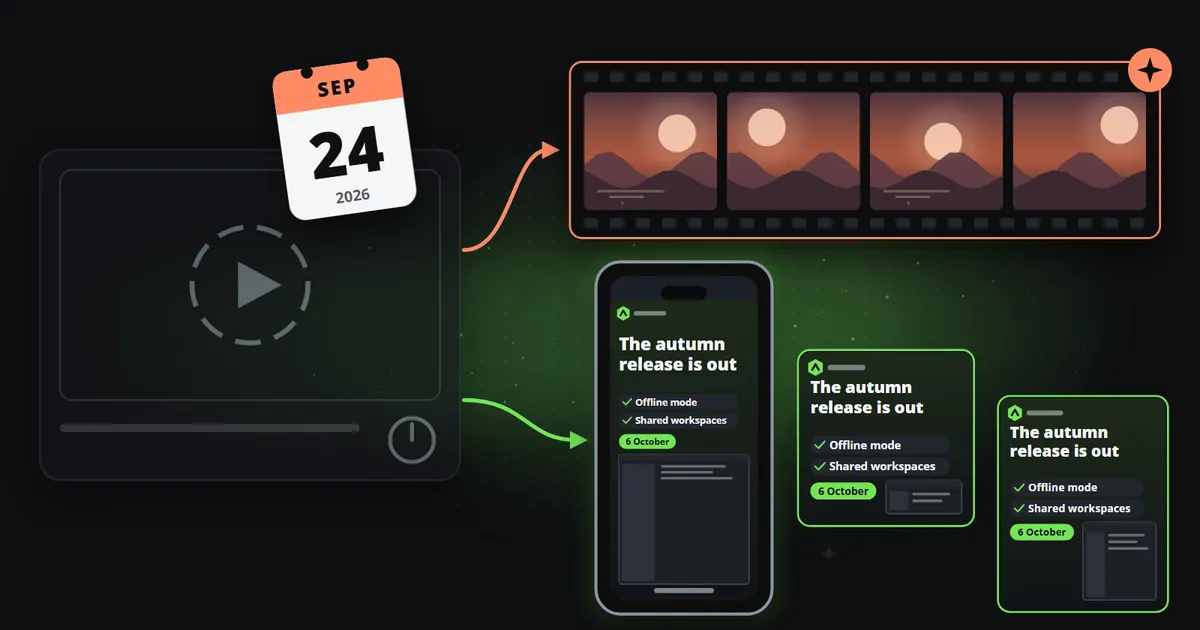
OpenAI closed the Sora app in April and its API on 24 September 2026. Where to go next depends on whether you made footage or posts that carry your figures.

Key takeaways
- OpenAI announced the end of Sora on 24 March 2026, closed the app on 26 April and switched off the API on 24 September. Anything built on the Sora API needs a new engine.
- For footage, the obvious replacements are Google Veo 3.1, Runway Gen-4.5, Kling 3.0 and Luma Ray3.2, priced from $0.50 to $4 per ten-second attempt.
- For posts that carry facts, such as a price, a result or a date, a generator was never the right tool. A template fills a fixed design with your data and does not depend on any one model staying online.
- The lesson of Sora is about dependency as much as quality. Keep the part of your pipeline that must keep running in something you control.
On 24 September 2026, OpenAI switched off the Sora API. Every endpoint and every Sora 2 model went with it, six months after OpenAI announced the end of Sora and five months after the consumer app closed. If you built anything on Sora, from a product feature to a weekly content routine, you are looking for a Sora alternative right now.
Which alternative is right depends on a question that is worth asking honestly: what were you actually making with it? For some teams the answer is footage. For many brands it was something else, short posts about their own news and numbers, and for those the best replacement is not another video model at all.
What happened to Sora
The timeline, as OpenAI set it out in its API deprecations list and its help centre (both checked on 14 October 2026):
| Date | What changed |
|---|---|
| 24 March 2026 | OpenAI announces that Sora, the app and the API, will be discontinued |
| 26 April 2026 | The Sora web and mobile apps close |
| 24 September 2026 | The Sora API and every Sora 2 model are removed from the OpenAI platform |
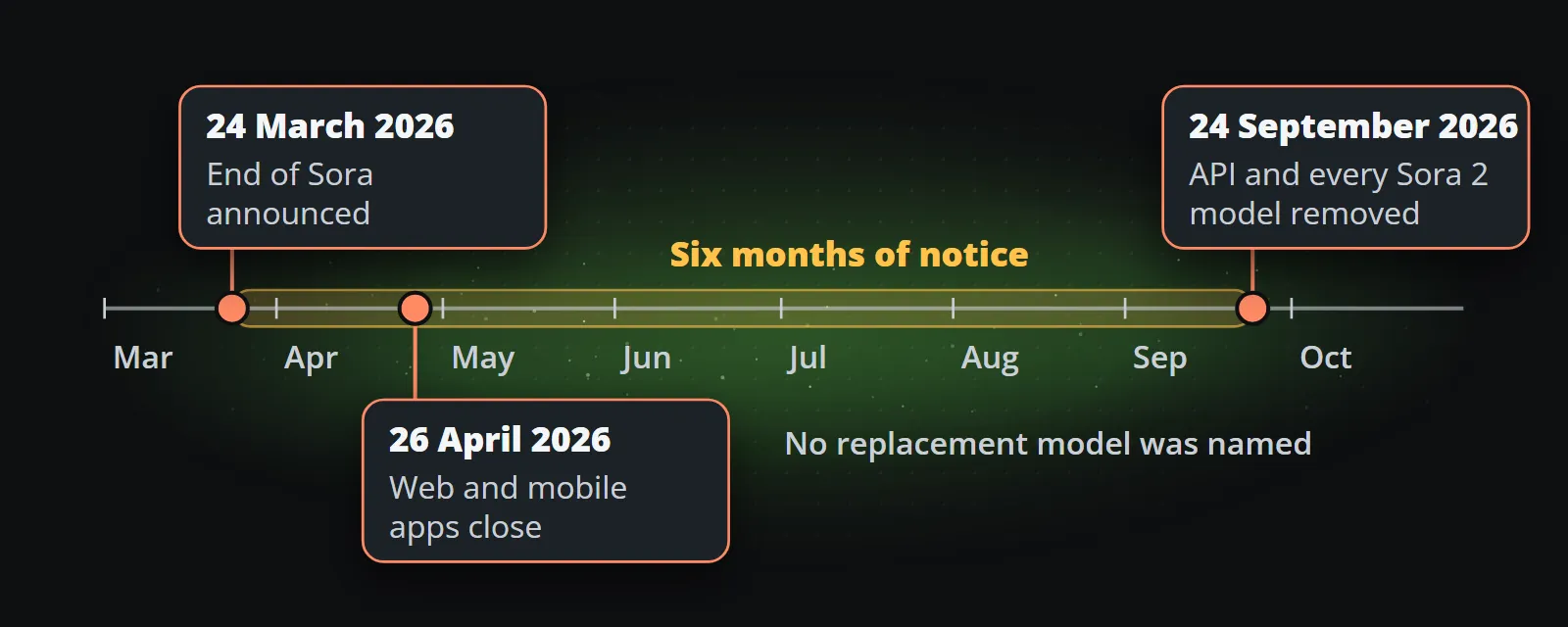
Developers had six months of notice, which is generous by the standards of the industry, but OpenAI’s documentation listed no replacement model. Products built on the API had to choose a new vendor, re-tune their prompts and re-test their output.
Sora alternatives if you used it for footage
For cinematic shots, b-roll and concept work, four model families lead in late 2026. List prices for one ten-second attempt, as published by the vendors on 23 September 2026:
| Model | Strength | One ten-second attempt |
|---|---|---|
| Google Veo 3.1 (Lite, Fast, full) | Strong realism and sound; several price tiers | $0.50 to $4.00 |
| Runway Gen-4.5 | Editing tools around the model, popular with creative teams | $1.20 at 720p |
| Kling 3.0 | Good motion, sound included at 1080p | $1.68 |
| Luma Ray3.2 | High-quality 1080p output | $3.60 |
All four take a first frame, and most a last frame, which makes it easier to keep a sequence coherent. All four are priced per second of output on graphics hardware, so the cost of a channel grows with every clip and every retry.
When you compare them, test with your own prompts and count usable clips, not attempts. A model that costs twice as much per attempt but needs half the retries is the cheaper one.
How to choose between them
Each family has a character, and the right one depends on what your Sora clips were for:
| If your Sora clips were mostly | Start testing with | Why |
|---|---|---|
| Realistic scenes with sound | Veo 3.1 | Strong realism, native audio, and a cheaper Lite tier for drafts |
| Creative work that gets edited afterwards | Runway Gen-4.5 | The model sits inside a set of editing tools creative teams already use |
| Motion-heavy shots at 1080p with sound | Kling 3.0 | Good movement and sound included in a mid-range price |
| Short, high-quality 1080p hero shots | Luma Ray3.2 | High output quality where a few clips matter more than many |
A fair test takes a day, and saves weeks of regret:
- Take ten real prompts from your Sora history, not the vendor’s showcase prompts.
- Run each prompt three times per model, at the resolution you actually publish.
- Count usable clips, the ones you would post without fixing anything.
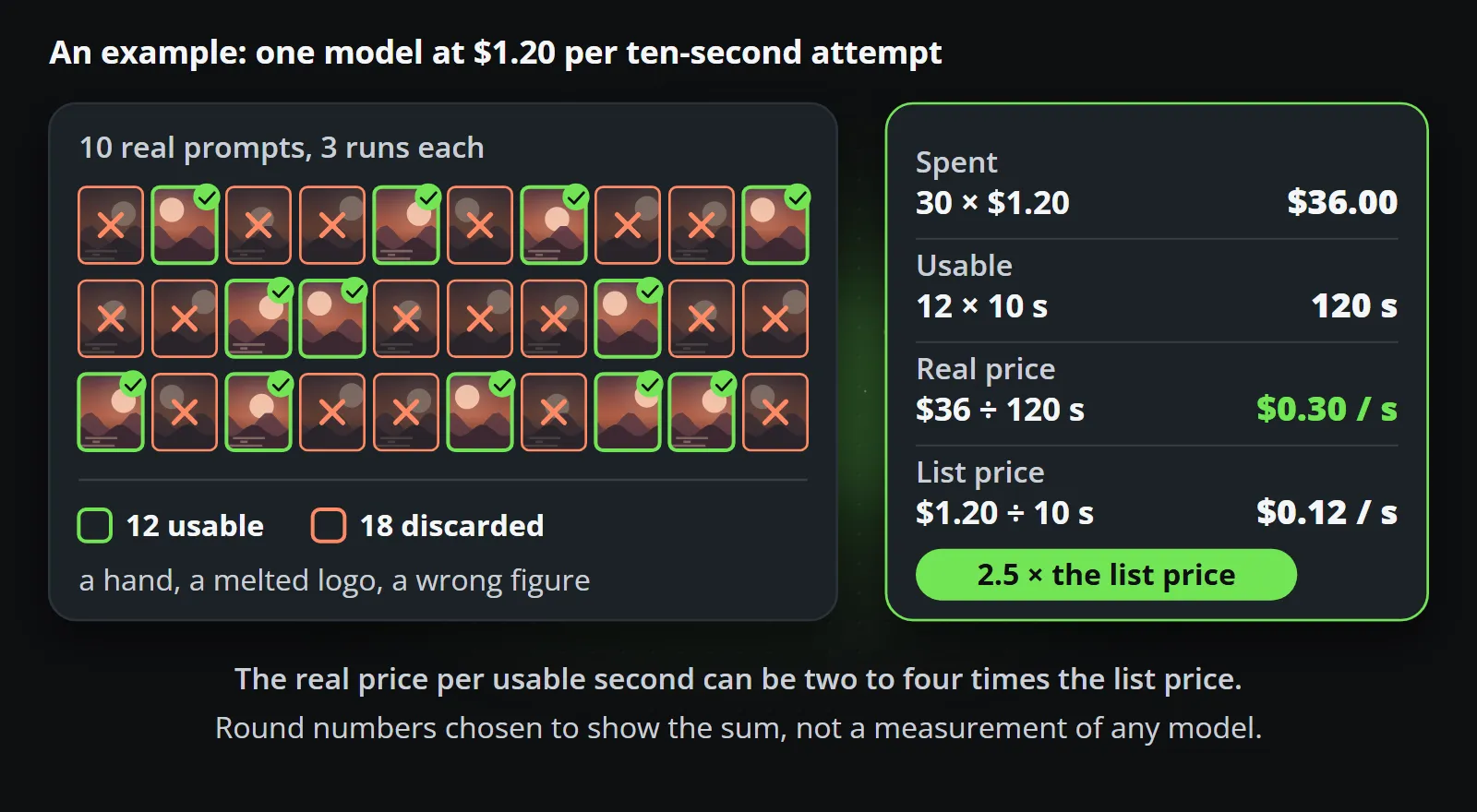
- Divide the money spent by the usable seconds. That is your real price, and it can be two to four times the list price.
- Read the terms: commercial use, what happens to your prompts and uploads, and how much notice the vendor gives before retiring a model. After Sora, that last line matters.
- Check what the files carry. Many tools now attach Content Credentials (C2PA) that platforms read and label, which you will want to know before a clip goes on a brand account.
Step 4 is simple arithmetic, shown here with round example numbers rather than a measurement:
If you used Sora for brand posts: you may not need a generator
Look at what your Sora output was for. If the list includes things like these:
- a weekly market or price update,
- a product release or a new feature,
- an event date, an opening, a result,
- an offer with a price and an end date,
then the video was carrying a fact, and the generator was doing two jobs badly: inventing a background and drawing your text. Generated text is pixels that look like letters, and a figure can change between frames. It is easy to spend more time fixing such clips than making them.
A template does that job directly. It is a design built once, with fields for the headline, the figure, the date and the picture. You send the data and it draws the clip, in your fonts, with your logo, at the right number. There is nothing to prompt and nothing to retry, and the same data always makes the same clip, which is why a template can be approved once. AI video generator vs template video compares the two in detail.
The lesson of Sora is about dependency
Sora was among the best-known video models in the world, and it is gone. Whatever replaces it in your workflow may also change its prices, its terms or its existence. For experiments that is fine. For the part of your marketing that has to run every day, it is a risk worth designing out.
Three questions help:
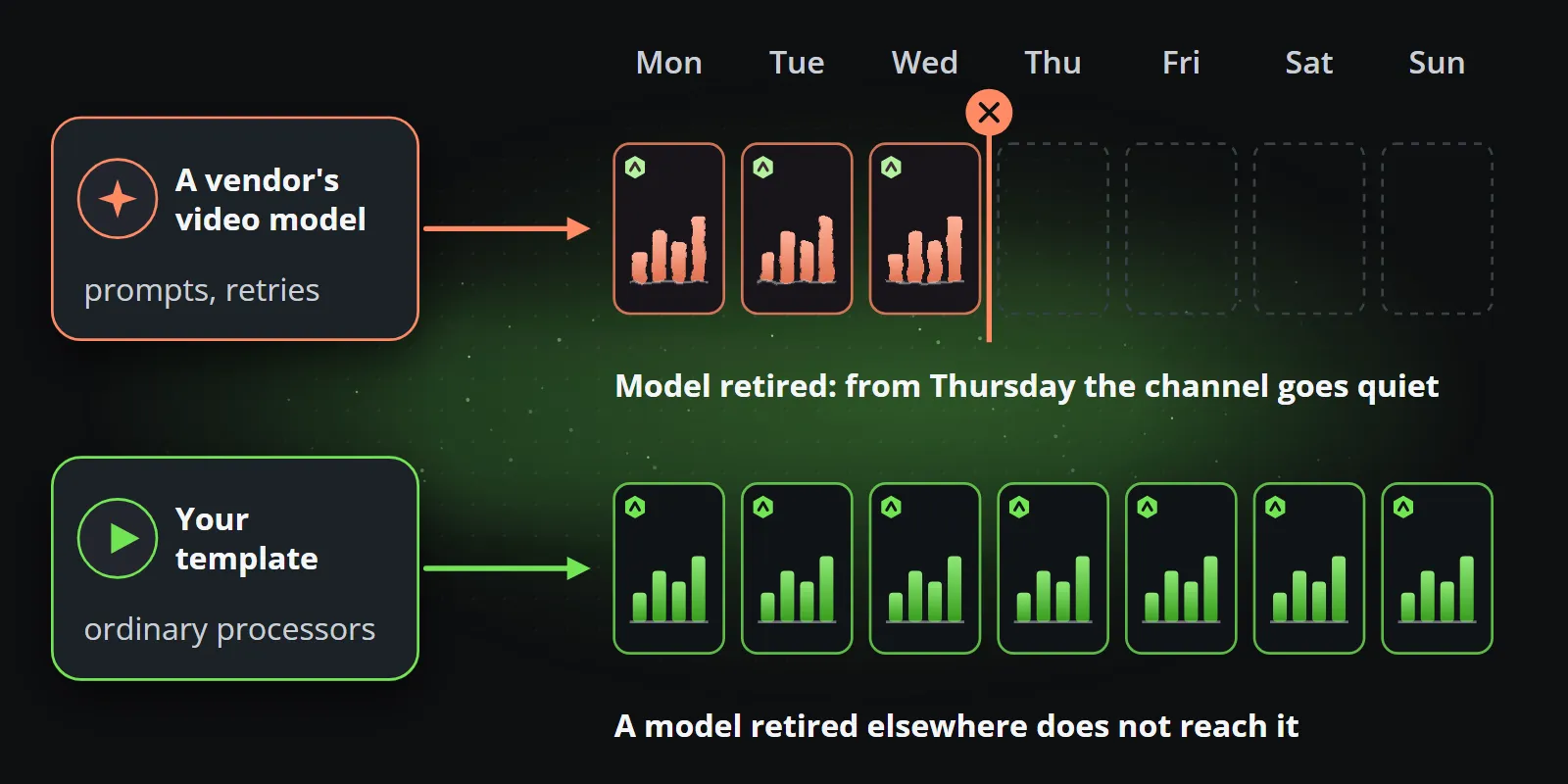
- What happens to my channel if this model disappears tomorrow? If the answer is that it goes quiet, the model is a dependency, not a tool.
- Can I reproduce last month’s clip exactly? If not, you cannot explain or correct what you published.
- Who approves each clip? If the answer is “somebody, every time”, the automation saved less than it seemed to.
A template answers all three: it is yours, it reproduces exactly, and it is approved once. Reelwire renders templates on ordinary processors rather than on a model vendor’s graphics cards, so a model being retired somewhere does not reach your channel at all.
A practical way to migrate
If your Sora workflow made recurring posts, moving it to templates is mostly a matter of writing down what your posts already contain:
- List the posts you made in the last month and group them by kind: updates, releases, offers.
- Write each kind down as fields. A price update is a headline, an instrument, a figure, a change and a date. That list is your template’s shape.
- Pick a template with those fields from a catalogue, or have one designed once.
- Connect the data. A ready-made feed, your own system over an API, or a person typing into a post list when there is no data source.
- Keep a generator for the moments that need footage. If a clip needs movement behind the facts, generate one loop, check it, and store it as a brand asset. Every later post reuses the same file instead of paying for a new attempt.
A worked example
Say a team used Sora for a weekly “product update” video: a prompt describing a sleek abstract background, then the release name and two new features typed over it in an editor, then a resize for each platform. Every week that was a handful of attempts, an hour of editing, and a clip whose background never quite matched the last one.
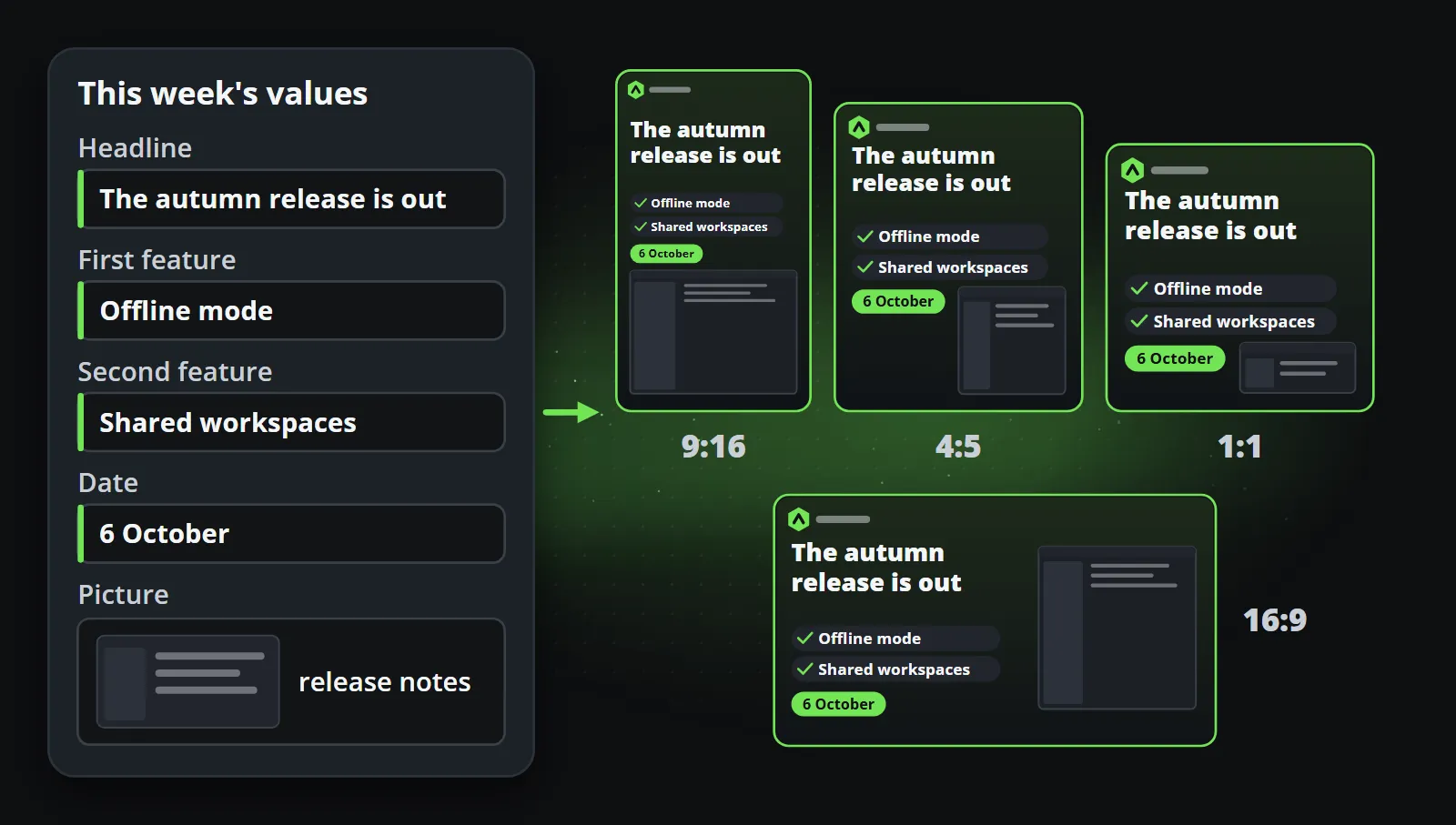
As a template, the same post is five fields:
| Field | This week’s value |
|---|---|
| Headline | The autumn release is out |
| First feature | Offline mode |
| Second feature | Shared workspaces |
| Date | 6 October |
| Picture | A screenshot from the release notes |
The release system, or a person filling a post list, sends those five values. The template draws the clip in the brand’s colours and fonts, in 9:16 for Reels, Shorts and TikTok, 1:1 and 4:5 for feeds, and 16:9 for YouTube and LinkedIn, in every language the channel publishes in. The caption goes out in the length each platform allows, and the post is handed over when it is due. Next week, only the five values change, and the clip looks like the same series, because it is.
Data to video walks through the connection step, and the free plan is enough to try a template against a month of your old Sora posts.
Bottom line
If Sora made your footage, pick from Veo, Runway, Kling and Luma and test them on your own prompts. If Sora made your posts, take the chance to stop generating facts. A template shows your real figures in your real design, costs about as much per finished post as one generated attempt, and does not disappear when a model is retired.
Frequently asked questions
When did the Sora API shut down?
OpenAI announced Sora's discontinuation on 24 March 2026, closed the Sora web and mobile apps on 26 April 2026, and removed the Sora API, including every Sora 2 model, on 24 September 2026.
What is the best Sora alternative for brand videos?
For cinematic footage, Google Veo 3.1, Runway Gen-4.5, Kling 3.0 and Luma Ray3.2 are the leading options. For recurring posts that show your own figures, prices or dates in your design, a template-based tool such as Reelwire fits better, because it draws real data instead of generating pixels.
How much do Sora alternatives cost?
At list prices in September 2026, one ten-second attempt costs about $0.50 to $0.80 with Veo 3.1 Lite, $1.20 with Veo 3.1 Fast or Runway Gen-4.5, $1.68 with Kling 3.0, $3.60 with Luma Ray3.2 and $4.00 with Veo 3.1 at 1080p. Several attempts per usable clip are common.
Can I migrate a Sora workflow to templates?
Yes, if what you produced was recurring and factual. Describe the post as fields (headline, figure, date, picture), choose a template that has them, and send the data. The template then renders every aspect ratio and language without prompting.

Co-founder of Reelwire. Every organisation has facts worth showing, its prices, results, releases and warnings, and the vision is that every one of them can show those facts every day, on brand, in every format and language, without a production team behind each post. Your data, in motion: correct, recognisable and consistent from the first clip to the thousandth.