Synthesia and HeyGen Alternatives: Branded Video Without an Avatar
Avatar tools put a generated presenter in front of your script. For a channel built on figures, dates and offers, a faceless template often fits better.

Key takeaways
- Synthesia and HeyGen are excellent at one thing: a presenter reading a script, in many languages, without a camera. Training, onboarding and explainers are where they shine.
- For a public brand channel, an avatar is a generated face that platforms may label and viewers may distrust, and it carries no data of its own.
- Faceless, designed videos that show the figure, the date or the offer directly are often what a brand channel needs, and they survive every change of staff.
- Reelwire fills templates with live data and draws them in every aspect ratio; it never generates a face or a frame.
Synthesia and HeyGen made something genuinely new possible: a presenter on screen, speaking your script in dozens of languages, without a camera, a studio or a person. For training material and explainers that is a real step forward. So when a brand wants more video for social media, an avatar tool looks like the obvious answer.
Often it is the wrong one, and not because the technology is poor. This article compares avatar video with faceless, template-based video for brand channels, and explains when a Synthesia or HeyGen alternative without an avatar is the better fit.
Avatar video vs template video at a glance
| Avatar tools (Synthesia, HeyGen) | Template video (Reelwire) | |
|---|---|---|
| What is on screen | A generated presenter reading your script | Your figures, text, pictures and logo as designed motion graphics |
| Where the content comes from | A script somebody writes | Data: feeds, your own systems, or a post list |
| What is generated | The face, the voice, the movement | Nothing: every frame is drawn from a template |
| Best at | Training, onboarding, explainers, internal updates | Recurring posts about facts: prices, results, releases, offers |
| Works with the sound off | Needs subtitles | Built to be read without sound |
| Aspect ratios | Usually chosen per video | Every ratio from one template |
| On the platforms | A realistic synthetic person, which labelling rules target | Nothing generated to declare |
Prices change often, so check each vendor’s own pricing page. Both are priced by video minutes or credits.
What avatar tools do well
Credit where it is due:
- Language at scale. One script becomes a presenter speaking many languages, with lip movement to match. For a company training staff in ten countries, that replaces ten shoots.
- No camera, no studio. A product walkthrough or a policy update can be made at a desk.
- Consistency of the presenter. The avatar does not have a bad day.
- Your own likeness. Both offer avatars made from footage of a real person, which keeps a known face on screen without recording every video.
Corporate learning, onboarding, sales explainers and internal communication are where these tools are strongest, and for those jobs they are hard to beat.
Why avatars are a weak fit for a brand channel
A public brand channel on TikTok, Instagram, YouTube Shorts or LinkedIn is a different job, and four things work against an avatar there.
1. A generated face is what labelling rules are written for
Rules on synthetic media focus on realistic people. YouTube asks creators to disclose realistic synthetic content, TikTok and Meta label AI content, and under the EU AI Act deployers must disclose deepfakes from 2 August 2026 (as of October 2026; this is not legal advice). A realistic presenter who does not exist sits close to the centre of all of these. That may be acceptable for an explainer; on a brand’s public feed, a label beside every post changes how it is read. AI slop goes into this in more detail.
2. Viewers may watch with the sound off
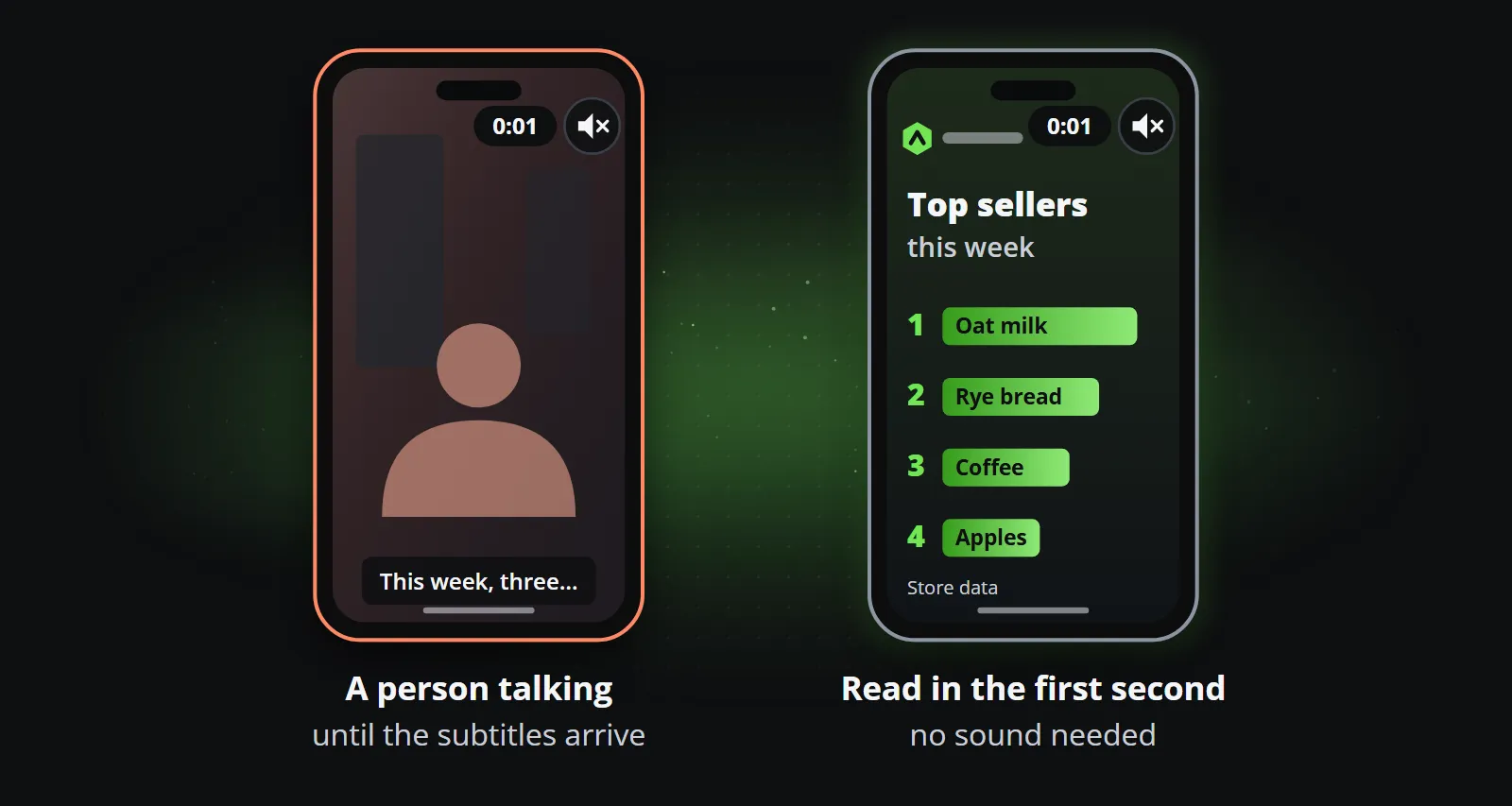
A clip may well be watched with the sound off, at least at first: on a train, at work, late at night. A presenter talking is then a person moving their mouth until somebody reads the subtitles. A designed post, a figure counting up, a ranking sliding into place, an offer with its price, is read in the first second without any sound.
3. The data is reduced to words
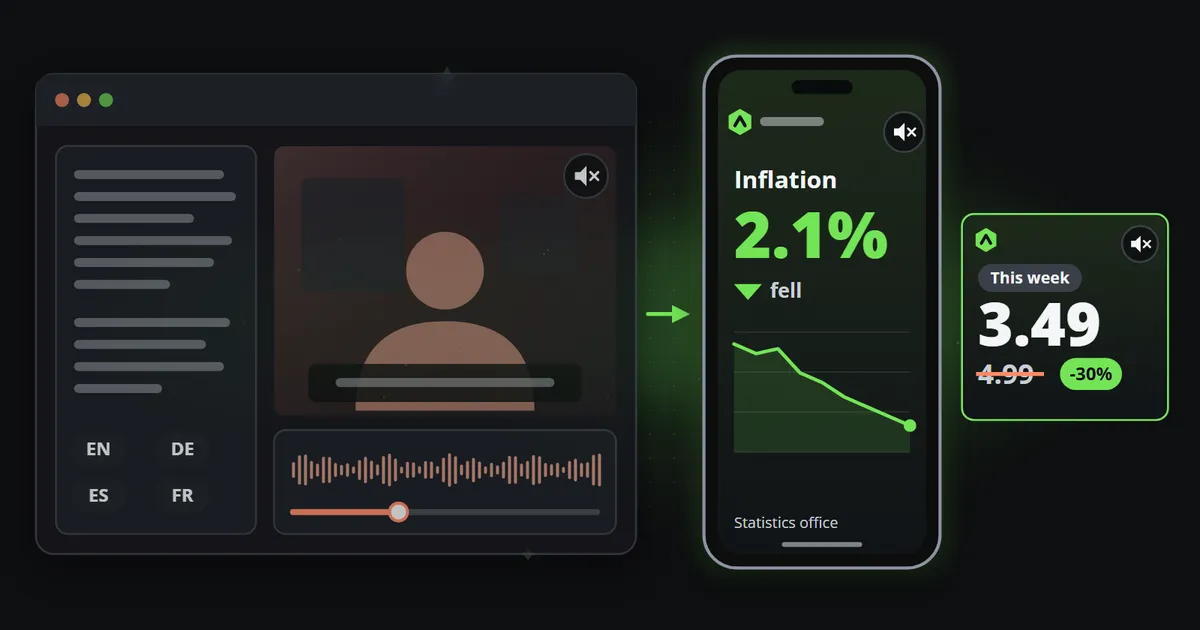
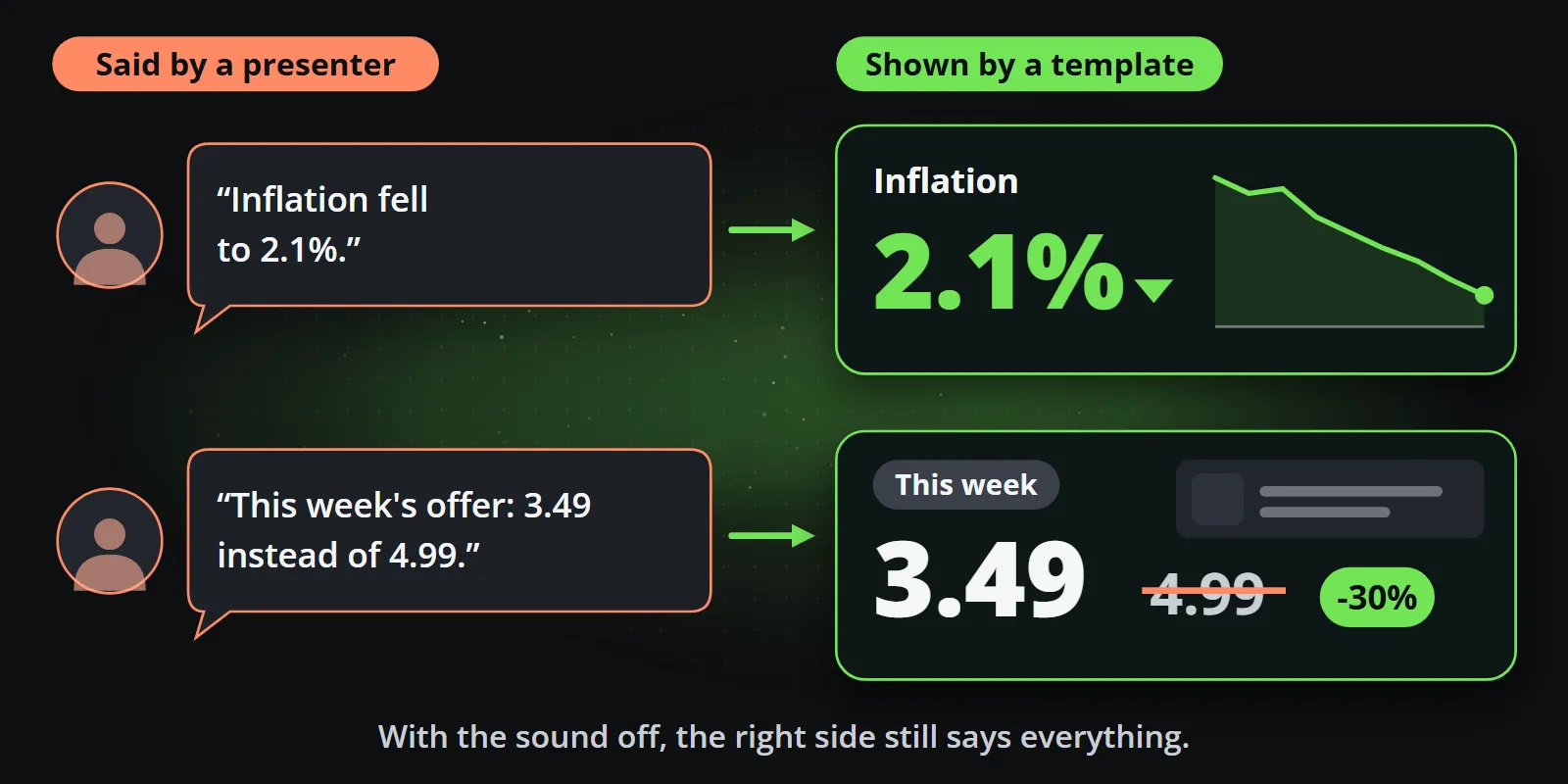
If your post is “inflation fell to 2.1%” or “this week’s offer: 3.49 instead of 4.99”, the avatar can say it. A template can show it: the number large, the change in colour, the chart behind it, the old price struck out. For anything numeric, showing beats saying.
Both Synthesia and HeyGen offer APIs that can fill a template’s text from your systems, so a developer can automate them. The result is still a presenter reading words, and you still build the pipeline around it: the trigger, the captions per platform, the posting.
4. A face, real or generated, is a dependency
Building a channel on a person is how creators win, and it is a risk for an organisation: the person can leave. An avatar of a real employee keeps their face after they have gone, which raises questions of its own. A generic avatar avoids that, but it is a face that represents nobody. Faceless content sidesteps the question entirely, which is why it suits organisations so well. Faceless videos for business covers how to run a channel that way.
The faceless alternative
A template is a design made once by a person, with named fields for the content. Data fills the fields, and the clip is drawn frame by frame, so:
- figures are exact, set in your typeface from the data,
- your logo is your file, not a model’s impression of it,
- every aspect ratio (9:16, 4:5, 1:1, 16:9 and 2:3) comes from the same design,
- every language the channel publishes in comes from the same template,
- the same data always makes the same clip, so a template can be approved once.
In Reelwire, a channel listens to a source, a ready-made feed, your own system over the API, or a post list, and each new event becomes a post that is handed over when it is due: by email with a kit to post it from a phone, by webhook to your own system, or directly to Discord, LinkedIn, Slack or Telegram. Data to video shows the whole loop.
The same weekly update, made both ways
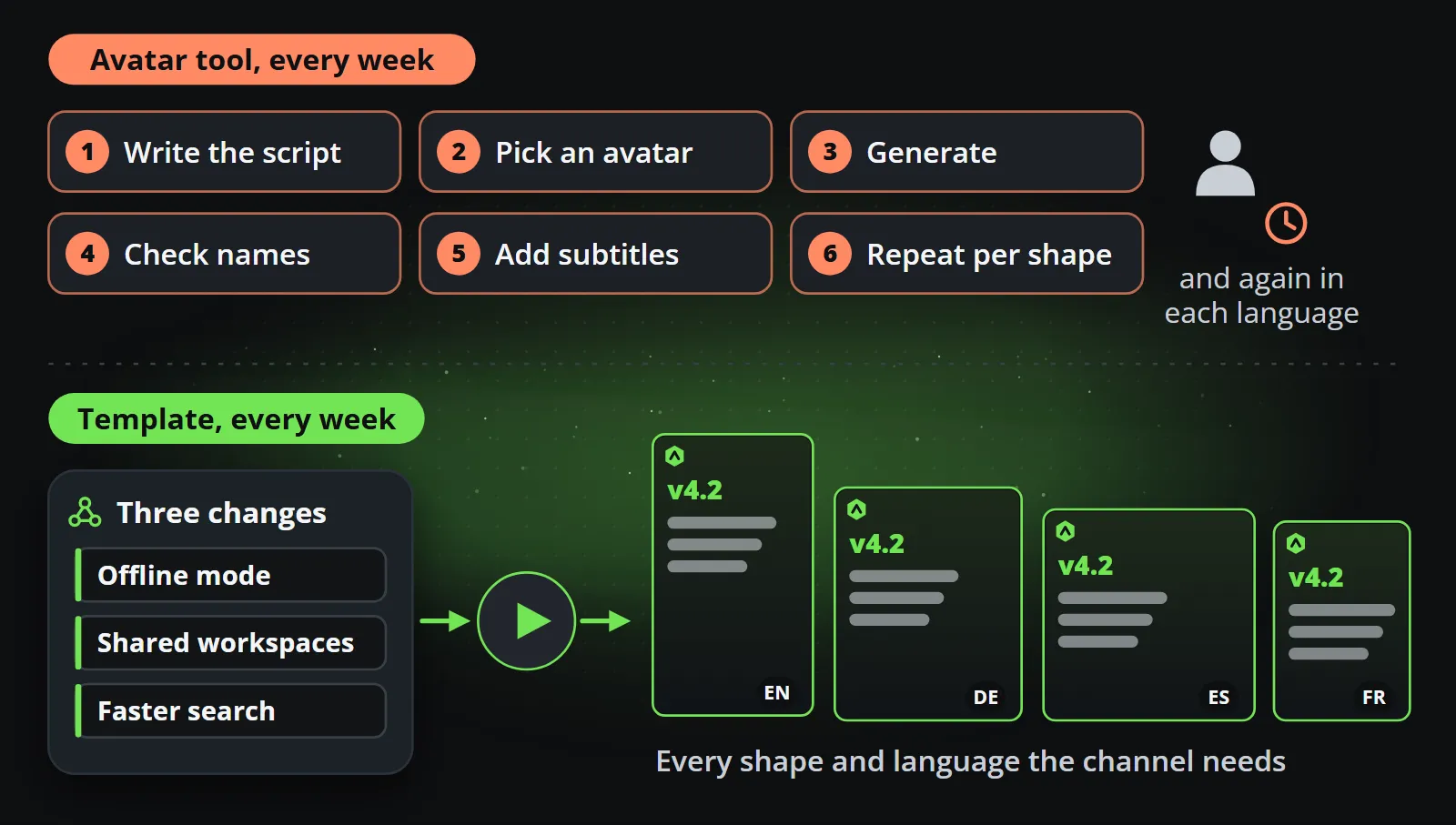
Take one real example: a weekly post announcing the three most important changes in a product, for LinkedIn, Instagram and YouTube Shorts.
With an avatar tool, somebody writes a script, picks the avatar and the background, generates the video, checks the pronunciation of the product names, adds subtitles, and repeats for each aspect ratio and language. The result is a presenter saying three sentences. A viewer scrolling past with the sound off sees a person talking, and has to wait for the subtitles to learn what changed.
With a template, the three changes arrive as data: three short lines, perhaps with a picture each, from the release notes or a post list. The template shows them one after another, large and legible, with the version number, the date and the logo, in every shape the channels need, in every language the channel publishes in. A viewer with the sound off understands it in the first two seconds.
Both are legitimate. The question is which one your audience reads faster, and which one somebody has to make by hand every week.
Real-person avatars: worth a second thought
Both tools can build an avatar from footage of a real person, so a known face can appear in videos it never recorded. That is attractive for a founder or a spokesperson, and it deserves more thought than a template choice:
- Consent and scope. The person should know exactly what their avatar may say, where, and for how long. Put it in writing.
- Continuity. When the person leaves the organisation, their face is still on the channel unless you take it down, and new videos with it are a question nobody wants to answer in public.
- Trust. Viewers increasingly assume a presenter may be synthetic. A label that says so is honest; a missing label that is later discovered is worse than having no avatar at all.
None of this applies to a faceless channel, which is one of its quieter advantages: the brand is the presenter, and the brand does not resign.
What it costs in practice
Avatar tools are priced by minutes or credits, so the visible cost grows with every video. The less visible cost is the person in the loop: writing each script, checking each render, adding subtitles, resizing. For an occasional explainer that is reasonable. For a daily channel it is a part-time job.
Template video turns the cost around. The design is paid for once, and each post after that is data in, clip out. On a paid Reelwire plan a finished video costs under a euro, and the hours spent per post are the ones you choose to spend reviewing it. What a short video actually costs breaks the full arithmetic down.
Which one should you use?
| Use an avatar tool when | Use templates when |
|---|---|
| A person explaining is the point | The fact is the point |
| The audience will listen: training, onboarding | The audience scrolls with the sound off |
| The video is long-ish and occasional | The posts are short and frequent |
| The content is a script | The content is data: prices, dates, results, offers |
| It is internal or for existing customers | It is a public channel meant to reach new people |
And they combine well. A brand can publish daily faceless posts from templates and add an occasional explainer with a presenter, real or avatar, when there is something to explain. The templates keep the channel present every day; the presenter turns up when a voice genuinely adds something.
Bottom line
Synthesia and HeyGen are the right tools when you need someone talking. If what you need is a channel that shows your figures, releases and offers every day, a presenter is the expensive way to say what a well-designed graphic can show at a glance. Try templates on your own data with the free plan, or compare the broader options in AI video generator vs template video.
Frequently asked questions
What is the best Synthesia alternative for social media?
It depends on the content. For a talking presenter, other avatar tools such as HeyGen are the alternatives. For short posts about figures, releases, offers or schedules, a template-based tool such as Reelwire fits better, because the content is shown as designed graphics in every aspect ratio instead of read out by an avatar.
Are AI avatar videos labelled as AI-generated?
Often, yes. A realistic generated person is exactly what platform rules on synthetic media cover: YouTube asks for disclosure of realistic synthetic content, TikTok and Meta label AI content, and the EU AI Act requires deepfakes to be disclosed from August 2026.
Can HeyGen or Synthesia make videos from data automatically?
Both offer APIs that can swap text in a template, so a developer can automate them. The result is still a presenter reading a script, and the data appears as words rather than as a chart, a counter or an offer card.
What is a faceless video?
A video with no presenter on camera: animated text, charts, product pictures and motion graphics carry the message. Faceless videos are popular because they are fast to produce, work with the sound off, and do not depend on any one person.

Co-founder of Reelwire. Every organisation has facts worth showing, its prices, results, releases and warnings, and the vision is that every one of them can show those facts every day, on brand, in every format and language, without a production team behind each post. Your data, in motion: correct, recognisable and consistent from the first clip to the thousandth.