Release Notes to Video: Turn Your Changelog Into Short-Form Content
Release notes are finished content that few people outside the project see. A release notes video takes the version, the changes and the date to every feed.

Key takeaways
- Release notes are already written, and often checked and approved too. What they lack is a format people watch and a place where people already are.
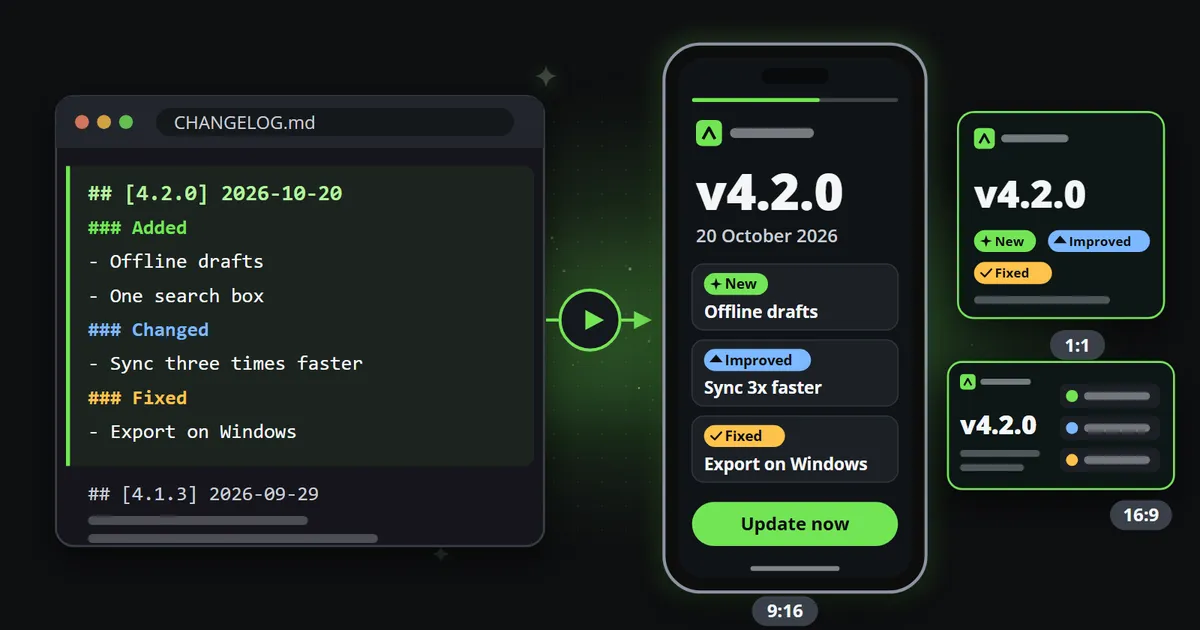
- A release notes video shows the version, the date and about three changes, each marked new, improved, fixed or removed: around eleven seconds, with the full notes linked in the post.
- The release system can feed it directly: a release webhook, an Atom feed or the changelog's own sections become one event, and every channel renders its own clip.
- One event can carry every language you sell in, and each channel draws its own language in its own aspect ratio, so a release reaches every market on the same day.
A release notes video turns the changelog you already wrote into a short clip people actually see: the version, the date and the three changes that matter, in the feeds where your users and your future users spend their time. The release notes themselves are written before anything ships, and often checked and approved too. What they lack is a format and a place.
This article covers what a good release notes video shows, how to feed it straight from the changelog or the release system, how to make it in every language you sell in, and how a steady release rhythm becomes a channel of its own.
Where do release notes get lost?
Release notes are written for the record. They are complete, precise and in order, which is exactly right for the person who goes looking for them: an administrator checking whether a bug is fixed, a developer reading what changed in an API, a customer’s IT team planning an update. That person finds the page because they already knew it existed.
Many other people never come across it. A changelog page waits to be visited; it does not travel. The people who would care about version 4.2, the user who has not noticed that offline drafts exist, the prospect comparing three tools, the colleague who could recommend you, are not reading your changelog. They are scrolling a feed.
Three habits make it worse:
- The news is buried in the record. The one entry that changes how people work sits between eleven fixes nobody outside the support team will miss.
- The announcement is a link. A post that says “Version 4.2 is out, see what’s new” asks people to leave the feed to read a page, and not everybody will.
- It exists in one language. The changelog is often only in English, so users in other markets read it in their second language, if they read it at all.
None of this means the release notes are badly written. They are written for one job, the record, and then asked to do a second one, the announcement, without a format for it.
What should a release notes video show?
Less than the release notes, and the same facts. A release notes video carries:
- The product and the version, large: “v4.2.0”.
- The date, or when the release reaches everybody: “Rolling out from 20 October 2026”.
- A headline for the release, in one line.
- Three changes, each marked as new, improved, fixed or removed, with a short sentence and, where it helps, one more line on who gets it or where to find it.
- A call to action at the end: update now, read the full notes, book a demo.
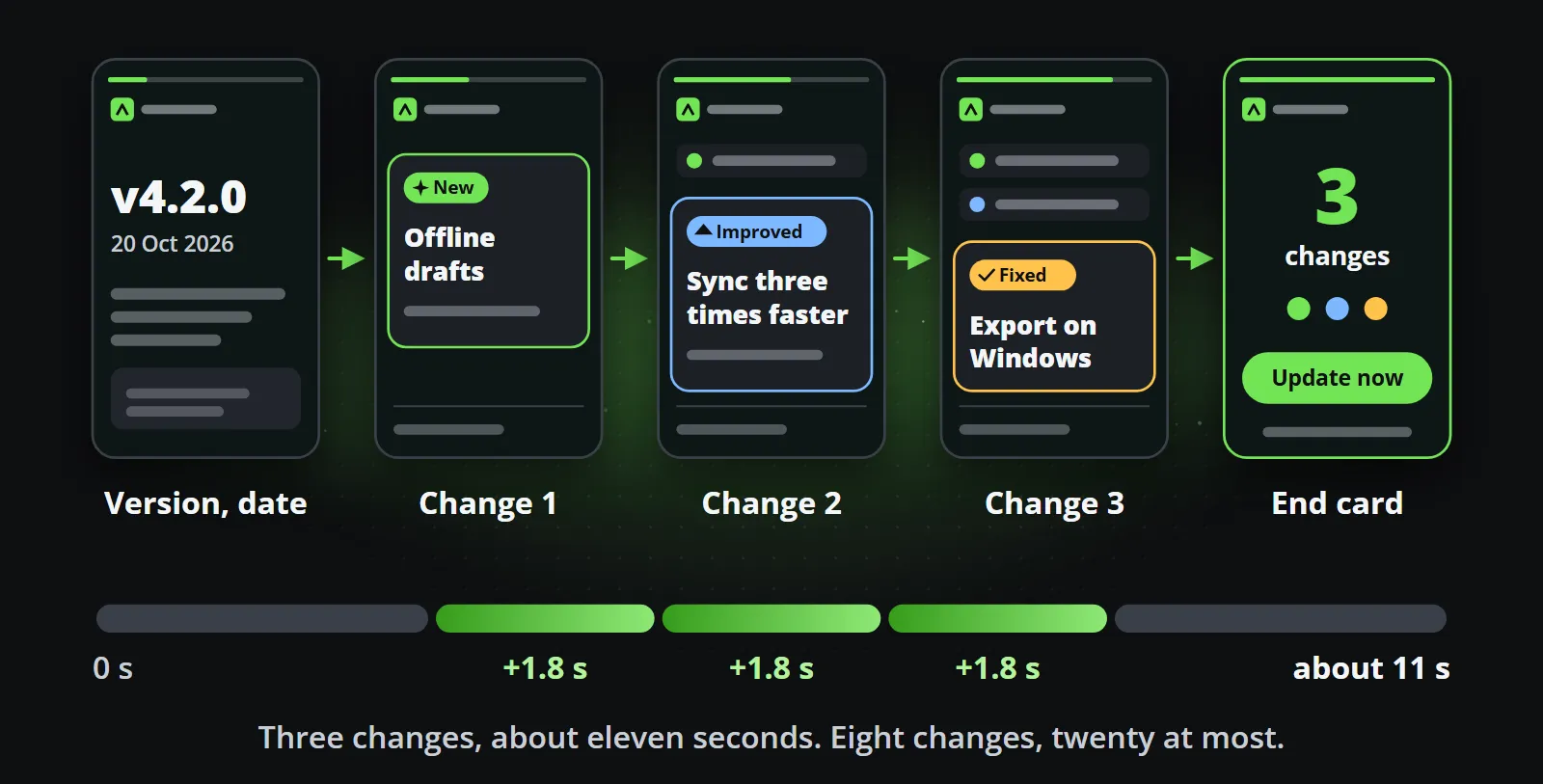
Reelwire’s Release notes template, part of its Tech package, is built around exactly this. It takes one to eight changes and gets a little under two seconds longer for each: with three changes the clip runs about eleven seconds, with eight about twenty. Every field has a limit, and the limits are part of the design rather than a nuisance:
| Field | Limit | Example |
|---|---|---|
| Product | 32 characters | Lumen Studio |
| Version | 16 characters | v4.2.0 |
| Headline | 64 characters | Offline drafts, faster sync and one search for everything |
| Date | 40 characters | Rolling out from 20 October 2026 |
| Changes | 1 to 8, each marked new, improved, fixed or removed | New: offline drafts |
| Each change | 72 characters, plus a 72 character detail line | Offline drafts: keep writing without a connection |
| Call to action | 28 characters, with a 48 character line under it | Update now |
A change that is too long is refused, naming the field, rather than clipped on a published clip. A screenshot of the release can be shown with the version too; it comes from your own media library, never from a web address.
Why three changes and not thirty?
The clip does not replace the changelog; it is the reason somebody opens it. Pick what a user would notice in their first week: the new thing they can do, the thing that got noticeably better, the annoyance that is finally gone. The full notes go in the post text as a link. That text is written once in up to four lengths, from 200 to 4,000 characters, and each platform gets the longest one that fits its limit.
How do you turn a changelog into a release notes video automatically?
The release already produces an event somewhere: a tag pushed, a release published, an entry added to the news page. Making the video is a matter of sending that event on.
From the release system. GitHub, for example, sends a release webhook with the action
published when a release goes out, and a GitHub Actions workflow can run on the same event
(GitHub’s documentation of webhook events,
checked on 14 October 2026). A few lines in that workflow, or a small service receiving the webhook,
map the release to the template’s fields and send one event to a Reelwire custom feed.
From a feed. Release pages often publish a feed of their own: a public GitHub repository’s
releases, for instance, are available as an Atom feed at /releases.atom, such as
Node.js’s releases feed (checked on 14 October 2026). A short script or an automation tool can watch it and send each new entry on.
Data to video shows that route for any RSS or Atom feed.
From the changelog file. A changelog that follows the Keep a Changelog convention already says what kind of change each line is, under six headings: Added, Changed, Deprecated, Removed, Fixed and Security (checked on 14 October 2026). Four of them map straight onto the kinds the clip draws.
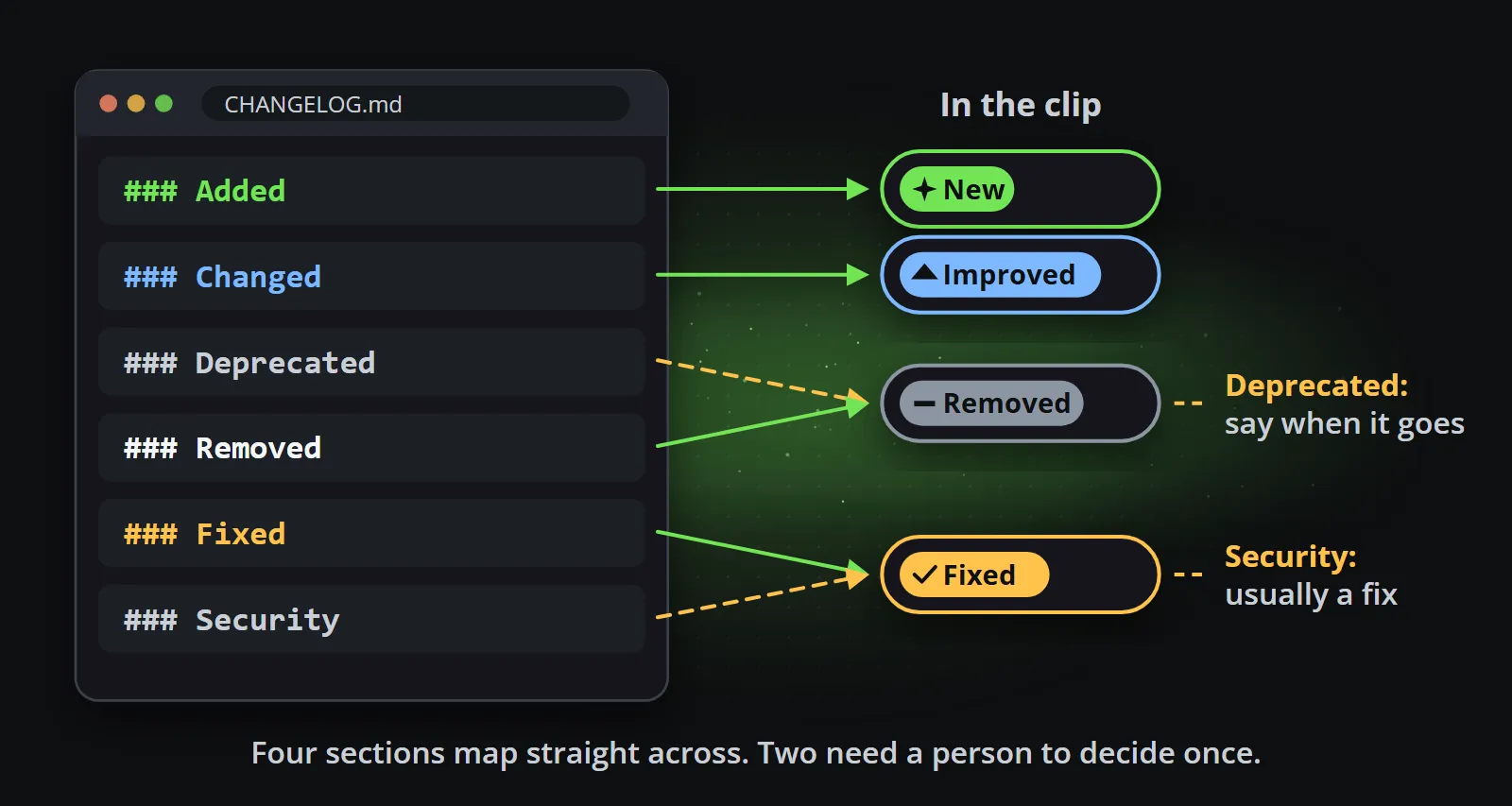
Deprecated and Security need one decision, made once. A deprecation is usually announced ahead of the removal it leads to, and a security update is usually shown as a fix, often without the details until people have had time to update.
Whichever way it arrives, the event goes to a custom feed over Reelwire’s REST API, with a key. The part that fills the clip looks like this:
{
  "clipData": {
    "kicker": "Lumen Studio",
    "version": "v4.2.0",
    "headline": "Offline drafts, faster sync and one search for everything",
    "date": "Rolling out from 20 October 2026",
    "changes": [
      { "kind": "new", "text": "Offline drafts: keep writing without a connection" },
      { "kind": "improved", "text": "Sync is up to three times faster on large projects" },
      { "kind": "fixed", "text": "Exports on Windows keep their file names" }
    ],
    "labels": { "new": "New", "improved": "Improved", "fixed": "Fixed" },
    "cta": { "label": "Update now", "detail": "lumenlabs.example/changelog" }
  }
}
The dashboard gives the code to send it in Node.js, Python, PHP, C# and curl, and a test tool checks an event against the template before anything is sent for real (custom feeds in the documentation). Every event carries an id the sender makes once and keeps with the release, so a release sent twice is still made once.
What happens next needs nobody. Each channel listening to the custom feed renders the clip in its own shape and language, and the post is handed over when it is due: by email, with a page to post it from a phone; by webhook, to your own system or a posting service; or posted directly to LinkedIn (a personal profile), Slack, Discord or Telegram. The template is approved once and every clip made from it inherits that approval; if somebody should also see each release clip before it goes out, the channel can ask for that too.
How do you make it in every language you sell in?
The changelog is in English; the users are in Germany, France and Japan. One event can carry every
language: the text in the event’s own language, and under locales only what differs in each of the
others (sending events in the documentation). A
channel is one account in one language, so the German channel draws the German text, and a channel
whose language the event does not carry draws the event in the language it is written in.
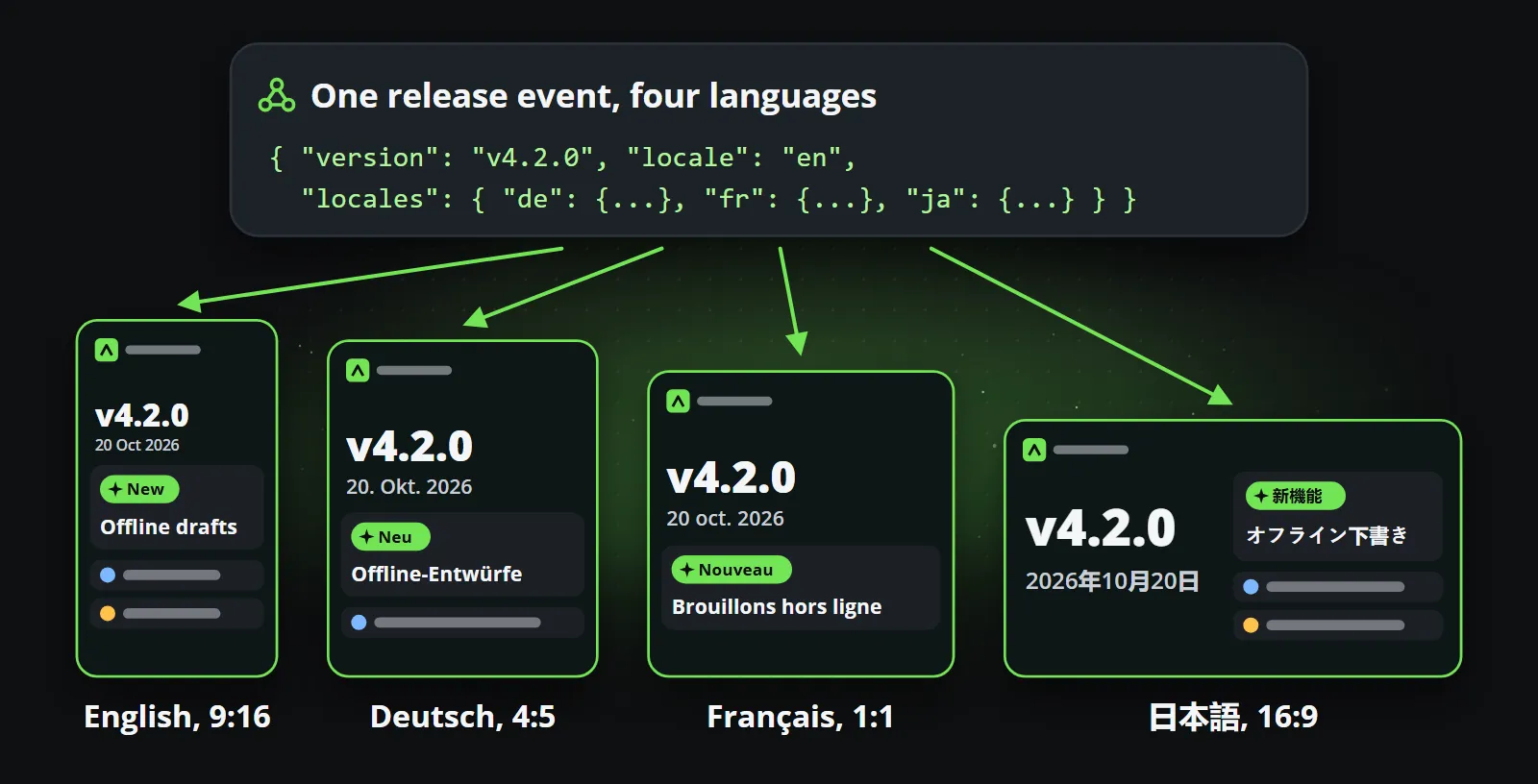
Each language is drawn in its own script, 186 of them, from German umlauts to Japanese and to Arabic written right to left. The words for new, improved and fixed are part of the content too, so they appear in the clip’s language instead of in English. Writing the translations stays with you: your localisation team, your translation service, or an AI assistant connected to Reelwire filling in the language sections.
Each channel also has its own aspect ratio. The 9:16 version for Reels and Shorts, the 4:5 and 1:1 versions for feeds and the 16:9 version for a product page are each laid out from the same template, not cropped from one another, which matters as soon as a clip carries text. One composition, every aspect ratio explains why.
Can a release calendar become a channel?
One release clip is useful. A steady rhythm of them is a channel, and one that runs on material the product team produces anyway. Between the releases themselves, a few more formats fill the weeks:
| Post | When | Where it comes from |
|---|---|---|
| Release clip | The moment a release is published | The release system or the changelog |
| Coming soon | A week before a planned release | A post written when the date is set |
| Feature spotlight | Between releases | One change explained with a screenshot |
| Monthly round-up | The first working day of the month | The month’s releases, summed up |
| Maintenance window | The day before it starts | The status page or the operations calendar |
The release clips come from the custom feed. The planned ones go into a post list in Reelwire’s Post composer, written when the date is known and published by themselves on the day, through the same templates, brand and hand-over as everything else. Formats like these work without anybody in front of a camera, which faceless videos for business covers in general.
The numbers stay small. A team shipping four releases a month, each posted in three shapes and two languages, makes 24 videos a month, which fits Reelwire’s free plan of 25 videos a month. A larger rhythm moves to a paid plan, at under a euro a video.
Bottom line
The release notes are already written. A release notes video only changes where they go: from a page people have to find to the feeds where they already are, in every language and every shape, the moment the release is out.
To see it with your own material, send the address of your news page and a week of your channel comes back, built from what is already on it. Or start on the free plan, 25 videos a month with no card, and read more on Reelwire for tech and industry.
Frequently asked questions
What is a release notes video?
A short clip, usually ten to twenty seconds, that announces a new version of a product: the version number, the date, a few changes marked as new, improved or fixed, and a call to action. It carries the same facts as the release notes, in a format people see in their feeds.
How long should a release notes video be?
Short enough to be watched to the end, around ten to fifteen seconds for three changes. Reelwire's Release notes template runs about eleven seconds with three changes and about twenty with the maximum of eight, and the post links the full notes.
Can I turn a GitHub release into a video automatically?
Yes. GitHub sends a release webhook when a release is published, and a GitHub Actions workflow can run on the same event. A small step maps the release to the template's fields and sends one event to a Reelwire custom feed, which renders the clip for every channel listening to it.
Do I have to rewrite my release notes for social media?
No, only choose. Pick the three changes a user would notice, shorten each to a sentence of up to 72 characters, and link the full notes. The version, the date and the kind of each change come straight from the changelog.
Can a release video be made in several languages?
Yes. One event carries the text in every language you have it in, and each channel draws its own language in its own script, with the words for new, improved and fixed in that language too.
Is a release notes video made with AI?
Not in Reelwire. The clip is drawn from a designed template with your data in it, so the version number, the dates and your logo are exactly what you sent, every time. An AI assistant can help write or translate the text, but nothing in the picture is generated.

Co-founder of Reelwire. Every organisation has facts worth showing, its prices, results, releases and warnings, and the vision is that every one of them can show those facts every day, on brand, in every format and language, without a production team behind each post. Your data, in motion: correct, recognisable and consistent from the first clip to the thousandth.