onOffice, Propstack and Reelwire: Connect Your Real Estate CRM With Two MCPs, Not a Plugin
How to use onOffice, Propstack or any property CRM with Reelwire: two MCP connectors in one AI chat instead of waiting for a plugin, and what each side needs.

Key takeaways
- The old way to join two tools is a plugin: built by somebody else, for exactly your two tools, with the fields its maker chose. Some never get built, and the ones that do have to be kept up.
- The new way is an AI chat with two MCP connectors, one for your CRM and one for Reelwire. You say what you want in words, and the chat moves the listing from one to the other.
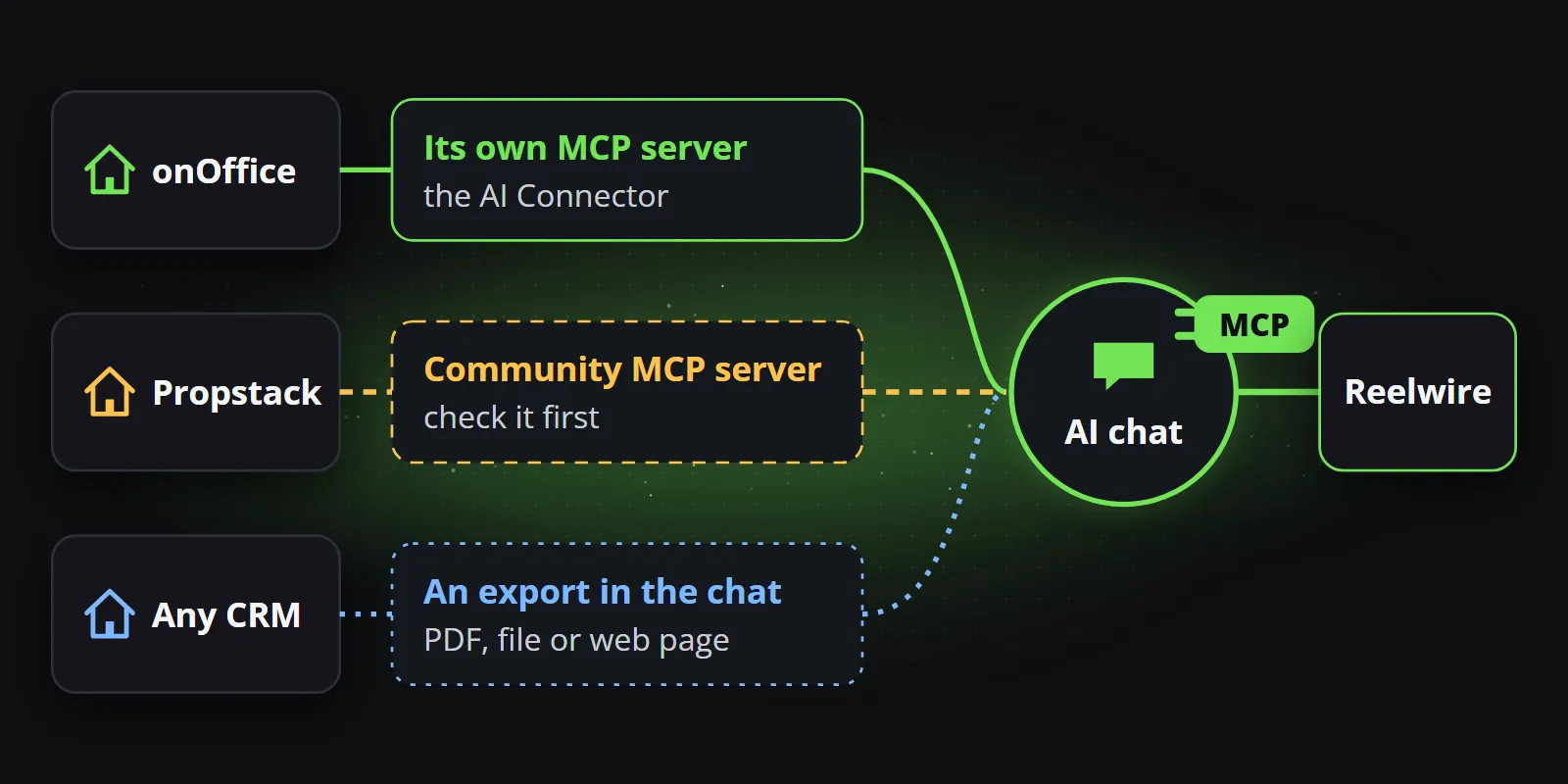
- onOffice offers its own MCP server, the onOffice AI Connector. For Propstack a community MCP server exists, which Propstack says is not its product. Any other CRM works through an export in the chat.
- Move listings, not people: block the contact tools in your chat's connector settings, and check what your data protection rules allow before client data goes to an AI provider.
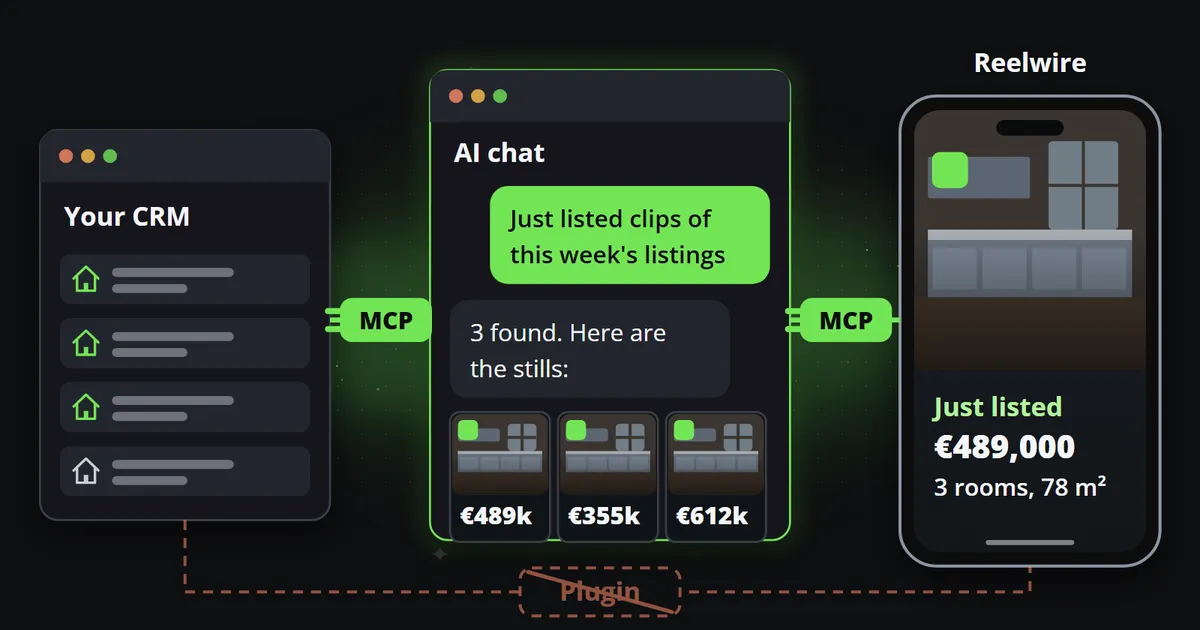
Every estate agent who looks at Reelwire asks the same question in the first five minutes: does it work with my CRM? With onOffice, with Propstack, with whatever the agency has kept its listings in for years. The usual answer in software is a plugin: an integration in a marketplace, built by somebody for exactly those two tools, switched on by an administrator, maybe with a fee of its own. This article argues for a simpler answer. Connect your CRM and Reelwire to the same AI chat, each with its own MCP connector, and let the chat move the listing from one to the other in your own words.
Why is a plugin the wrong way to join two tools?
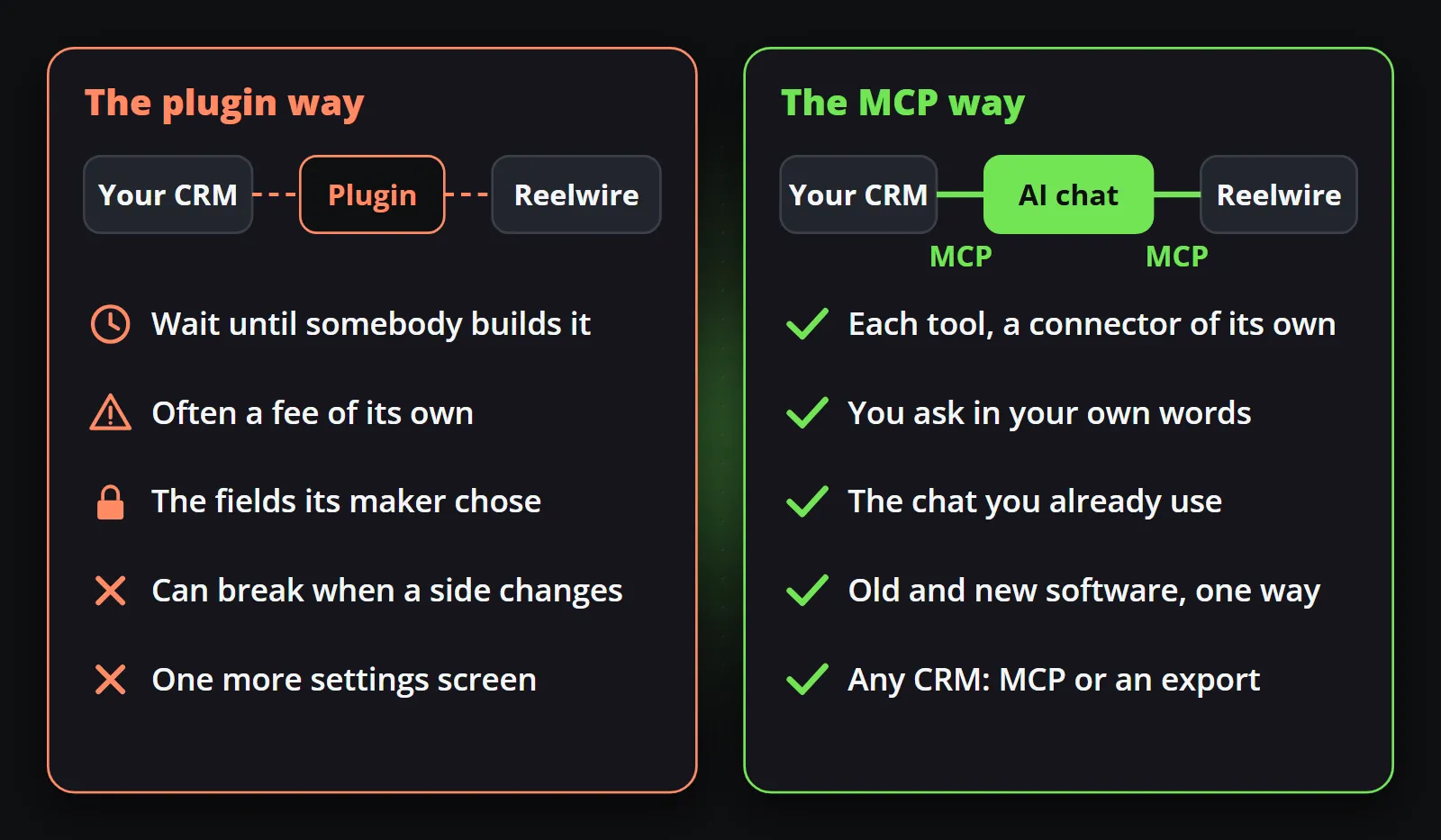
A plugin is a promise somebody else has to keep. For the two tools you happen to use, somebody has to decide it is worth building, build it, and then keep it working every time either side changes. Until then you wait. And once it exists, it does what its maker decided:
- It is fixed. It maps the fields its maker chose. The energy figures in a different place, a second language, a text written your way: each is a change request.
- It is one more thing to pay for and look after. A plugin is often an extra on top of the tariff, set up once by whoever administers the CRM and forgotten until it breaks.
- It is one pair of tools. A plugin between your CRM and one video tool says nothing about the next tool you add. Every new tool starts the wait again.
- It needs its own screens. Another settings page to learn, with its own words for the same things.
None of that is anybody’s fault. It is what joining two programs looked like before both of them could talk to an AI chat.
What changes with MCP?
MCP, the Model Context Protocol, is a standard way for an AI chat to use other software. A tool that offers an MCP server describes what it can do, find a property, show a still, schedule a post, and an AI chat such as Claude or ChatGPT can do those things on your behalf, with your sign-in and your rights in that tool. MCP for video explains it from Reelwire’s side.
The point for an estate agent is simple: when your CRM has an MCP connector and Reelwire has one, the chat in the middle is the integration. Nobody has to build anything for your particular pair of tools.
It changes four things:
- Each side can keep its own connector. Where the CRM’s maker offers one, as onOffice does, the maker keeps it up to date; Reelwire keeps Reelwire’s. When either tool changes, its own connector changes with it.
- You ask in words, not in field mappings. “The three flats taken on this week, a just listed clip for each, in German, with the energy figures.” The chat finds the fields.
- Your old software works like your new software. The same chat, the same way of asking, for the CRM you have used for ten years and for the video tool you started last week.
- Nothing to build for your pair of tools. Reelwire’s connector is on every plan, the free one included, and it is one address to add. Whether your CRM’s connector comes with your tariff is a question for its maker.
How do you use onOffice with Reelwire?
onOffice offers its own MCP server for onOffice enterprise, the onOffice AI Connector. It is activated in the onOffice Marketplace, gives an MCP server address to add to the chat as a custom connector, and works with the rights of the onOffice user who connected it. onOffice says it is included in the all-in and expert tariffs, and its help page lists ChatGPT, Claude, Mistral and Langdock among the providers it was tested with, as of July 2026 (onOffice on the AI Connector and its help page, checked on 17 November 2026).
- In onOffice enterprise, activate the AI Connector in the Marketplace and copy its MCP server address.
- In your AI chat, add it as a custom connector, then add Reelwire’s the same way, with the address in Reelwire’s guide to connecting an assistant. Each person connects for themselves: Reelwire asks you to sign in, onOffice for a one-time code.
- Ask. For example: “Find the properties listed in onOffice this week. For each, make a just listed clip in the agency’s Reelwire brand, 9:16, German, with the rooms, the area, the price and the energy certificate’s figures, and show me the stills.”
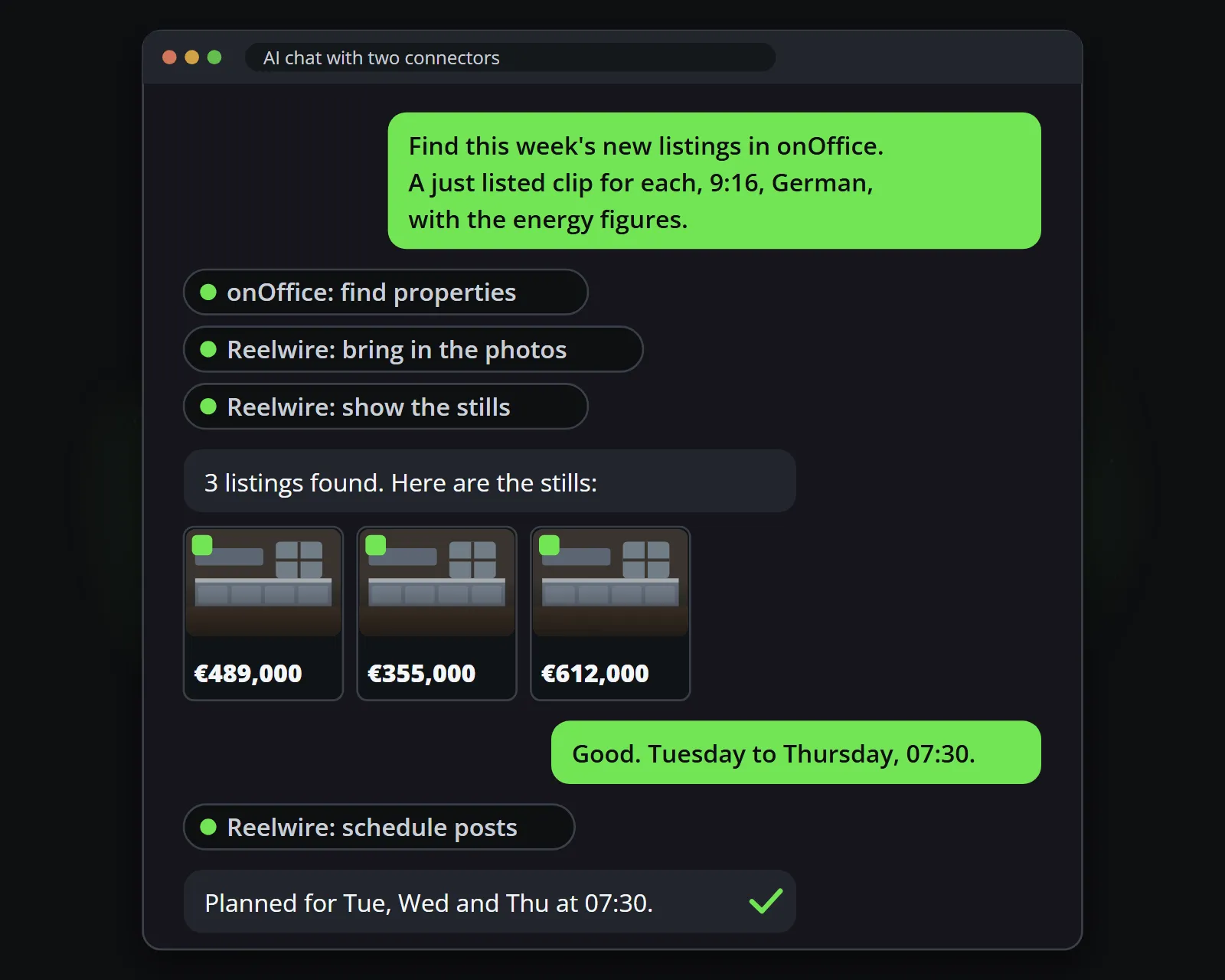
The chat reads the listings from onOffice, brings their photos into Reelwire’s media library, from their web address or, where it cannot reach them, through an upload link you drop them into, and shows a still of each clip in your brand before anything is rendered. You change a word or a picture in the same conversation, then tell it when they should go out. In Reelwire they are posts like any other: approved first where the channel asks for it (approval is part of Reelwire’s Business plan), then handed over by email or webhook, or posted by a platform connector.
Photos are the one step that may need a hand. Where the CRM gives the chat no public address for a photo, the chat asks you to drop the files into the upload link it shows, which takes a minute per listing rather than none.
How do you use Propstack with Reelwire?
Propstack has no MCP server of its own. Its documentation links a community MCP server that works with a Propstack API key, and says plainly that it is an external project, not a Propstack product, used at your own risk and without Propstack’s support (Propstack’s page on the MCP server, checked on 17 November 2026). If your agency is comfortable with that, it is the same three steps as above, with the community server in place of onOffice’s: give it only the API permissions it needs, and try anything that writes into Propstack on a test listing first.
If not, nothing is lost. Export the listing from Propstack, its exposé as a PDF or the week’s listings as a file, or give the chat the address of the listing’s page on your website, and ask the same question. The chat reads what you gave it and makes the clips in Reelwire.
How do you use any other CRM with Reelwire?
The same two questions, in the same order:
| Your CRM | How the listing reaches the chat | What you do |
|---|---|---|
| Offers an MCP server | Its own connector | Add it beside Reelwire’s and ask |
| Has a community MCP server | A connector somebody else keeps | Check it as you would any software with your data, then the same |
| Has neither | An export: an exposé PDF, a file of listings, the listing’s web page | Drop it into the chat and ask |
In every case Reelwire is the second connector, and the chat is the hub. Ask your CRM’s maker whether an MCP server is planned: it is a question worth asking.
What does each side need?
An AI chat that takes two custom connectors. In November 2026: Claude on Pro, Max, Team or Enterprise (its free plan takes one custom connector, and this needs two; on Team and Enterprise an owner adds the connectors first), or ChatGPT on Business, Enterprise or Edu, where an admin adds them for the workspace. Vendors change their plans often; Reelwire’s guide keeps the current list.
The CRM’s side. onOffice’s AI Connector in the all-in or expert tariff; for Propstack, a Propstack account with API access for the community server, or nothing at all if you export.
Reelwire’s side. Any plan. The stills are free; each video rendered counts against your plan’s videos. Five listings a week on one channel, in one shape and one language, is about 22 videos a month, inside Individual’s 75 for €49. Listing photos fill the free plan’s 50 MB of storage quickly; Individual has 500 MB.
What stays a person’s, and what about data protection?
Two rules keep this as safe as it is simple.
Move listings, not people. A listing’s address, rooms, area, price and photos are what a clip needs. Your contacts, owners and prospects are not. In Claude’s connector settings each tool can be allowed, set to ask first, or blocked, and onOffice recommends setting them carefully, especially for tools that reach personal data such as a contact search. Block what the clips do not need.
Check before personal data goes to an AI provider. Whatever the chat reads passes through its provider. onOffice’s own help page says to decide beforehand whether, and under what conditions, personal data may go to the chosen provider, especially one outside the EU. That holds for any CRM, and above all for the personal data the GDPR protects. This is general information as of 17 November 2026, not legal advice: ask your data protection officer about your setup.
And the chat changes nothing behind your back. It asks before a tool that changes something, unless you allowed that tool, Reelwire shows the stills of a clip before a video is rendered, and nothing goes out on a channel that needs approval until a person says yes.
Bottom line
Plugins were how two programs talked to each other when neither could talk to you. Now both can: your CRM through its MCP connector, Reelwire through its own, and the AI chat you already use in between. Keep your CRM, keep your listings where they are, and say what you want made of them.
To try it, connect Reelwire to your assistant, send your listings page to see a week of your channel, or start on the free plan: 15 videos a month, no card needed.
Frequently asked questions
Can I use onOffice with Reelwire?
Yes, without a plugin. onOffice offers the onOffice AI Connector, an MCP server for ChatGPT, Claude and other AI chats, included in its all-in and expert tariffs. Connect it and Reelwire's MCP server in the same chat, and ask for clips of your listings in your own words.
Can I use Propstack with Reelwire?
Yes. Propstack has no MCP server of its own; its documentation links a community MCP server that works with a Propstack API key and says it is not Propstack's product and used at your own risk. Without it, export the listing or its exposé and give the file to the chat.
Does this work with any other real estate CRM?
Yes. If your CRM offers an MCP server, connect it beside Reelwire's. If not, give the chat what your CRM exports: an exposé as a PDF, a CSV of the week's listings or the address of the listing's page. The chat reads it and makes the clips in Reelwire.
Which AI chat do I need?
One that lets you add two custom MCP connectors. In November 2026 that meant Claude on Pro, Max, Team or Enterprise, or ChatGPT on Business, Enterprise or Edu. Vendors change their plans often, so check yours.
Does it run by itself, without anybody asking?
A chat works when somebody asks it, which for most agencies is the point: once a week, a sentence makes the week's clips. An agency that wants every listing to post with nobody asking can still have a developer send its listings to a custom feed in Reelwire.
Make your first clips today
The free plan makes 15 clips a month and asks for no card. Add your logo and colours, pick a template, and see a finished clip in your own brand before you decide anything.

Co-founder of Reelwire. Every organisation has facts worth showing, its prices, results, releases and warnings, and the vision is that every one of them can show those facts every day, on brand, in every format and language, without a production team behind each post. On brand, every day: correct, recognisable and consistent from the first clip to the thousandth.
Get the next post in your feed
Follow Reelwire, and the next one shows up where you already read.