Economic Calendar Videos: CPI, NFP and Rate Decisions as 10-Second Clips
A preview before each release, the actual against the consensus right after it: how to run an economic calendar video channel from official figures.

Key takeaways
- The economic calendar is published weeks ahead, so a channel built on it can be planned to the minute: a preview before each release, the actual against the consensus after it, and the market's first move.
- Speed comes from taking people out of the path, not from rushing them: the figure arrives as data, the template is approved in advance, and the clip is handed over by webhook or posted by a connector.
- Show the actual, the consensus and the previous figure in the units and decimals of the official release, name the publisher and the period, and label a flash estimate as one.
- Keep the template factual: no adjectives on the figure, no view on what to trade, and the risk warning fixed in the design so it is on every clip.
The economic calendar sets the times at which the most watched figures come out. Inflation, the jobs report and the central banks’ rate decisions arrive at times published weeks in advance, and they are among the moments markets watch most closely. An economic calendar video turns each of those moments into a short clip: a preview before the release, the actual figure against the consensus as soon as it is out, and the market’s first reaction after it.
That makes it a social channel you can plan to the minute. You know today which releases fall next month, what form each clip takes and what it must never say. What you do not know is the number, and the number is exactly what a template is for.
What is an economic calendar video?
It is a clip of ten to fifteen seconds about one scheduled release, built to be read with the sound off. Before the release it says what is coming and when, what economists expect and what the last figure was. After the release it puts the actual figure next to both, large, with the difference spelled out.
Every one of those clips has the same structure, which is why they suit a template rather than an editor. The layout, the brand, the source line and the risk warning are designed once; each release only fills in the event, the period, the time and three figures.
Which releases belong on the channel?
Start with the handful that move markets everywhere, then add the ones your audience trades. These are the anchors, with their official publishers, as each publisher’s own schedule showed them when checked on 14 October 2026. The last column lists the next dates after this article came out on 12 November 2026:
| Release | Published by | When | Next dates after 12 November 2026 |
|---|---|---|---|
| US consumer prices (CPI) | US Bureau of Labor Statistics | 8:30 a.m. Eastern, monthly | 10 December 2026 |
| US jobs report (nonfarm payrolls, “NFP”) | US Bureau of Labor Statistics, The Employment Situation | 8:30 a.m. Eastern, monthly, usually a Friday | 4 December 2026, 8 January 2027 |
| US interest rate decision | Federal Reserve, FOMC | Statement at 2:00 p.m. Eastern on the meeting’s second day, eight scheduled meetings a year | 8 and 9 December 2026 |
| Euro area interest rate decision | European Central Bank | Decision at 14:15 CET, press conference at 14:45 | 17 December 2026 |
| Euro area inflation, flash estimate | Eurostat | The last working day of the month, or shortly after | Monthly |
The Federal Reserve’s statements are headed “for release at 2:00 p.m.”, and the ECB has published its decisions at 14:15 CET since July 2022. Dates can move, so a channel should read its calendar from a feed rather than from a list somebody typed in once.
The three clips per release: preview, actual, reaction
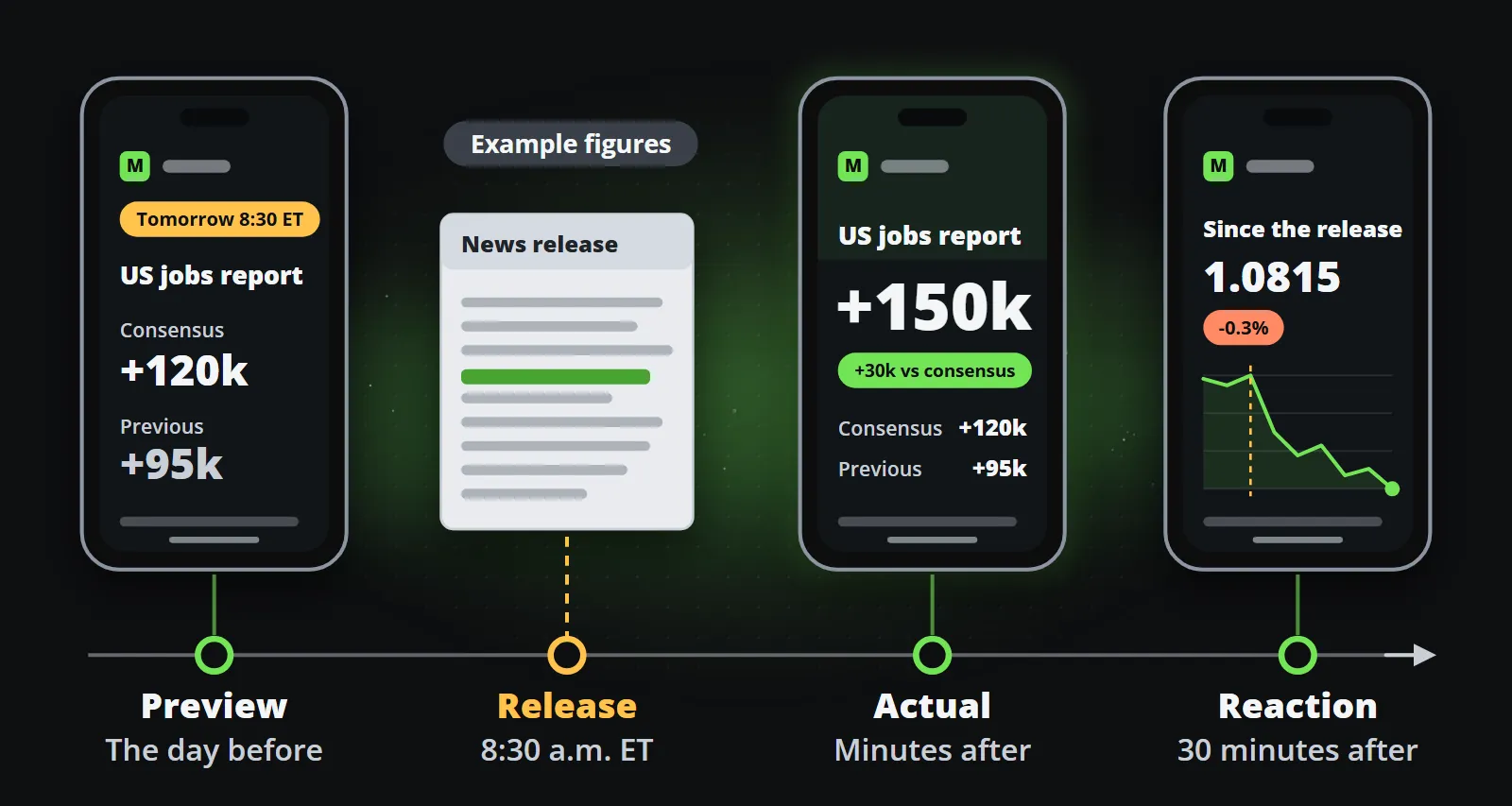
- The preview. The day before, or on the morning: the event, the time, the consensus and the previous figure. It can be made and checked hours before it is posted, so it is the clip that can carry a check per post comfortably.
- The actual. Minutes after the release: the actual figure large, the consensus and the previous beside it, and the difference as a number. This is the clip where speed matters, and where nothing should be typed by hand.
- The reaction. Fifteen to thirty minutes later: what the market did since the release, as a line from your own price data, for the currency pair or index your audience follows, with the level before and the level now. Facts only: what moved and by how much, never why it will move next.
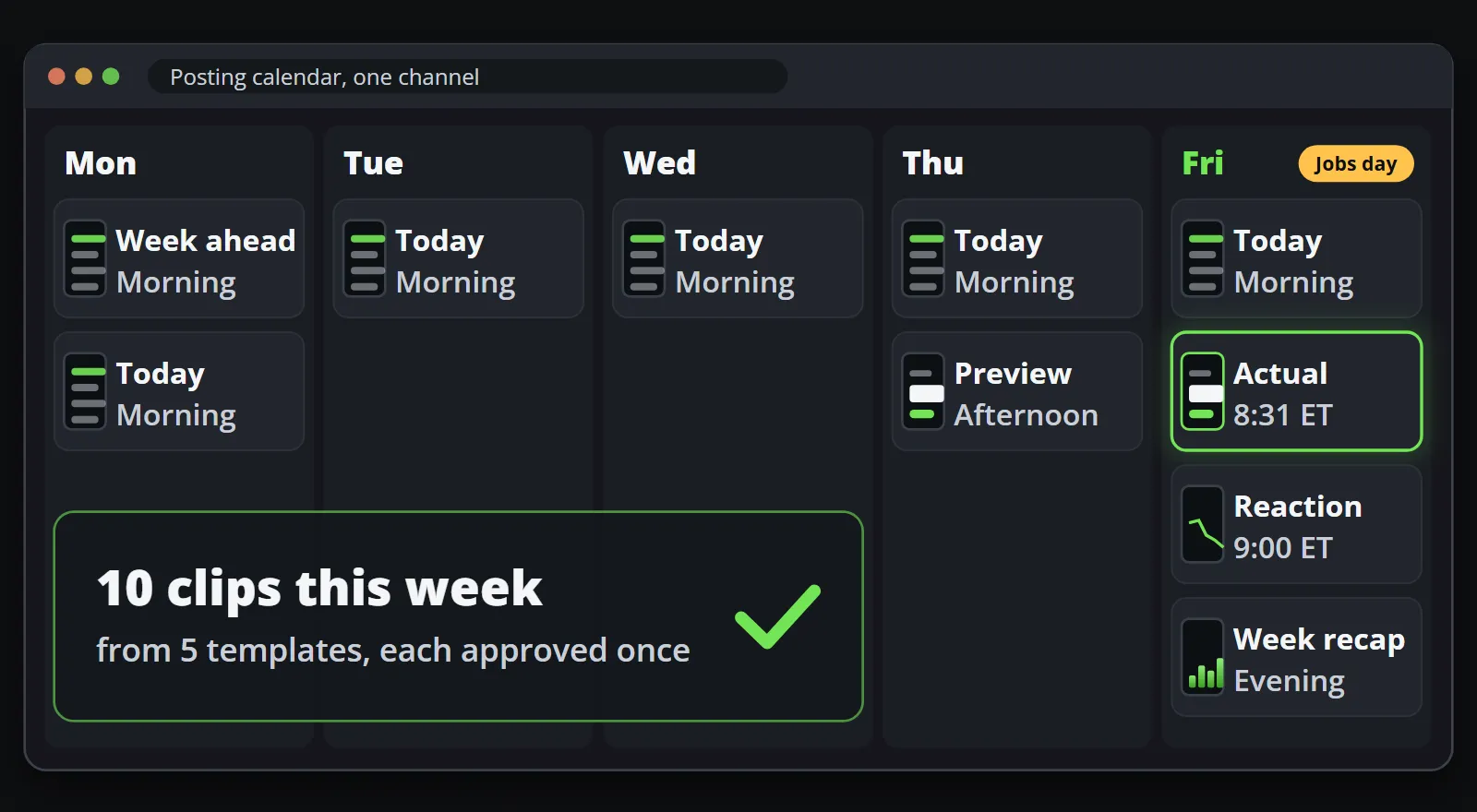
A week with a jobs report, a rate decision and an inflation print is nine clips from three templates. Add a weekly agenda on Monday and a short list of the day’s releases each morning, and the channel has something on it every working day without anybody writing a script.
How fast can the actual figure go out?
Speed matters for the actual figure, so it is worth being honest about what it means here. A text alert on a trading terminal will always be faster than a video; the clip’s job is to be an early video of the figure in your brand, on the platforms where your audience scrolls. What makes a release clip slow is rarely the drawing but the people in the path, and each of their steps can be taken out:
| What slows the clip down | How to take it out |
|---|---|
| Somebody copies the figure into a design | The figure arrives as data, from a feed or your own system |
| A designer lays it out after the release | The template is designed for every shape in advance |
| Compliance reviews each clip | Compliance approves the template version once, before the first release |
| Somebody downloads and uploads the file | A webhook hands it to your system, or a connector posts it directly |
In Reelwire, a channel listens to a source, and each new event becomes a post on every channel listening to it. Reelwire’s ready-made feeds include a breaking economic print, with the forecast and the previous figure, produced within minutes of each headline release in the large economies and drawn in several formats: a big number, a marker on a scale, a change and a line chart. Its source line gives the release time in UTC, not the publisher and the period, so where a clip must name both, your own system sends the figures instead, over the API, the moment your desk has them. The preview and the reaction come from your own system too: the preview needs your consensus source, the reaction your own prices. Data to video explains both routes.
A channel can also require a person to approve each post. For previews and weekly agendas that costs little. For the actual figure it adds whatever time that person takes to answer, so one sensible setup is a release channel with the template approved and the check per post off, and the check kept on for channels where a person adds words of their own.
How should consensus, actual and previous be shown?
The point of a release clip is the comparison, so it has to be exact. A few rules make it so:
- The official units and decimals. If the release reports inflation to one decimal place, so does the clip. A payroll change stays in thousands of jobs, as published.
- The difference as a figure. “0.1 below the consensus” is information; “inflation shock” is an opinion with your logo on it.
- The period and the publisher. “US CPI, October 2026, year on year, US Bureau of Labor Statistics.” A figure without its period is a figure people misread.
- The time zone. A release time on a clip watched in Frankfurt, London and New York needs its zone.
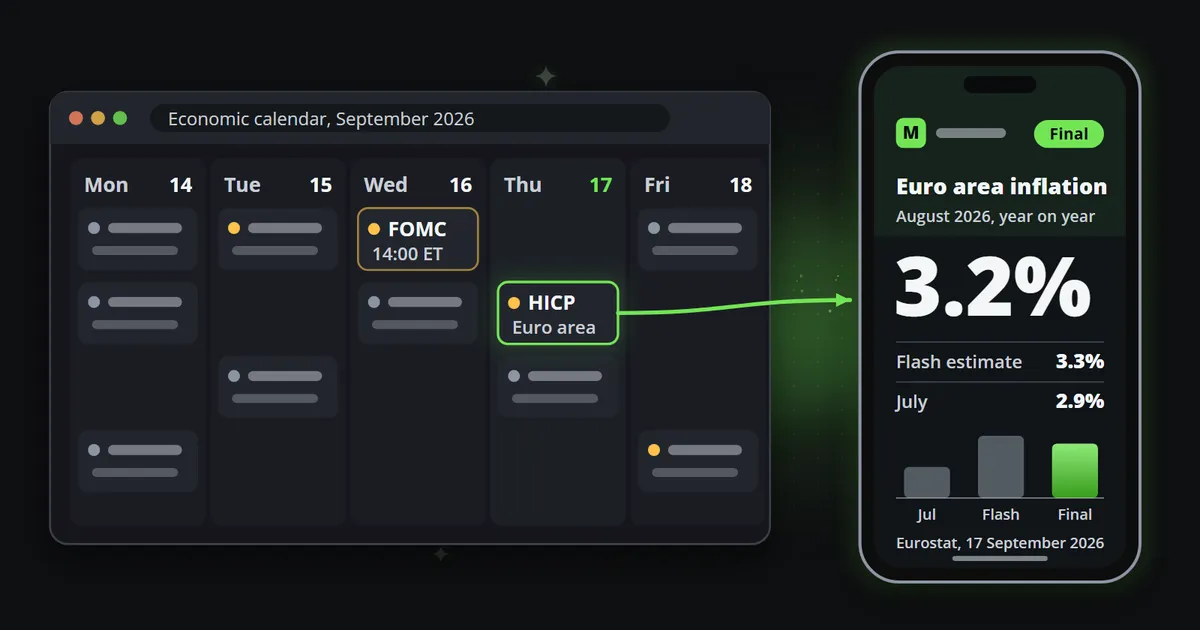
- Flash is not final. First estimates are revised. Eurostat’s flash estimate of euro area inflation for August 2026 was 3.3%, and the figure it published on 17 September 2026 was 3.2% (Eurostat, checked on 14 October 2026). A template with a “flash” label and a “final” label keeps both clips true.
- The consensus is a forecast, not a fact. Say what it is: economists’ expectation, as your calendar provider publishes it. It is not an official number and should not look like one.
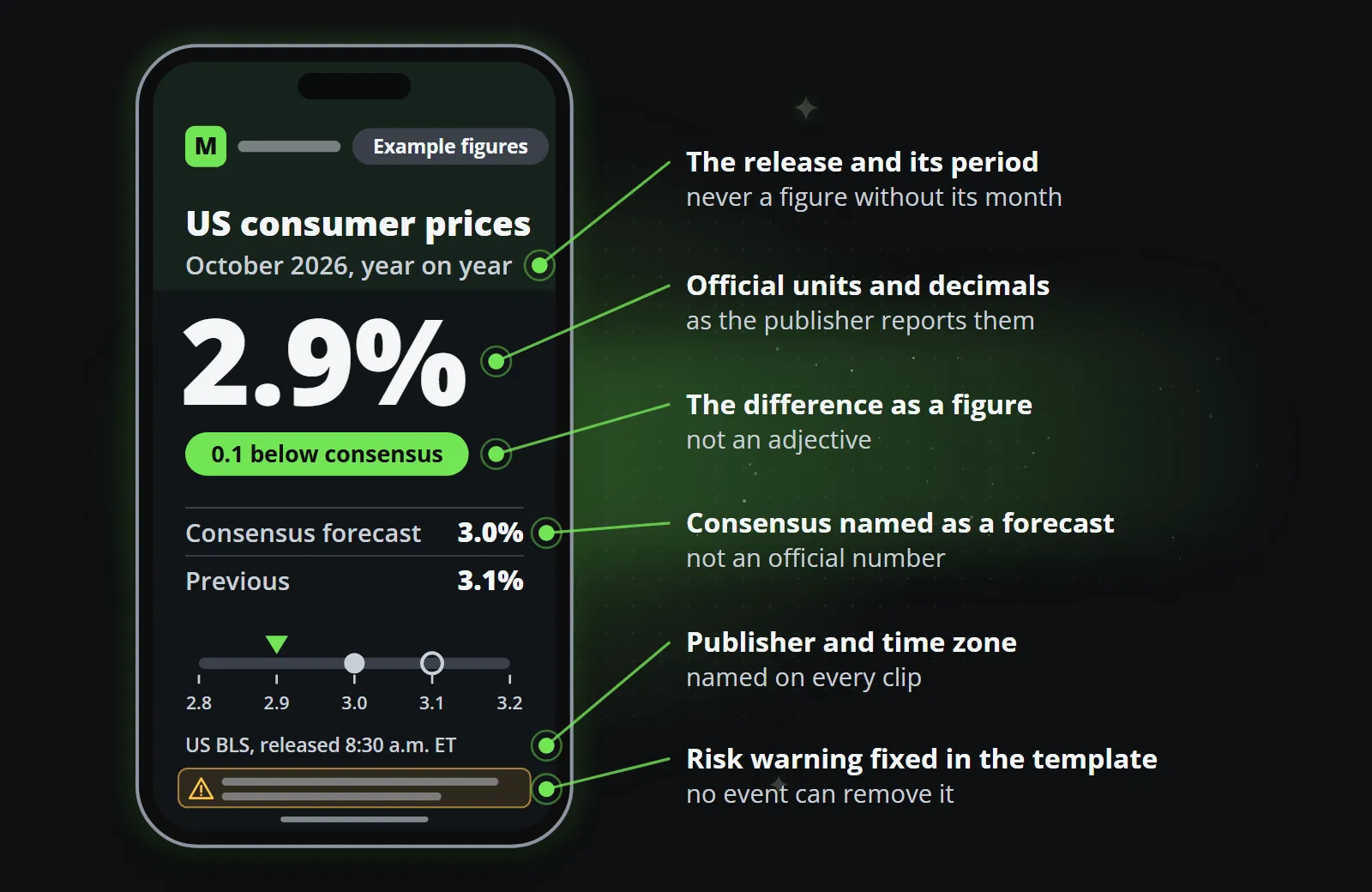
A template makes these rules mechanical. Every field has a limit: a period that does not fit, a figure in the wrong shape or a headline that is too long is refused by name before anything is drawn, rather than clipped on a published video. The same data always makes the same clip, so the figure on screen is the figure that arrived.
That is also why the figure should never come from a video model. A generated clip draws digits as pixels and can change them between frames; what generative video still cannot do shows the failure in detail. A release clip that misstates inflation by a tenth is worse than no clip.
Where does the data come from?
Three inputs, and most finance teams already have all three:
- The schedule. The official calendars above, plus an economic calendar service for the full list of events with their consensus and previous figures. Reelwire’s ready-made feeds include the week’s high-impact events every Monday morning and the day’s releases on weekday mornings with at least two releases to watch, with their times in UTC.
- The figure. From the publisher’s release through your market data provider and your own system, or from the breaking economic print feed described above where its release time in UTC is enough.
- The market reaction. From your own price data, which you already show your clients.
Ready-made feeds are part of every plan, the free one included, and a channel can listen to a feed and to your own system at once.
Name a source on the clip only when it is the official publisher. A calendar or a consensus from a commercial provider is described for what it is (“economic calendar”, “consensus forecast”) rather than presented as an authority.
Approval and risk warnings in the template
For a regulated firm, a clip like this is usually treated as a marketing communication, and the rules for market updates then apply to calendar clips as they do to any other: fair, clear and not misleading, with the risk warning your regulator requires. Daily market update videos for brokers covers that framework. This is not legal advice, and it describes the general position as of 14 October 2026; your compliance team knows your exact obligations.
Calendar clips make it easier than most, because they say so little:
- Fix the warning in the template. It is part of the design, legible in every aspect ratio, and no event can remove it.
- Keep the words factual. The event, the period, three figures and the difference. No “buy”, no “expect a rally”, no adjectives on the number.
- Approve the template version once. In Reelwire a new template version produces nothing until it is approved, and every clip made from it inherits that approval, so compliance reviews the design before the first release rather than each clip at 8:31.
- Keep the record. Each clip knows which template version and which data made it, so the question of why something went out always has an answer.
What does a week of calendar clips look like?
Here is a week with a US jobs report on one channel, every clip from a ready-made feed or from your own system:
| When | Clip | Template | Where the data comes from |
|---|---|---|---|
| Monday morning | The week’s high-impact events | Agenda | Ready-made feed |
| Weekday mornings | What to watch today | List | Ready-made feed, on days with at least two releases |
| Thursday afternoon | Preview: jobs report tomorrow, consensus and previous | Big number | Your own system |
| Friday, minutes after 8:30 a.m. Eastern | Actual against consensus and previous | Big number | Ready-made feed or your own system |
| Friday, half an hour later | The market’s first move since the release | Line chart | Your own price data |
| Friday evening | The week in one clip | Ranked bars | Your own system |
Every shape and every language
The same template draws each clip in 9:16 for Reels, Shorts and TikTok, 4:5 and 1:1 for feeds, and 16:9 for YouTube and LinkedIn, one channel per shape, and in every language your channels publish in, each drawn in its own script. A correction to the template, a new wording of the warning for example, reaches every shape and language at once.
The post text travels with the clip. It is written once in up to four lengths, and each platform gets the longest that fits, so the figure and the warning can be in the caption too.
Bottom line
The calendar hands a finance channel its subjects, its timing and its deadlines weeks in advance. What it cannot hand over is the number, and that is the one part a template takes care of without anybody touching it: the figure arrives, the approved design fills, and the clip goes out in every shape and language while the market is still reading the release.
To see it on your own instruments and calendar, send three symbols and a day of your channel comes back on your brand, or read more on Reelwire for finance.
Frequently asked questions
What is an economic calendar video?
A short clip, usually ten to fifteen seconds, about one scheduled release such as inflation, a jobs report or a rate decision. Before the release it shows the time, the consensus and the previous figure; after it, the actual figure against both.
How quickly can a video of the jobs report or CPI go out?
As quickly as the figure reaches your system as data, plus the time to draw the clip and hand it over. With the template approved in advance and the clip handed over by webhook or posted by a connector, nobody has to design, check or upload anything in between. A text headline will always be faster; the clip's job is to be an early video of the figure in your brand.
Where do official release dates come from?
From the publishers themselves: the US Bureau of Labor Statistics publishes the schedule for CPI and the Employment Situation, the Federal Reserve its FOMC meeting dates, the ECB the dates of its monetary policy meetings, and Eurostat its release calendar for euro area inflation.
What does NFP stand for?
Nonfarm payrolls: the monthly change in the number of US employees outside farming, published by the US Bureau of Labor Statistics in its Employment Situation report at 8:30 a.m. Eastern, usually on a Friday early in the month.
Is an economic calendar video investment advice?
It should not be. A clip that states what was published, what was expected and what came before, with no recommendation and no view of its own, is information. Whether a particular clip counts as a marketing communication or a financial promotion depends on who publishes it and where; this is not legal advice, so check with your compliance team.

Co-founder of Reelwire. Every organisation has facts worth showing, its prices, results, releases and warnings, and the vision is that every one of them can show those facts every day, on brand, in every format and language, without a production team behind each post. Your data, in motion: correct, recognisable and consistent from the first clip to the thousandth.