Reelwire vs OpusClip: Repurposing Needs a Long Video You Don't Have
OpusClip turns long videos into shorts. Many organisations have no long video to cut; they have data, news and offers. A fair comparison, prices dated.

Key takeaways
- OpusClip is good at what it is for: it takes a long video, finds the moments worth sharing, reframes them for vertical screens, captions them and can post them. If you record webinars, podcasts or interviews, it is a strong tool.
- Its precondition is footage. Every clip starts from a video somebody recorded, and its credits are counted per minute of video imported, so both the work and the cost begin with a recording.
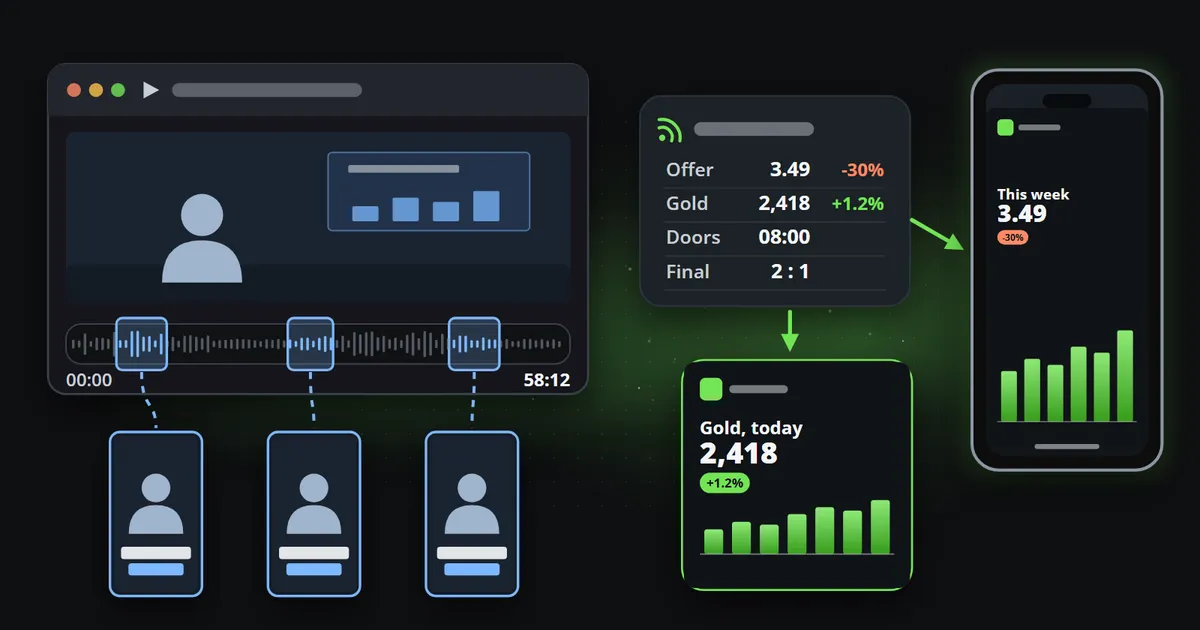
- Many organisations publish facts rather than footage: prices, offers, dates, results, releases. Reelwire starts from that data and fills designed templates, with nobody recording or editing.
- The two fit together: repurpose the talks you already record, and let your data carry the daily posts in between.
OpusClip is one of the best-known tools for turning a long video into short ones. Give it a webinar, a podcast or an interview, and it finds the moments worth sharing, cuts them into vertical shorts, adds animated captions and can post them for you. For anybody who records long video regularly, that is a real saving of editing time.
The catch sits before the first click: you need the long video. Many teams looking for an OpusClip alternative are not short of footage to cut; they have no footage at all. What they do have is data, news and offers: prices that change, opening hours, results, release notes, event dates. This comparison is about that gap, and about when each tool is the right one. Facts about OpusClip were checked on its own pages on 14 October 2026.
Reelwire vs OpusClip at a glance
| OpusClip | Reelwire | |
|---|---|---|
| What it is | AI clipping: a long video in, short clips out | Data in, branded short video out |
| What you bring | A recording: a webinar, podcast, interview or stream | Data: a ready-made feed, your own system’s events, or a post list |
| Who decides what is in a clip | The AI picks the moments; you review and edit | The template you chose, filled with the data that arrived |
| What starts each clip | Typically a person importing a video; on Pro, also its API | The data arriving, on the schedule you set |
| Shapes | 9:16 on Free and Starter; 9:16, 1:1 and 16:9 on Pro | 9:16, 4:5, 1:1, 16:9 and 2:3 from one template |
| Words on screen | Animated captions of what was said | The template’s fields, each with a length limit |
| Branding | Brand templates: one on Free and Starter, up to four on Pro | One brand on every clip: logo, colours, fonts, badge, background, intro, outro, soundtrack |
| Getting it posted | Posts to YouTube Shorts, TikTok and Instagram from Starter; more platforms and a scheduler on Pro | Handed over by email or webhook, or posted directly to Discord, LinkedIn (a personal profile), Slack and Telegram |
| How it charges | Credits: one per minute of video imported | Per finished video, whatever its length |
| Cheapest paid plan (different currencies and meters) | Starter, $15 a month for 150 credits | Individual, €49 a month for 75 videos |
| Free plan | Yes: captions watermarked, downloads for three days | Yes: 15 videos a month, no card |
Prices change, so check OpusClip’s pricing page for today’s figures. The difference this article is about, what each tool starts from, changes far less.
What does OpusClip do well?
In the description its home page gives search engines, OpusClip says it “turns long videos into high-quality viral clips, and publishes them to all social platforms in one click”, and the home page itself says it is used by more than 20 million creators and businesses. The core of it is clipping: you upload a file (up to 10 GB on the free and Starter plans, 30 GB on Pro) or paste a link from YouTube, Google Drive, Vimeo, Zoom and similar services, and it proposes short clips.
Around that core, its pricing page lists, plan by plan:
- Clipping by what was said on every plan, and on Pro also by visual objects, sound, emotion and the genre of the video.
- A virality score for each clip, from Starter up: the tool’s own estimate of how well a moment might do.
- Reframing. The subject is tracked and the frame follows it: 9:16 on Free and Starter, and 9:16, 1:1 and 16:9 on Pro.
- Animated captions in caption templates, watermarked on the free plan.
- B-roll. Stock footage and AI-made pictures dropped into a clip, a few a month on Starter and more on Pro, which adds AI video B-roll powered by Agent Opus.
- Brand templates for fonts, colours and logos: one on Free and Starter, up to four on Pro, which also adds intro and outro cards.
- Posting. Starter posts to YouTube Shorts, TikTok and Instagram; Pro adds Facebook, LinkedIn, X, Pinterest, Threads and others, a scheduler and a team workspace.
- An API. Pro and Business list a video editing API, a scheduler API and an MCP connector for AI assistants.
That is a complete tool for a specific job. If your marketing already produces long recordings, and the problem is that nobody has time to watch them back and cut the good minutes out, OpusClip solves that problem well, and Reelwire does not try to.
How does OpusClip pricing work?
OpusClip charges in credits, and a credit is tied to the length of what you put in, not to what comes out. According to its help centre, checked on 14 October 2026:
- Processing costs one credit per minute of the original video imported, however many clips you keep. A video under a minute counts as one; on longer ones, part of a minute is dropped, so 4.5 minutes costs 4 credits. A slider lets you process only part of a video to spend less.
- Posting a clip to X costs three credits per account.
- On monthly plans, credits expire after 60 days; on yearly plans, the year’s credits are issued at the start and expire after twelve months.
Prices and features below are from the pricing page, credits from the help centre:
| Plan (checked 14 October 2026) | Price listed | Credits | Worth knowing |
|---|---|---|---|
| Free | $0 | Not stated on the pricing page | Captions watermarked, downloads kept for three days, 9:16 only |
| Starter | $15 a month | 150 a month | Virality score, posting to three platforms, downloads kept for 30 days |
| Pro | $29 a month per pack | 300 a month per pack | 9:16, 1:1 and 16:9, scheduler, API, two users per pack, up to four |
| Business | On request | Custom | Its own processing queue, CMS integration, 4K |
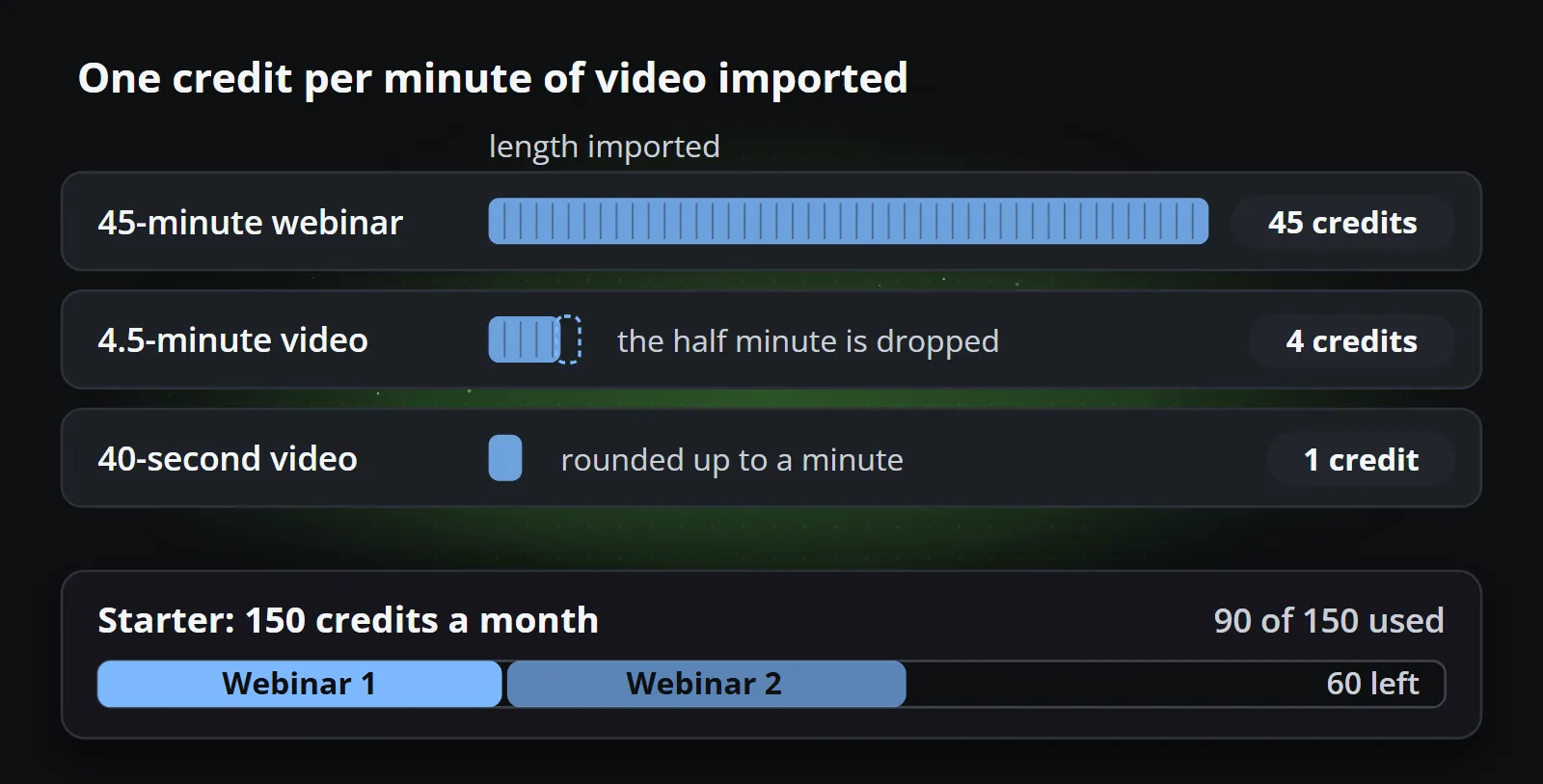
The model is fair and easy to predict: an hour of recording costs sixty credits whether it yields two clips or twenty. It also says something about where the value comes from. The credit is spent on footage, because footage is what the tool works on.
The precondition: a library of long video
Repurposing assumes that the long video already exists. For a podcast network, a conference, a training company or a creator who streams every week, it does: hours of recorded talk pile up, and the hard part is finding the minute in each hour worth posting. That is the situation OpusClip was built for.
Many organisations are not in it. Think of what a shop, a city office, a software company or a sports club actually publishes week after week:
- this week’s offers and prices,
- opening hours, closures and dates,
- results, fixtures and standings,
- a release, a change, a figure that moved,
- a countdown to something that is coming.
None of this exists as video. It exists as data, in a spreadsheet, a database, a product system or a public source, and the only way to get it into a repurposing tool is to record somebody talking about it first. That turns a five-second fact into a production: a person on camera, a script, a recording, an upload, and an AI pass to find the five seconds again.
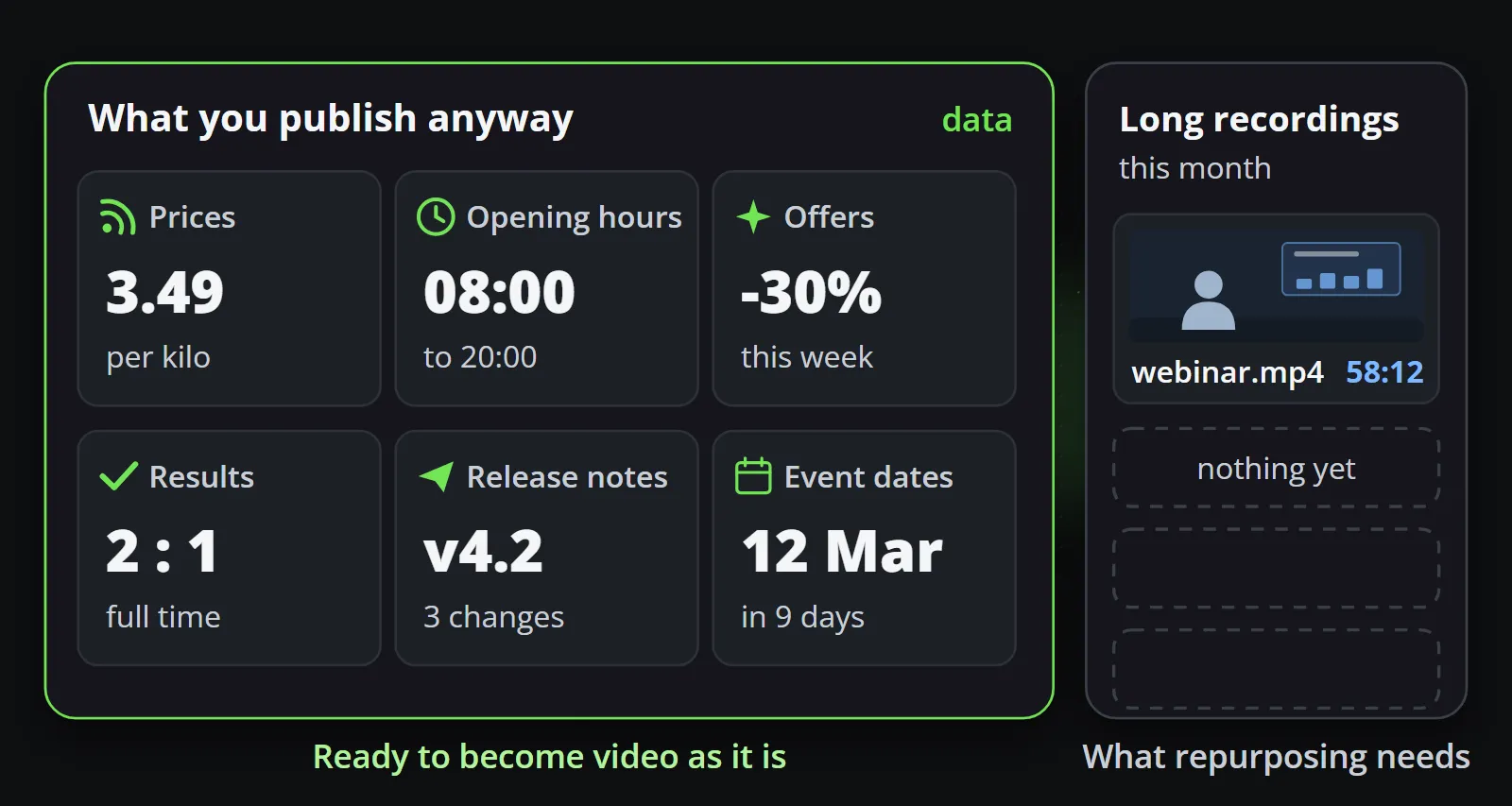
So the first question is not which tool clips better. It is what you have to start from. If the honest answer is “an hour of recordings a month, at best”, the hour is the ceiling on what repurposing can make for you, and the channel goes quiet between recordings.
What if your content is data, not footage?
Reelwire starts from the other end. Instead of a recording, a channel listens to a source:
- Ready-made feeds, Reelwire’s own feeds of live public data, such as market prices, weather, holidays and sports, switched on per channel, each with its own release schedule.
- Custom feeds, where your own system sends events over the REST API with a key, with code examples in Node.js, Python, PHP, C# and curl, and a test tool in the dashboard.
- Post lists in the Post composer, where somebody writes posts in advance for a date.
When something arrives, a designed template fills with it and renders a clip, wearing your brand: logo, colours, fonts, presenter badge, background, intro and outro. The same data always makes the same clip, so a price in the video is the price that arrived, set in your typeface. A field that is too long is refused by name rather than clipped. Every aspect ratio and every language your channels publish in comes from the same template, and the post text is written once in up to four lengths, so each platform gets the longest one that fits.
When the post is due, it is handed over by email, with a post kit to share it from a phone, or by a signed webhook to your own system or a posting service, and Discord, LinkedIn (a personal profile), Slack and Telegram can be posted to directly. Data to video walks through the three sources in detail.
What comes out is a different kind of clip from a repurposed one: no face, no voice, a figure or a date set in a composition. That is a strength for some posts and a limit for others. Faceless videos for business covers which formats work without a presenter and how to keep them from looking mass-produced.
Is Reelwire an OpusClip alternative?
It depends entirely on what you start from, so the honest answer is a table rather than a yes:
| Choose OpusClip when | Choose Reelwire when |
|---|---|
| You record long video regularly: webinars, podcasts, interviews, streams | You have no recordings, or too few to post every week |
| The value is in what people said, their faces and voices | The value is in a fact: a price, a date, a result, a figure |
| A person is happy to review the clips each time | The posts should go out when the data changes, without anybody opening anything |
| Your posts follow your recording calendar | Your posts follow your data: daily, weekly, on every release |
| Vertical, square and wide are enough | You also need 4:5 or 2:3, or several languages at once |
Neither tool is an AI video generator in the sense of making footage from a prompt. OpusClip cuts real recordings, and Reelwire draws templates. If you were also weighing tools that generate footage, such as Runway, Kling or Veo, Reelwire vs AI video generators compares nine of them.
A worked example: one month of shorts
Take a team that runs two 45-minute webinars a month and also wants something on its channels every day.
With OpusClip, the two webinars are 90 minutes of footage: 90 credits, inside Starter’s 150 a month for $15. If the team wants square and wide versions, the scheduler and LinkedIn as well, that is Pro at $29 a pack. What comes out is however many good moments the two webinars hold, which is a matter of what was said, and those clips cluster around the two recording days.
With Reelwire, a daily post from the team’s own figures, in two shapes (9:16 for Reels, Shorts and TikTok, and 1:1 for feeds), is about 60 videos a month, inside the Individual plan’s 75 for €49. Nobody records anything. The posts follow the data: if a figure changes on a Tuesday, Tuesday’s clip shows it.
Using both: shorts from your webinars, daily posts from your data
For a team with some recordings, the two tools cover different parts of the same content calendar:
- The talks and interviews carry personality: a person explaining something, answering a question, disagreeing. That is where repurposing shines, and no template can stand in for it.
- The facts in between carry presence: the channel says something useful every day, on brand, even in the weeks nobody recorded anything.
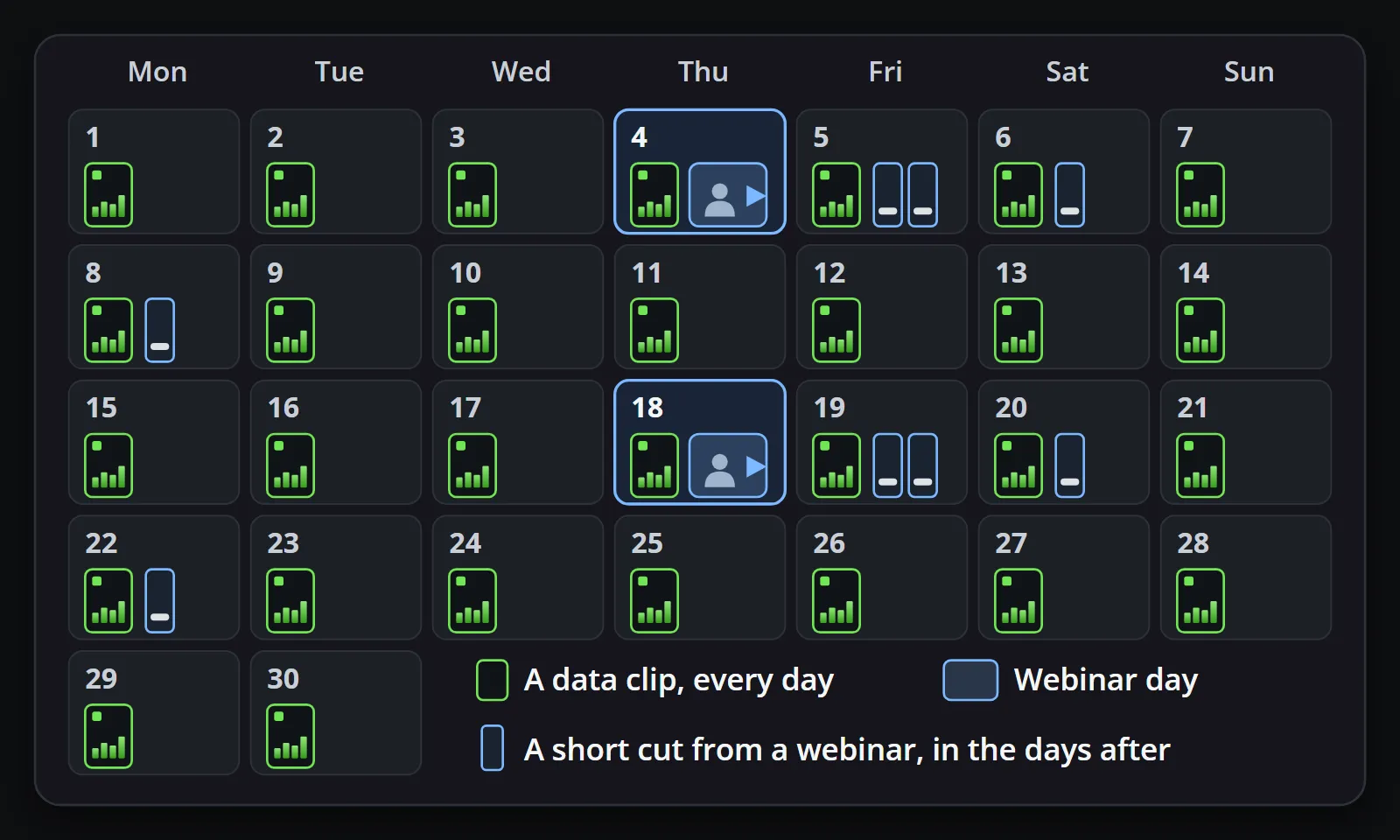
Nothing has to be integrated for this to work. OpusClip posts or schedules its clips; Reelwire hands its posts over by email or webhook, and a scheduler or posting service can take both. The only thing to agree on is the calendar: which days carry a repurposed clip and which a data post, so the two do not land in the same hour. The bills do not overlap either: one meter counts minutes of recording, the other finished videos.
Questions to ask before you decide
- Who will record, and when? With repurposing, the recording is the work and the tool is the easy part. Budget the speakers’ time, not only the subscription.
- Where does your data live, and can it leave? A price list, a booking system, a release log or an open public source can be sent somewhere. Facts that live only in somebody’s head cannot.
- How long does a post stay true? A clip of a good explanation can stay useful for months. A figure somebody said in last month’s webinar is out of date the day it changes.
- Who looks at each clip before it goes out? OpusClip’s clips are typically proposals a person picks and edits. Reelwire’s are drawn from a template approved once, with an optional check per post for channels that need it.
Bottom line
OpusClip is a good tool for a specific starting point: a library of long video that deserves a second life as shorts. If you have that library, use it. If you do not, the search for an OpusClip alternative is really a search for a different starting point, and for many organisations that starting point is the data they already publish somewhere else.
To see what your own data looks like as video, start with Reelwire’s free plan, 15 videos a month with no card, or read how it works from source to post.
Frequently asked questions
Is Reelwire an OpusClip alternative?
For organisations without a library of long video, yes: Reelwire makes short videos from data rather than from footage. If you record webinars, podcasts or interviews, OpusClip is the better tool for those, and the two work side by side.
How much does OpusClip cost?
On 14 October 2026 its pricing page listed a free plan, Starter at $15 a month, Pro at $29 a month and Business on request. Its help centre says Starter includes 150 credits a month and Pro 300 per pack, and one credit is one minute of the original video imported.
Can OpusClip make short videos without a long video?
Its clipping starts from a video: a file you upload or a link to one on YouTube, Google Drive, Vimeo, Zoom and other services. It can add AI and stock B-roll to a clip, but the clip itself is cut from footage you provide.
What does Reelwire need instead of a video?
Data: a ready-made feed of live public data, events your own system sends over the API, or posts somebody writes in advance in a post list. A template turns each one into a clip in your brand, in every aspect ratio and language your channels use.
Which is cheaper, OpusClip or Reelwire?
They meter different things. OpusClip charges credits per minute of video you import, so two 45-minute webinars a month fit Starter's 150 credits for $15. Reelwire charges per finished video: 15 a month free, 75 for €49 on Individual, under a euro a video on a paid plan.
Make your first clips today
The free plan makes 15 clips a month and asks for no card. Add your logo and colours, pick a template, and see a finished clip in your own brand before you decide anything.

Co-founder of Reelwire. Every organisation has facts worth showing, its prices, results, releases and warnings, and the vision is that every one of them can show those facts every day, on brand, in every format and language, without a production team behind each post. On brand, every day: correct, recognisable and consistent from the first clip to the thousandth.